Authenticate with an API key

Create an API key and use it to call the management API from your own application.

An API key is a bearer token you create to call the management API from your own code. Use one when you build directly against the API: a dashboard that reads audit events, or a script that manages policies.

Create a key

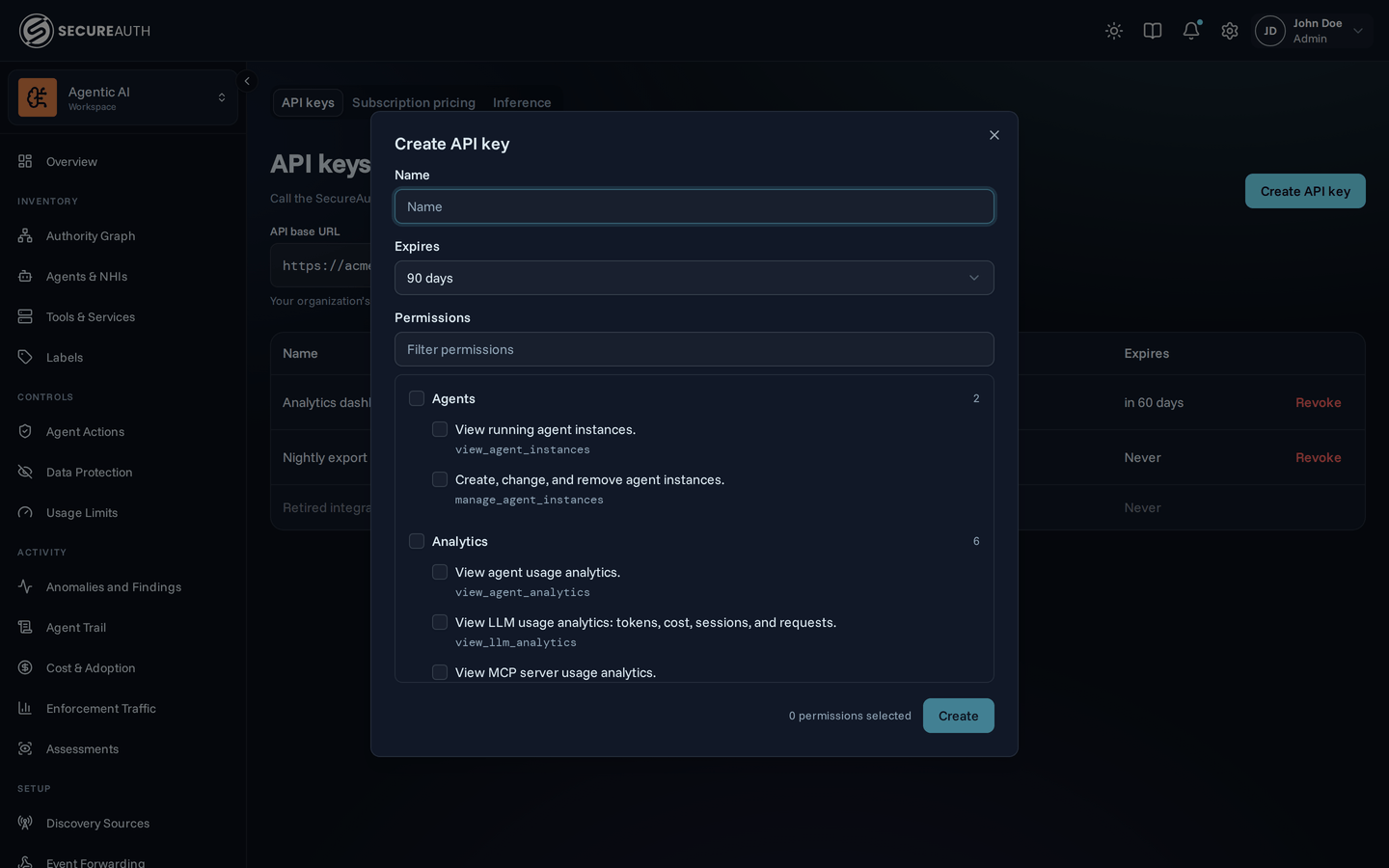
Open Settings, go to the API keys tab, and choose Create API key. Give it:

  • a name, so you can recognize it later,
  • an expiry (30 days, 60 days, 90 days, 365 days, or never), and
  • the permissions it needs.
Create API key dialog with fields for name, expiry, and permissions
The permissions list offers only the permissions you can grant

A key can only do what you can

You can grant a key only the permissions you already hold. If you can't manage rate limits, no key you create can either.

Changing your own access later does not change an existing key's permissions. If your access grows or shrinks, an already-created key keeps what you gave it until you rotate or revoke it.

Base URL

Every request goes to your organization's own gateway host:

https://<org-slug>.aisecurity.services.<region>.connect.secureauth.com/api/v1

Your organization's slug is the first label of that host. Your region is us, eu, or aus.

To read the exact value, open Settings, go to the API keys tab, and copy the API base URL field.

Use the key

Send the key as a bearer token in the Authorization header. No other header is required:

curl https://<org-slug>.aisecurity.services.<region>.connect.secureauth.com/api/v1/auth/permissions \
  -H "Authorization: Bearer saai_api_..."

Call GET /auth/permissions to see what a key can do: it returns the grants attached to the credential that called it.

Permissions

Grant a key only the permissions it needs. Each row below lists the endpoints that require the permission.

A key can hold manage_api_keys, which lets it create, rotate, and revoke keys. It still can't create a key with more permissions than it holds.

PermissionEndpoints that require it
view_agents
View agents.
  • GET /agents/catalog
    List agent catalog
view_agent_instances
View running agent instances.
  • GET /agent-instances
    List agents
  • GET /agent-instances/{agent_instance_id}
    Get agent
  • GET /agents/instance-counts
    Count agent instances
manage_agent_instances
Create, change, and remove agent instances.
  • POST /agent-instances
    Create agent
  • DELETE /agent-instances/{agent_instance_id}
    Delete agent
  • PATCH /agent-instances/{agent_instance_id}
    Update agent
  • POST /agent-instances/{agent_instance_id}/revoke
    Revoke agent tokens
view_mcps
View connected MCP servers.
  • GET /mcps
    List MCPs
  • GET /mcps/catalog
    List MCP catalog
  • GET /mcps/{mcp_id}
    Get MCP
manage_mcps
Add, configure, and remove MCP servers.
  • POST /mcps
    Create MCP
  • DELETE /mcps/{mcp_id}
    Delete MCP
  • PATCH /mcps/{mcp_id}
    Update MCP
view_policies
View policy rules.
  • GET /policies
    List policies
  • POST /policies/cel/evaluate
    Evaluate CEL expression
  • POST /policies/cel/validate
    Validate CEL expression
  • GET /policies/evaluate/agent-instances/{agent_instance_id}
    Evaluate agent instance access
  • GET /policies/evaluate/agents
    Get agent access stats
  • GET /policies/evaluate/agents/{agent_slug}
    Evaluate agent access
  • GET /policies/schema
    Get policy schema
  • GET /policies/{policy_id}
    Get policy
manage_policies
Create, change, and remove policy rules.
  • POST /policies
    Create policy
  • DELETE /policies/{policy_id}
    Delete policy
  • PATCH /policies/{policy_id}
    Update policy
view_data_protection
View data protection settings.
  • GET /dlp/rules
    List DLP rules
  • GET /dlp/rules/{rule_id}
    Get DLP rule
manage_data_protection
Change data protection settings.
  • POST /dlp/judge/preview
    Preview LLM judge
  • POST /dlp/rules
    Create DLP rule
  • DELETE /dlp/rules/{rule_id}
    Delete DLP rule
  • PATCH /dlp/rules/{rule_id}
    Update DLP rule
view_rate_limits
View rate limit rules.
  • GET /rate-limits/rules
    List rate limit rules
  • GET /rate-limits/rules/{rule_id}
    Get rate limit rule
manage_rate_limits
Create, change, and delete rate limit rules.
  • POST /rate-limits/rules
    Create rate limit rule
  • DELETE /rate-limits/rules/{rule_id}
    Delete rate limit rule
  • PATCH /rate-limits/rules/{rule_id}
    Update rate limit rule
view_topology
View the topology of agents, MCP servers, and connections.
  • GET /topology/graph
    Get topology graph
view_audit
View the audit log of tool calls.
  • GET /audit-events
    List audit events
view_tool_analytics
View tool usage analytics.
  • GET /analytics/blocked-tools-count
    Count blocked tools
  • GET /analytics/blocked-tools-over-time
    Blocked tool time series
  • GET /analytics/blocked-unique-tools
    Count blocked unique tools
  • GET /analytics/event-breakdown
    Event breakdown by action
  • GET /analytics/hourly-distribution
    Hourly tool distribution
  • GET /analytics/tool-executions-over-time
    Tool execution time series
  • GET /analytics/top-blocked-tools
    List top blocked tools
  • GET /analytics/top-tools
    List top tools
  • GET /analytics/unique-tools
    Count unique tools
view_agent_analytics
View agent usage analytics.
  • GET /analytics/active-agent-instances
    Count active agent instances
  • GET /analytics/blocked-agent-instances-count
    Count blocked agent instances
  • GET /analytics/top-agent-instances
    List top agent instances
  • GET /analytics/top-blocked-agent-instances
    List top blocked agent instances
view_user_analytics
View per-user usage analytics.
  • GET /analytics/active-users
    Count active users
  • GET /analytics/blocked-users-count
    Count blocked users
  • GET /analytics/llm-cost-by-group
    LLM cost by group
  • GET /analytics/llm-spend-by-group-model
    LLM spend by group and model
  • GET /analytics/llm-user-percentiles
    LLM user percentiles
  • GET /analytics/tool-access/hourly
    Tool access by hour
  • GET /analytics/tool-access/identities
    List tool access identities
  • GET /analytics/tool-access/severity-matrix
    Tool access severity matrix
  • GET /analytics/tool-access/summary
    Tool access summary
  • GET /analytics/tool-access/systems
    List tool access systems
  • GET /analytics/tool-access/tools
    List tool access tools
  • GET /analytics/top-blocked-users
    List top blocked users
  • GET /analytics/top-users
    List top users
view_mcp_analytics
View MCP server usage analytics.
  • GET /analytics/top-blocked-mcps
    List top blocked MCPs
  • GET /analytics/top-mcps
    List top MCPs
view_policy_analytics
View policy enforcement analytics.
  • GET /analytics/top-blocking-policies
    List top blocking policies
view_llm_analytics
View LLM usage analytics: tokens, cost, sessions, and requests.
  • GET /analytics/llm-cost-over-time
    LLM cost time series
  • GET /analytics/llm-cost-total
    Total LLM cost
  • GET /analytics/llm-facets
    List LLM facets
  • GET /analytics/llm-models-count
    Count LLM models
  • GET /analytics/llm-session-activity
    LLM session activity
  • GET /analytics/llm-session-rank
    LLM session rank
  • GET /analytics/llm-session-stats
    LLM session stats
  • GET /analytics/llm-session-timeline
    LLM session timeline
  • GET /analytics/llm-sessions
    List LLM sessions
  • GET /analytics/llm-spend-summary
    LLM spend summary
  • GET /analytics/llm-token-economics
    LLM token economics
  • GET /analytics/llm-tokens-over-time
    LLM token time series
  • GET /analytics/llm-tokens-total
    Total LLM tokens
  • GET /analytics/llm-top-models-by-cost
    Top models by cost
  • GET /analytics/llm-top-models-by-tokens
    Top models by tokens
  • GET /analytics/llm-top-users-by-cost
    Top users by cost
  • GET /analytics/llm-top-users-by-tokens
    Top users by tokens
view_anomaly_detection
View anomaly detection findings.
  • GET /anomaly/findings
    List findings
  • GET /anomaly/findings-over-time
    Get findings over time
  • GET /anomaly/findings/summary
    Get findings summary
  • GET /anomaly/findings/{id}
    Get finding
  • GET /anomaly/findings/{id}/series
    Get finding series
manage_anomaly_detection
Configure anomaly detection.
  • PATCH /anomaly/findings/{id}
    Triage finding
view_users
View users in the organization.
  • GET /groups
    List groups
  • GET /users
    List users
  • GET /users/{user_id}
    Get user
manage_users
Delete users and groups in the organization.
  • DELETE /groups/{group_id}
    Delete group
  • DELETE /users/{user_id}
    Delete user
manage_connections
Manage connections between agents and MCP servers.
  • GET /user/connections
    List user connections
  • POST /user/connections/authorize
    Start OAuth authorization
  • GET /user/connections/{connection_id}
    Get user connection
  • DELETE /user/connections/{connection_id}
    Delete user connection
view_tags
View tags.
  • GET /tag-assignments/{target_type}
    List tag assignments
  • GET /tag-usage
    List tag usage
  • GET /tags
    List tags
  • GET /tags/{tag_id}
    Get tag
manage_tags
Create, change, and remove tags.
  • PUT /tag-assignments/{target_type}/{target_key}
    Set target tags
  • POST /tags
    Create tag
  • DELETE /tags/{tag_id}
    Delete tag
  • PATCH /tags/{tag_id}
    Update tag
manage_ingest_keys
Create and revoke telemetry ingest keys.
  • GET /ingest-keys
    List ingest keys
  • POST /ingest-keys
    Create an ingest key
  • DELETE /ingest-keys/{key_id}
    Revoke an ingest key
manage_seat_pricing
Manage per-seat pricing configuration.
  • GET /seat-assignments
    List seat assignments
  • POST /seat-assignments
    Assign seat
  • DELETE /seat-assignments/{id}
    Delete seat assignment
  • POST /seat-assignments/{id}/end
    End seat assignment
  • GET /seat-pricing
    List seat prices
  • POST /seat-pricing
    Configure seat price
  • DELETE /seat-pricing/{id}
    Delete seat price
  • POST /seat-pricing/{id}/end
    End seat price
view_webhooks
View webhooks and their delivery history.
  • GET /webhooks
    List webhooks
  • POST /webhooks/cel/validate
    Validate a webhook condition
  • GET /webhooks/schema
    Get the webhook condition schema
  • GET /webhooks/{webhook_id}
    Get a webhook
  • GET /webhooks/{webhook_id}/deliveries
    List webhook deliveries
manage_webhooks
Create, change, and remove webhooks.
  • POST /webhooks
    Create a webhook
  • DELETE /webhooks/{webhook_id}
    Delete a webhook
  • PATCH /webhooks/{webhook_id}
    Update a webhook
  • POST /webhooks/{webhook_id}/deliveries/{delivery_id}/retry
  • POST /webhooks/{webhook_id}/rotate-secret
  • POST /webhooks/{webhook_id}/test
view_nhi
View NHI sources.
  • GET /nhi/agents
    List NHI agents
  • GET /nhi/findings
    List NHI findings
  • GET /nhi/findings/{finding_id}
    Get an NHI finding
  • GET /nhi/sources
    List NHI sources
  • GET /nhi/sources/{source_id}
    Get an NHI source
manage_nhi
Add, configure, and remove NHI sources.
  • PATCH /nhi/findings/{finding_id}
    Triage an NHI finding
  • POST /nhi/providers/{provider}/test
    Test NHI credentials
  • POST /nhi/sources
    Add an NHI source
  • DELETE /nhi/sources/{source_id}
    Delete an NHI source
  • PATCH /nhi/sources/{source_id}
    Update an NHI source
  • POST /nhi/sources/{source_id}/check
    Re-check an NHI source
view_inference
View inference connections and the models bound to them.
  • GET /inference/bindings
  • GET /inference/connections
  • GET /inference/connections/{connection_id}
manage_inference
Add, change, and remove inference connections and their bindings.
  • POST /inference/bindings
  • DELETE /inference/bindings/{binding_id}
  • PATCH /inference/bindings/{binding_id}
  • POST /inference/bindings/{binding_id}/activate
  • POST /inference/connections
  • DELETE /inference/connections/{connection_id}
  • PATCH /inference/connections/{connection_id}
  • POST /inference/connections/{connection_id}/test
report_device_observations
Report device observations from an enrolled device agent.
No public endpoint requires it.
view_devices
View enrolled devices.
No public endpoint requires it.
manage_devices
Revoke enrolled devices.
No public endpoint requires it.
enroll_devices
Issue software statements that let a device enroll.
No public endpoint requires it.
view_device_observations
Read raw device observations exactly as sensors reported them.
No public endpoint requires it.
view_api_keys
View API keys.
  • GET /api-keys
    List API keys
manage_api_keys
Create, rotate, and revoke API keys.
  • POST /api-keys
    Create an API key
  • DELETE /api-keys/{key_id}
    Revoke an API key
  • POST /api-keys/{key_id}/rotate
    Rotate an API key
view_roles
View roles and who holds them.
  • GET /roles
    List roles
  • GET /roles/{role_id}
    Get role
manage_roles
Create, change, and delete roles, and assign them to users.
  • POST /roles
    Create a role
  • PUT /roles/{role_id}
    Update a role
  • DELETE /roles/{role_id}
    Delete a role
  • PUT /users/{user_id}/roles
    Replace a user's roles
view_notifications
Receive live notifications of changes.
No public endpoint requires it.

Rotate, revoke, and expire

Rotating a key issues a new secret on the same key and invalidates the old one immediately. Its name, permissions, and expiry stay the same. Update the application with the new secret and nothing else changes.

Revoking a key is permanent and immediate: the key stops authenticating right away and can't be brought back. A revoked key stays listed, marked revoked, so you keep a record of it.

An expired key stops working the moment it expires, with no warning. Note the expiry when you create a key, or rotate it ahead of time if the application still needs it.

Keep a key safe

  • The full key is shown only once, when you create or rotate it. Copy it immediately; the gateway can't show it to you again.
  • Treat a key like a password: don't share it over chat or email, and don't paste it into a support ticket.
  • Never commit a key to source control, even in a private repository.
  • Create one key per application. If a single application's key leaks, you revoke just that key instead of rotating credentials shared with everything else.

Next steps

  • Conventions: paging, sorting, and identifiers, which apply to every operation.
  • Errors: what a rejected request tells you, including what a 401 from a revoked key looks like.