Propagate request headers to MCP servers
Send fixed headers with every call to a custom MCP server, to route it, pick a tenant, or lock the server to the gateway
An internal MCP server often sits behind a proxy or load balancer that expects a header before it lets traffic through, or it needs a tenant ID to know whose data to serve. Request headers are name and value pairs the gateway adds to every request it sends to a custom server. You set them once on the server, and every agent's calls carry them.
When to use request headers
- Lock an internal server to the gateway. A shared secret header that your reverse proxy, API gateway or firewall checks, so only calls through Agent Authority reach the server.
- Pick a tenant or environment. A tenant, workspace or environment ID the server reads to scope its data.
- Route the request. A routing key that a load balancer or service mesh uses to pick the backend.
- Send an API key under its own name.
A key the server expects in a header such as
X-Api-Key, set with the API key option.
Request headers are the same for every caller, so they identify the gateway, not the person. To tell the server who's calling, send user identity as well.
Add headers to a custom server
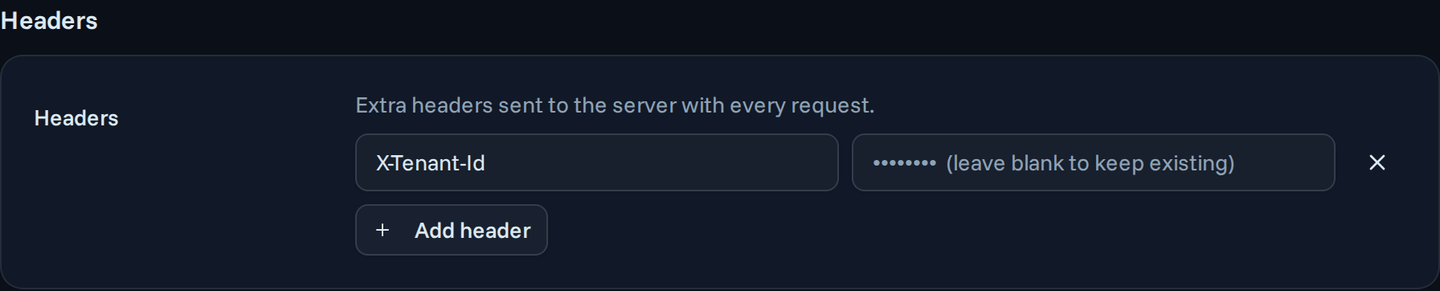
Add headers when you add the server, or later on its Settings tab.
- With API key, the headers sit inside Authentication, because they carry the key.
- With every other option, add them in the Headers section below Authentication.
Switching to or from API key removes the stored headers, so an API key never stays behind as an extra header. Catalog servers have no headers setting.
Lock an internal server to the gateway
If agents could reach an internal MCP server directly, they could skip your rules, data protection and audit. A secret header closes that gap at the network edge:
- Put the server behind a reverse proxy, API gateway or firewall that rejects any request without the header, such as
X-Gateway-Secret. - Add that header and its secret value to the custom server in Agent Authority.
- The gateway now sends the secret with every request, so calls through Agent Authority pass and direct calls are rejected.
The gateway stores the value encrypted and never shows it again, so agents and users can't read it. To rotate the secret, have the proxy accept both the old and the new value, update the header on the Settings tab, then retire the old value.
Pair the secret with Send user identity, and the server also knows which person each call is for, from a signed token it can verify.
How headers combine with authentication
You can add headers whatever authentication option the server uses.
The one difference is Authorization:
| Authentication option | Can you set Authorization? |
|---|---|
| Users sign in themselves | No: OAuth sends it with the person's token |
| OAuth app | No: OAuth sends it with the app's token |
| API key | Yes |
| No authentication | Yes |
See MCP server authentication for what each option does.
Reserved names
The gateway or the MCP session sets some headers itself, so the gateway rejects these names in any letter case:
Host, Content-Length, Content-Type, Accept, Connection, Keep-Alive, Transfer-Encoding, TE, Trailer, Upgrade, Proxy-Authorization, and Last-Event-ID.
Mcp-– the MCP protocol owns every name that starts with it, such asMcp-Session-IdandMcp-Method.X-SecureAuth-– the gateway owns every name that starts with it, because it carries user identity.
Limits
- Up to 32 headers per custom server.
- Each name is unique regardless of letter case, and up to 256 characters long.
- Each value is up to 8192 bytes.
Where the gateway sends headers
The gateway sends the headers with every request to the MCP server. It never sends them to the OAuth endpoints it uses to discover the provider, sign users in, register an app, or get and refresh tokens, so a secret meant for your server never reaches an identity provider.
How values are stored
The gateway stores the values encrypted and never shows them after you save. On the Settings tab, each stored header keeps its name and shows an empty value field. Leave the value blank to keep the stored one, or type a new value to replace it. To delete a header, remove its row and save.
Request headers and user identity
| Request headers | User identity | |
|---|---|---|
| What it says | Which gateway, tenant or route | Which person the call is for |
| Same for every call | Yes | No, one per person |
| Who sets the value | You, once | The gateway, on each call |
| Can the server trust it | As far as it trusts the secret | Yes, it verifies the signed token |
| Header names | Your own | X-SecureAuth-Jwt-Assertion, and optional X-SecureAuth- plain headers |
Next steps
Your custom MCP server now receives the headers it needs on every call, and can reject anything that didn't come through the gateway. Next, tell it who each call is for.
- User identity assertion – send a signed token that names the person behind each call
- Custom MCP server – the rest of the server's settings