User identity assertion
Send a signed token naming the person behind each call, so your MCP server can trust who's calling without a login
An internal MCP server often needs to know the person behind a tool call, to scope results to what they may see or to log who did what.
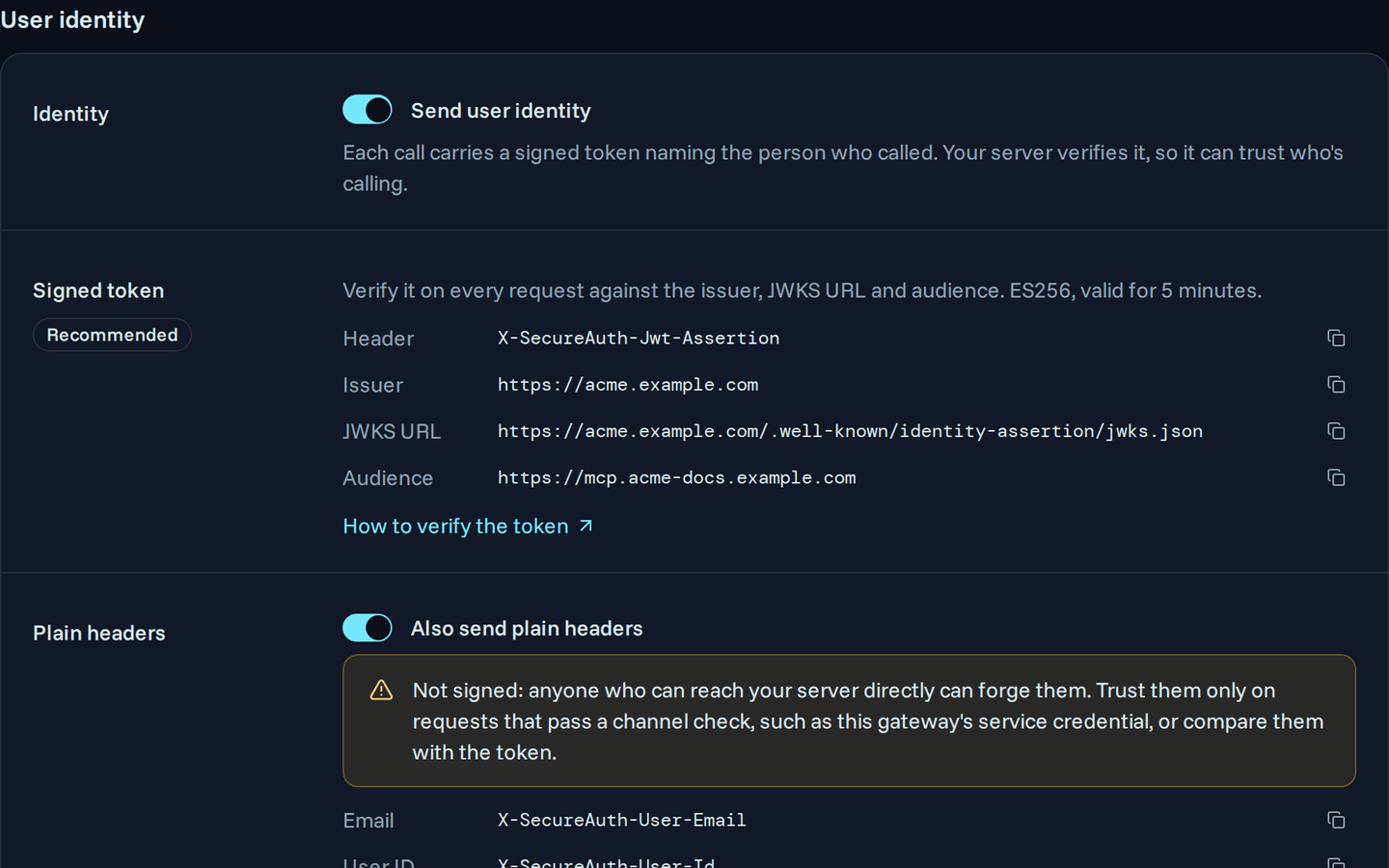
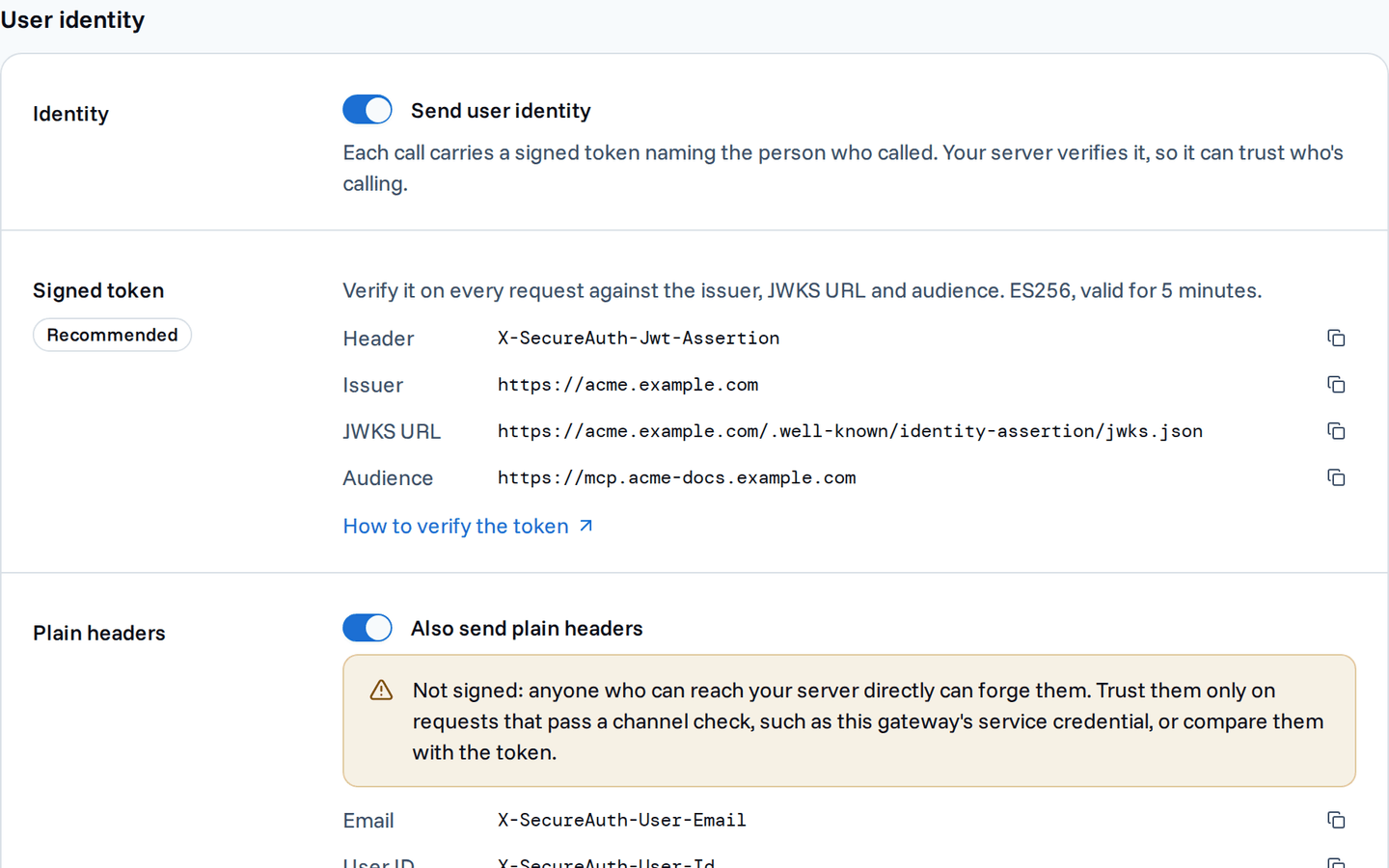
With user identity assertion, the gateway sends a signed token naming that person on every call, in the X-SecureAuth-Jwt-Assertion header.
Your server verifies the signature and reads the person from the token, with no separate login and no trust in the network.
How it works
- A person's agent calls a tool on your custom server through the gateway.
- The gateway has already authenticated the agent and the person it acts for.
- It signs a short-lived token with that person's ID, email, name and groups, and adds it to the request.
- Your server checks the signature against your workspace's public keys, then reads the person from the claims.
The token proves the gateway vouched for the person, so a request that didn't come through the gateway can't carry a valid one.
Turn it on
- Open the custom server from Inventory › Tools & Services, then its Settings tab.
- Under User identity, switch on Send user identity.
- Save, then copy the Issuer, JWKS URL and Audience shown there into your server's verification settings.
Only custom servers support it, and the gateway requires an https server URL.
When the gateway sends it
The gateway sends identity only when a person calls through an agent and has an email address on file.
Autonomous agents send none.
The background tools sync and the connection check when you add the server also send none, because no person is calling.
If your server demands the identity on every call, let it answer tools/list without it.
What the token carries
The token is a JSON Web Token (JWT) signed with ES256 (Elliptic Curve Digital Signature Algorithm with P-256 and SHA-256). It lasts 5 minutes, and the gateway issues a new one before it expires. It carries these claims:
| Claim | Value |
|---|---|
iss | Your workspace URL, shown as Issuer |
aud | Your server URL without its query string, shown as Audience |
sub | The user's ID |
email | The user's email address |
name | The user's display name |
groups | The user's group names, as an array (empty when the user has none) |
iat, exp | When the gateway issued the token, and when it expires |
Verify the token
Your server fetches the public keys from the JWKS URL (JSON Web Key Set), which is /.well-known/identity-assertion/jwks.json on your workspace URL.
Pin all of the following, so a token issued for another workspace or another server fails:
- the issuer
- the JWKS URL
- the audience
- the ES256 algorithm
In Node, use jose:
import { createRemoteJWKSet, jwtVerify } from "jose";

const jwks = createRemoteJWKSet(new URL(JWKS_URL));

const { payload } = await jwtVerify(
  request.headers["x-secureauth-jwt-assertion"],
  jwks,
  { issuer: ISSUER, audience: AUDIENCE, algorithms: ["ES256"] },
);
In Go, use go-oidc:
keySet := oidc.NewRemoteKeySet(ctx, jwksURL)
verifier := oidc.NewVerifier(issuer, keySet, &oidc.Config{
	ClientID:             audience,
	SupportedSigningAlgs: []string{oidc.ES256},
})

idToken, err := verifier.Verify(ctx, r.Header.Get("X-SecureAuth-Jwt-Assertion"))
Token size limit
A person in many groups can push the token past its size limit.
Then the gateway leaves out groups and sets "groups_truncated": true.
Look the groups up yourself when you see that claim, rather than treating the person as having none.
Next steps
Your server can now trust which person each call is for, and scope or log by it. Next, decide whether it also needs the same identity as plain headers.
- User identity headers – the same person as unsigned headers, for servers that can't verify a token
- Propagate request headers – lock the server to the gateway with a shared secret header