Rate limits
Cap how fast agents can call tools, org-wide or split further by user, agent, or tool
Access Policies decide whether a tool call runs. Rate limits decide how fast. A rule caps the number of tool calls allowed in a window, so a looping agent can't run up charges on the paid API behind an MCP server, exceed that server's own quota, or use up capacity other people need.


What a rule says
Each rule answers three questions.
Which calls does it cover?
The scope, the same selector Access Policies and Data Protection use.
Name resources, agents, agent instances, users, groups, tags, or tool patterns.
Leave a field empty and it matches anything.
An empty scope covers every tool call.
A scope also carries a type naming the kind of traffic it matches; today that is always mcp_call.
How much budget?
limit calls per window_seconds, up to an hour.
By default the gateway spaces calls evenly across the window rather than letting them all through at once:
a rule of 60 calls an hour allows about one call a minute.
burst sets how many calls can go through together.
Set it to 10 on that same rule and ten calls go through every ten minutes, at the same overall rate.
burst defaults to 1 and can be at most limit.
Budget for whom?
Every budget starts as one pool for your whole organization: key_by always includes org.
Leave it at that and everyone in the org draws from one pool.
Add dimensions to split that pool into smaller ones:
| Dimension | Gives a separate budget to |
|---|---|
user | each user |
agent_instance | each registered agent instance |
mcp | each MCP server |
tool | each tool |
"60 calls a minute" therefore means something different depending on what's added.
With key_by: ["org"], everyone shares one pool of 60.
Add user and each user gets their own 60 instead.
Combine dimensions to narrow the budget further.
key_by: ["org", "user", "tool"] gives each user their own 60 calls to search, and separately their own 60 calls to summarize.
One user using up their search budget doesn't touch their summarize budget, and doesn't touch anyone else's search budget either.
The order of the dimensions doesn't matter.
Limit only some calls with a condition
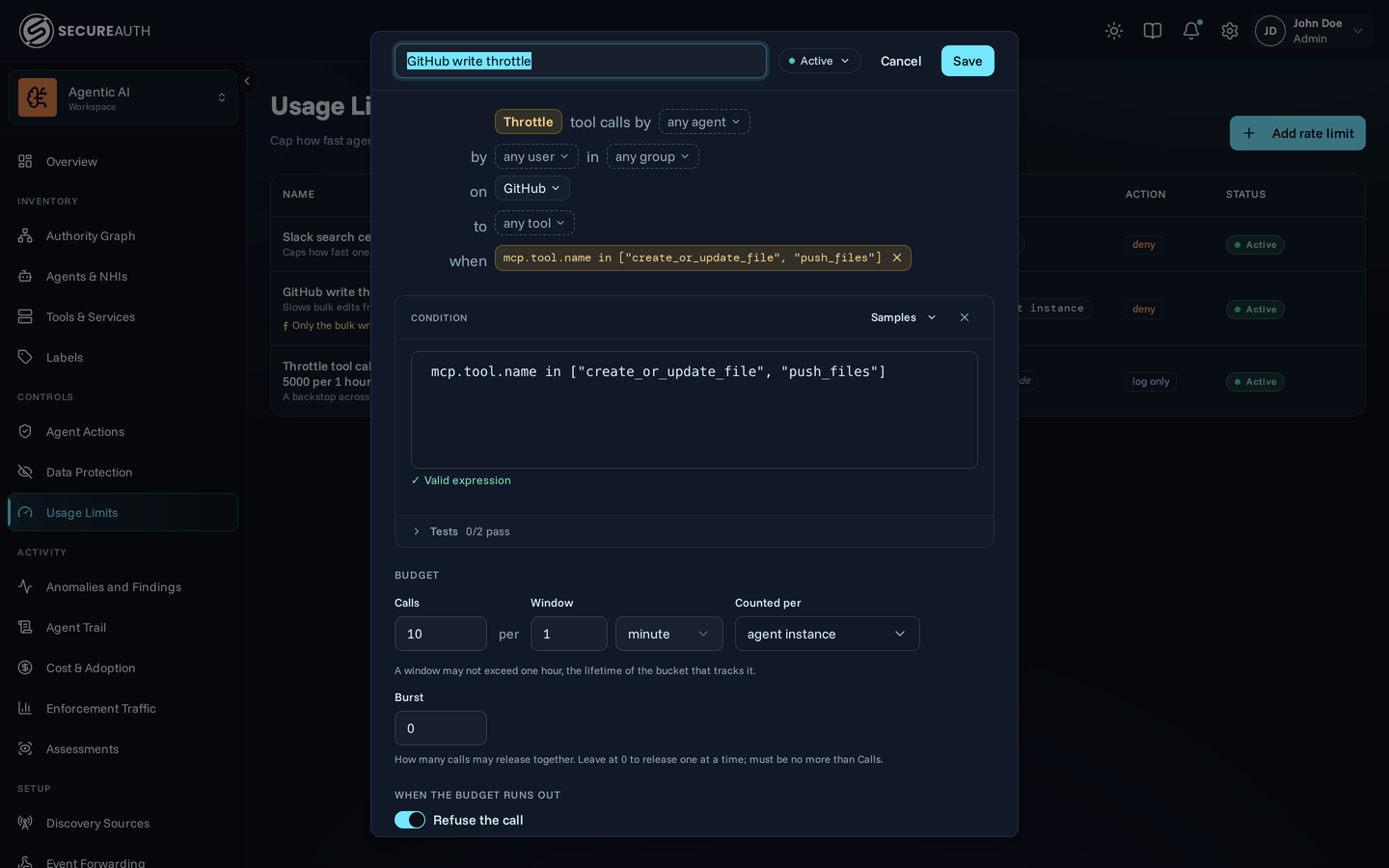
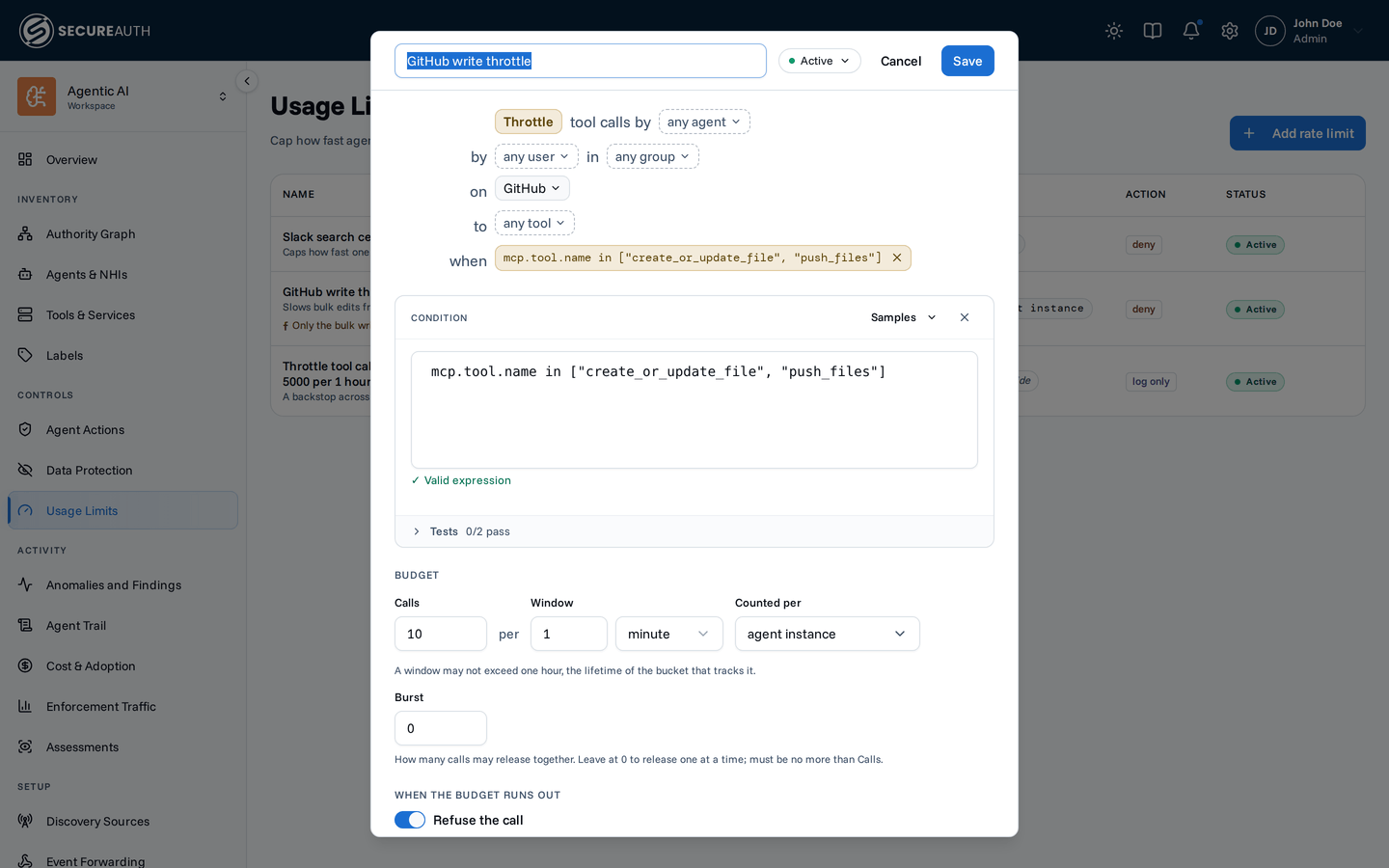
A rule can carry a Common Expression Language (CEL) condition that narrows the calls it covers beyond the scope.
The condition uses the same variables as an Agent Access condition.
These are agent (with agent.autonomous), user, mcp (with mcp.tool), and request (with request.args and request.ip).
The rule applies only when the condition is true.
For example, this condition limits calls from outside the 10.8.0.0/16 network:
!request.ip.inCidr("10.8.0.0/16")A condition that fails to evaluate at runtime still applies the limit. A condition that is not valid CEL is rejected when you save the rule.
Rules add up, they don't override
Every rule whose scope matches a call must have budget left. Rules carry no priority and none overrides another: if any matching rule is out of budget, the gateway refuses the call.
That's what lets a broad ceiling and a narrow one work together:
- 1000 calls a minute for the organization,
key_by: ["org"] - 50 calls a minute for any one user,
key_by: ["org", "user"]
Both apply to every call. One user can't spend the organization's whole budget, and the organization's ceiling still holds no matter how many users are active.
Test a rule before you enforce it
The right limit is hard to guess, and a limit set too low refuses work people needed.
Set action to log_only and the rule draws down its budget and records every call it would have refused, without refusing anything.
Those calls appear in the Agent Trail on the call itself, badged logged, not blocked, and naming the rule.
The entry is still a successful tool execution, because the call ran, so you can read exactly which calls a deny rule would have turned away, and for whom, before you switch action to deny.
What counts against a budget
One unit of budget means one call that reaches the MCP server. The gateway counts a call at the moment it forwards it upstream. Anything refused before that costs nothing and never gets refused for lack of budget: a call an Access Policy blocks, or a call to a tool on a server nobody has connected yet. That last case matters: otherwise a saturated limit would answer with "Rate limit exceeded" in place of the link you need to connect.
Rate limits apply to tool calls only. The gateway never limits tool listing or connections.
What a refused agent receives
A refused call comes back as a failed tool result, not a transport error, so the agent's model reads it and can back off:
Rate limit exceeded for "search". Retry in 4s.The message leaves out the rule's name and ID on purpose:
they go to the Agent Trail instead, where a refusal appears as a tool error of type rate_limited naming the rule that refused it.
A log_only rule never produces a tool error, because the call succeeded;
the Agent Trail records the shortfall on the successful call instead.
When the upstream MCP server throttles a call itself, the Agent Trail records a tool error of type upstream_rate_limited instead, with no rule attached.
Frequent upstream_rate_limited errors suggest adding a rule that keeps your agents under the upstream's quota.
Organization-wide defaults
SecureAuth can set a per-user and per-organization ceiling for your organization. These apply in addition to any rules you define, not instead of them: as with any other pair of matching rules, the tighter limit is the one that binds. By default, SecureAuth caps nothing. Ask your SecureAuth contact what your organization has, if anything. It's a last line of defense against a runaway agent, not a substitute for rules you choose.
Using the Usage Limits page
Manage rules from the Usage Limits page in the dashboard, pictured at the top of this page. Each row shows a rule's scope, its budget, the dimensions it's keyed by, and whether it denies calls or only logs them. A rule keyed by org alone shows a single org-wide label. Add any dimension and that label is replaced by one label per dimension you added.
Click Add rate limit to open the rule editor.
Set the scope, the calls-per-window budget, an optional burst, and any dimensions beyond org to key the budget by, then choose deny or log_only for the action.
Click + condition to add a condition to the rule.
The name fills in from the rule, its budget, and what the budget is counted per, for example Throttle tool calls by any agent on Slack to any tool · 60 per minute per user.
Replace it with your own name.
The status control offers Active, Draft, and Disabled.
The gateway enforces only active rules.
A draft rule is saved but never enforced.

