What's new in 2022
These highlights are archived. They describe features and changes announced during 2022 and are kept for reference. For current updates, see What's new.
26.12 Configuration Export/Import
We value your feedback and are always looking for ways to improve our platform. In response to customer requests, we've made enhancements to our configuration export and import capabilities to improve performance.
We've updated our import and export APIs to exclude dynamic and non-configuration objects, which speeds up the process. To provide the option to still retrieve these objects, we've introduced a new with_data query parameter to the Export Global Tenant Configuration Root API and the Export Tenant's Configuration System API . When with_data is set to true, these APIs will include dynamic and non-configuration objects in the exported configuration:
-
Consents
-
ConsentActions
-
ConsentGrants
-
ScopeGrants
-
PrivacyLedgerEvents
-
OpenbankingUKConsents
-
OpenbankingBRConsents
-
OpenbankingFiles
-
CDRArrangements
-
OpenbankingFDXConsents
Before the change, those fields were populated by default.
16.12 Brand Login Pages, Consent Pages, 2FA Screens, and Much More
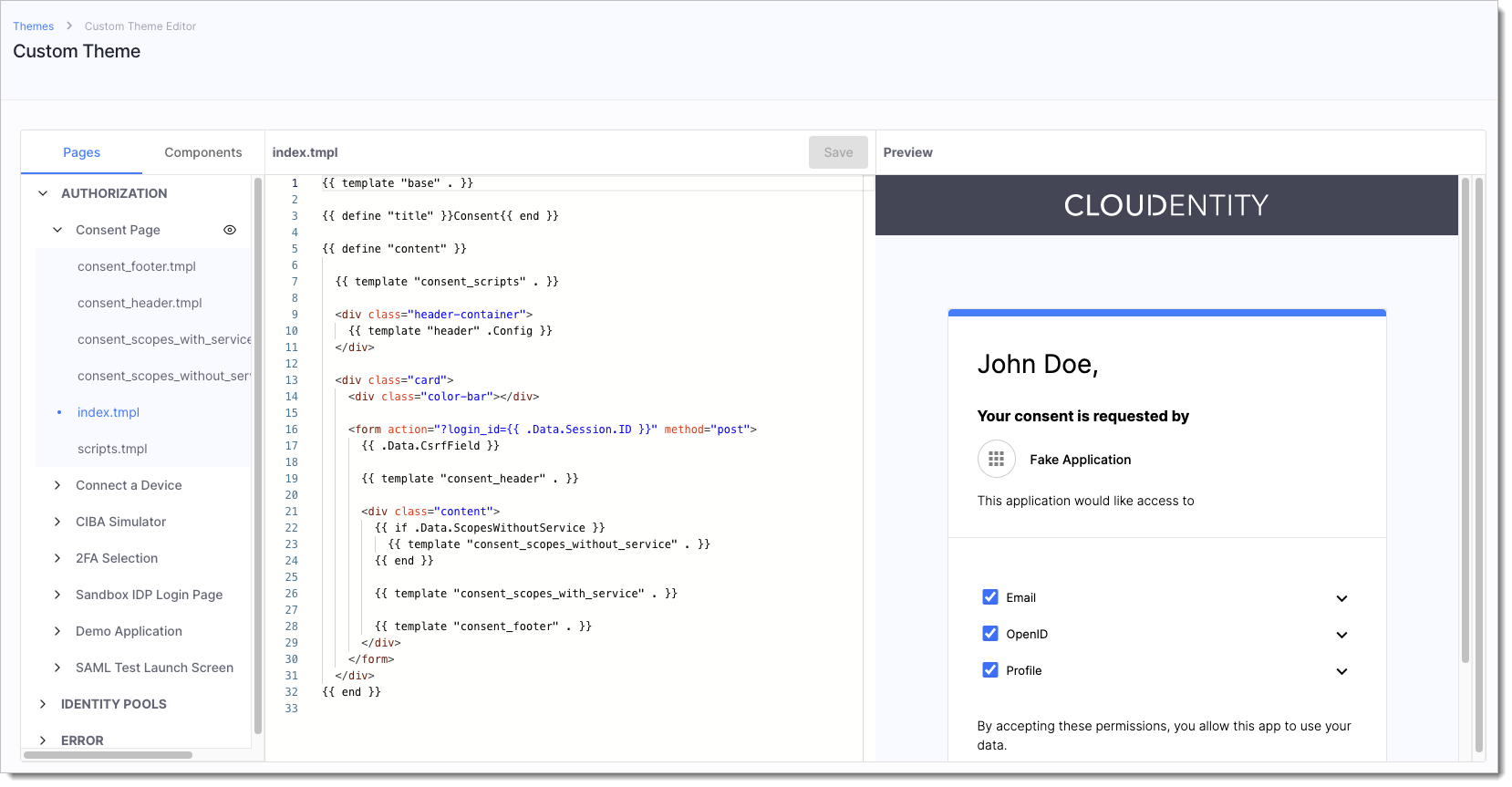
We are excited to announce the release of custom themes. Administrators can now create and assign custom appearance themes to CIAM components to brand them according to their company style. This includes the ability to customize consent pages displayed to users during authorization flows, login pages for users that authenticate with CIAM Identity Pools, the Demo Application, Error Pages, and more. The built-in editor provides an IDE-like experience and preview capabilities for creating and styling your template HTML code. Branding your components can provide a number of benefits for your business. It helps to establish and maintain a consistent visual identity, which can improve recognition and trust with your customers, partners, and employees. Overall, branding can help to differentiate your business and improve its overall image and reputation.
07.11 Utilize Improved Identity Pools
We added a bunch of new improvements to Identity Pools:
-
User credentials now include the
expiresAtparameter. Once the password expires, it fails verification, and the user needs to either reset it or change.Password expiry can be utilized when migrating users from external identity sources without their passwords defined. Just provide no password and set the expiry date for a date in the past to trigger password change for your users.
-
Added option to set Preferred Authentication Mechanism useful when both password and OTPs are enabled for an IDP. Now, it is possible to pick the default one that shows up on the login screen.
-
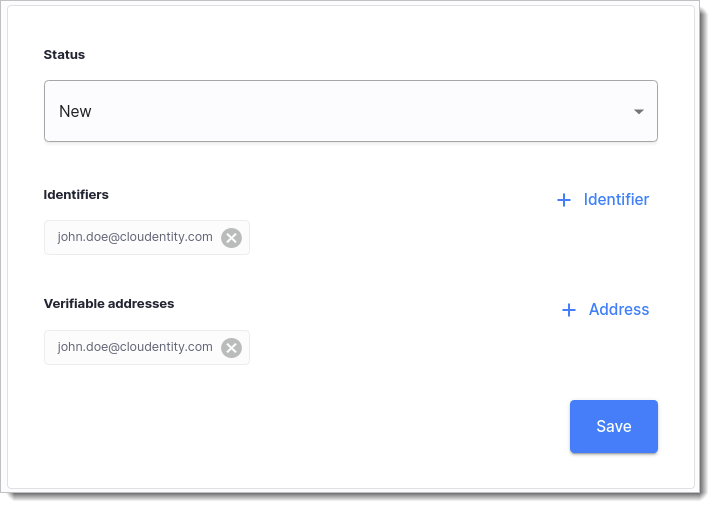
Admin platform users can now manage user identifiers and addresses within Identity Pools. Admins can add new identifiers with the email, mobile, UUID types, or even identifiers coming from external sources. Additionally, admins can add new verifiable email or mobile addresses for users and define whether the address is verified or not.
-
Refactored Identity APIs to enable developers to extend them more easily.
26.10 Manage Users' Identifiers and Addresses in Identity Pools
SecureAuth Platform admin users can now manage user's identifiers and addresses within SecureAuth Identity Pools. Admins can add new identifiers with the email, mobile, UUID types, or even identifiers coming from external sources. Additionally, admins can add new verifiable email or mobile addresses for users and define whether the address is verified or not.
24.10 Cache Request Responses Within SecureAuth Authorizers
We improved SecureAuth authorizer's integration with the Open Policy Agent's REGO language, so that the caching features in the REGO http.send() function are effective. You can now use the following fields in your REGO policies:
-
cache- Cache HTTP response across OPA queries. Default: false. -
force_cache- Cache HTTP response across OPA queries and override cache directives defined by the server. Default: false. -
force_cache_duration_seconds- If theforce_cachefield is set totrue, this field specifies the duration in seconds for the freshness of a cached response.
In SecureAuth v2.8.0, the authorizers provide an inter-query cache that persists across policy validations, which enables calls to the http.send() method to access cached responses from previous policy validations. The cache is recreated on each API discovery cycle, so the duration of cached responses is limited by the authorizer's discovery interval.
The cache size can be configured via the rego_inter_query_cache_size configuration setting for SecureAuth authorizers:
enforcement:
    rego_inter_query_cache_size: 1000000 # maximum size for the Rego inter-query builtin cache
20.10 Full Support for Brazilian Open Insurance
SecureAuth platform now fully supports Brazilian Open Insurance (OPIN) initiative.
-
The Open Finance Brazil type of workspace is configured to provide industry-specific OPIN configuration, for example, OPIN scopes.
-
Added permission mappings and groups validation required by OPIN. It can be used in the consent creation endpoint.
-
Added the following endpoints from the OPIN spec for consent creation and management:
-
Create Insurance Data Access Consent
-
Get Insurance Data Access Consent
-
Delete Insurance Data Access Consent
-
-
Added DCR requirements support coming from the the Open Insurance specification. This includes:
-
Requirement of using mTLS for DCR registration
-
Software statement parsing and validation for the model provided by the specification
-
Software role to scope mapping during DCR
-
-
Extended mTLS aliases in the OAuth wellknown endpoint to include the backchannel authentication endpoint when Client Initiated Backchannel Authentication method is enabled as required by the OPIN specification.
-
Add an option to configure supported
acr(Authentication Context Class Reference) values in the authorization server's OAuth advanced settings. Workspaces now use whatever is configured in the settings instead of an internal hardcoded list.
14.10 Bunch of New Articles for Financial Data Exchange (FDX) Compliance
 |
|
We have added a whole lot of new articles on complying with the Financial Data Exchange (FDX) standards body! Check out brand new solution guide. Learn how to build consent pages that comply with the FDX requirements, how data providers can protect their APIs with SecureAuth, and much more:
21.09 Password Policies for Identity Pool Users
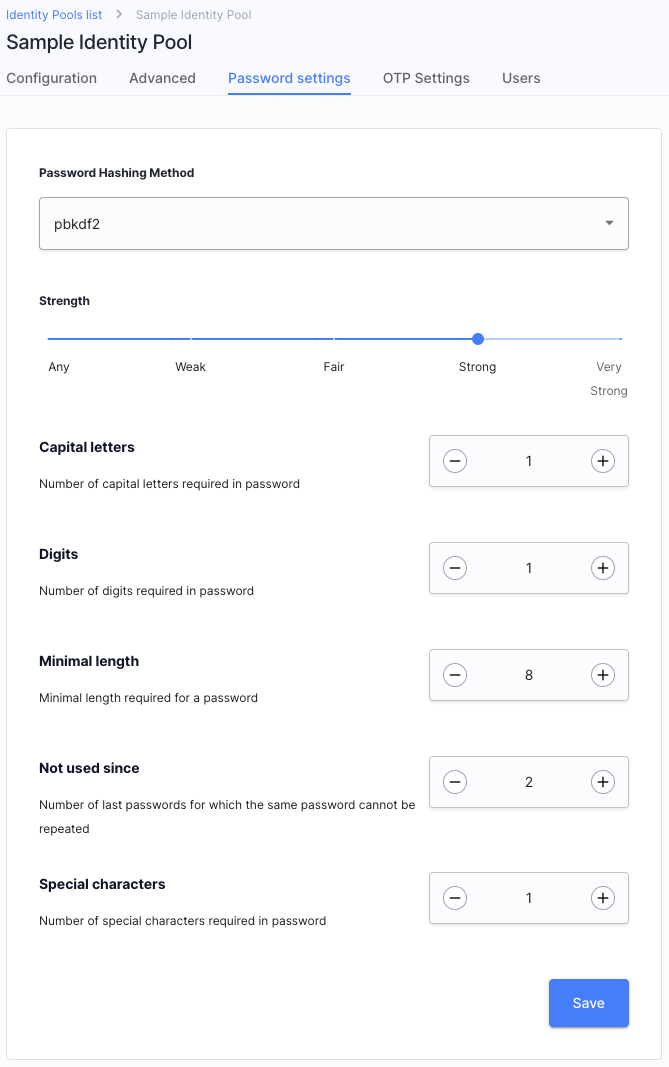
Times, when qwerty1234 was thought to be a safe password, are long gone! Make sure that your users fulfill all of the requirements for safe passwords with SecureAuth password policies. Such policies enable the Identity Pool administrators to specify, for example, the minimal length of a password, number of special characters, and many more.
16.09 Integration with Kusk API Gateway
Kusk API Gateway enables developers to build, validate, deploy, and monitor REST APIs based on Envoy Proxy running on your Kubernetes cluster. Do you know what else can be run in a K8s cluster? That's right! SecureAuth authorizers! It is now possible to integrate the Kusk Gateway with SecureAuth and protect the APIs deployed behind your gateway with advanced access control measures. The integration is based on the SecureAuth Standalone Authorizer.

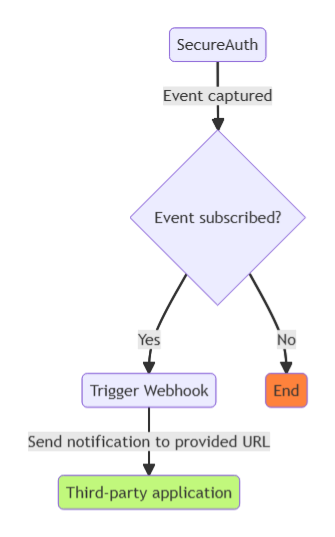
1.09 Event-Based Notifications Using Webhooks
With SecureAuth Extensions, you can set up event-based notifications in order to subscribe third-party applications to important events captured by our platform. You can, for example, notify an external CRM system that a user granted their consent for an application registered within your Open Banking workspace, and more.