Partner access quickstart
This quickstart is for developers and admins setting up access for external partners: companies that do operational work for or with your business, like vendors, brokers, contractors, distributors, and channel resellers. It walks through the SecureAuth Connect platform setup for partner organizations: a workspace, an organization per partner, federated identity providers, scoped application access, time-bounded tokens, and a token claim that identifies which partner each request belongs to.
Partners are represented as organizations in your workspace, the same way B2B SaaS customers are. This quickstart layers partner-specific configuration on top of that foundation: which apps each partner can access, how long their tokens stay valid, and what audit metadata the token carries.
How partner identity differs from B2B SaaS
Partners and B2B SaaS customers share the same architecture (organizations in a workspace) but represent different operational relationships. Four traits set partner identity apart:
-
External workers, not your customers. Partners use your systems to do work for or with you. They're accountable to an outside employer (their own company), so their home identity provider is the source of truth for who they are. You don't own their directory.
-
Scoped to a defined set of apps. Partners see only the apps they need for the work. A logistics partner shouldn't see your underwriting tools, and an outside consultant shouldn't see your production financial systems.
-
Lifecycle is short and rotates. Contracts end, projects close, distributor agreements renew or terminate. Partner access has to expire automatically. Stale partner access is one of the most common audit findings.
-
Audit and attestation pressure. Data-sharing agreements, SOC 2, and similar compliance frameworks require traceable records of who accessed what, plus an internal owner who certifies the partner relationship. Partner activity often gets more scrutiny than internal employee activity.
In SecureAuth Connect, each partner company is represented as one organization in your workspace. The organization holds the partner's identity provider (IdP), branding, administrators, and policies. Your applications receive tokens that carry an organization_id claim identifying which partner the user belongs to. The three deltas from B2B SaaS show up in what apps each partner is allowed to use, how long their tokens stay valid, and what audit metadata rides in the token.
For partners, almost everything lives inside the organization: the administrator, identity provider, applications, token settings, claims, branding, and policies. The workspace is the container that groups partner organizations together. This is different from B2B SaaS, which uses one shared application on the workspace; in partner setups, each partner has its own applications registered inside their organization. Use organization templates to roll out consistent configuration across many partners.
If you've completed the B2B SaaS access quickstart, the workspace and organization mechanics are the same. You can either keep partners in a separate workspace (recommended, because they have a different lifecycle, different audit pressure, and often different teams managing onboarding) or extend your existing B2B workspace if partners overlap with your customer flow. See Building B2B SaaS platforms with Organizations for guidance on the trade-off.
If you're starting fresh and only need partner access, you can do the foundation here. Otherwise, run through the B2B quickstart from "Create a B2B workspace" through "Connect each customer's identity provider," then return here for partner-specific configuration.
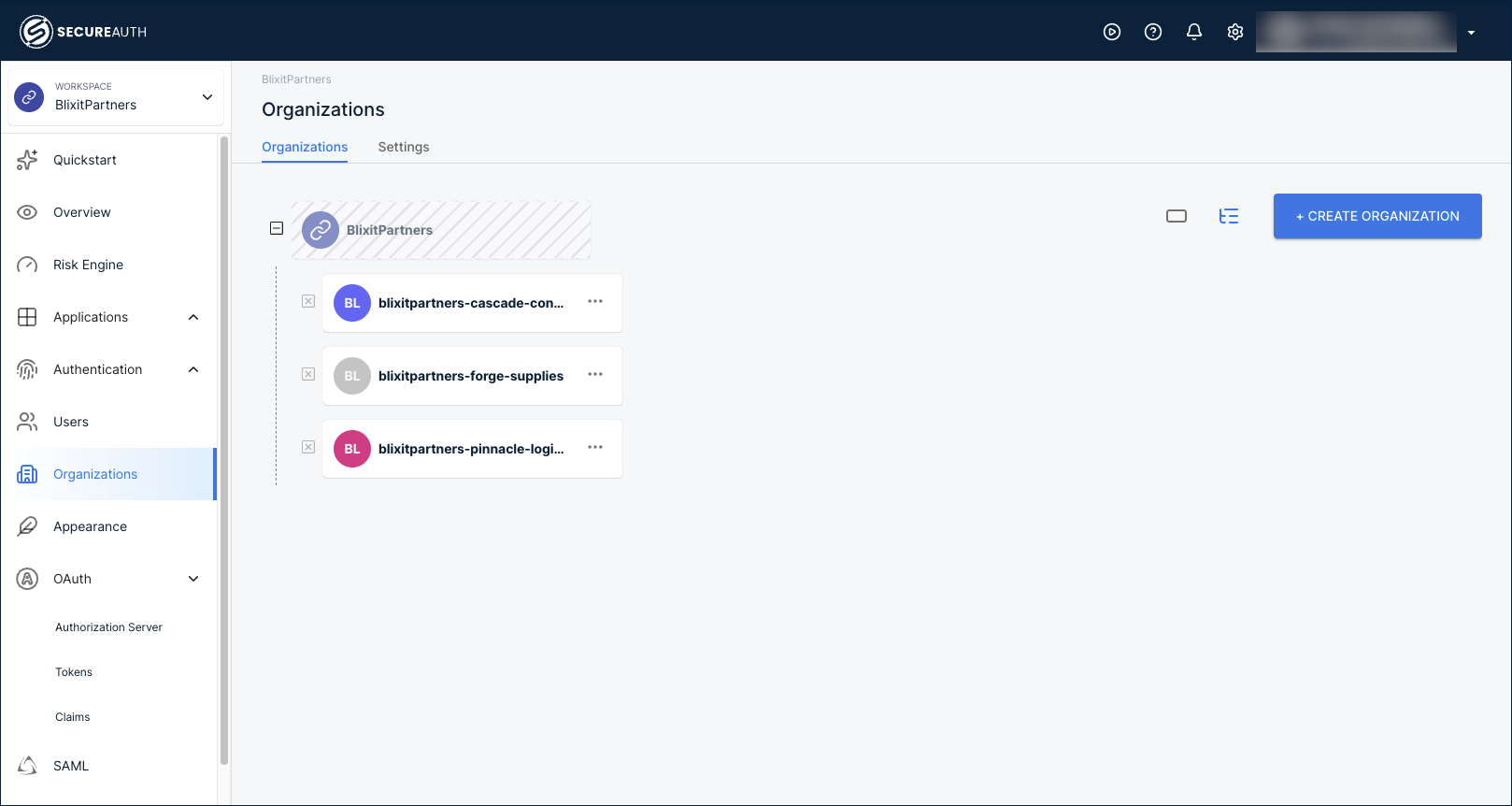
This quickstart uses a separate workspace named BlixitPartners, with three example partner organizations: Cascade Consulting, Forge Supplies, and Pinnacle Logistics.
Create a partner workspace
You start with a workspace because organizations, identity providers, applications, and policies all live inside it. Use a separate workspace for partners when the partner relationship is operationally distinct from your customers: different lifecycle, different audit pressure, different teams managing onboarding and offboarding. Select the Partners B2B Integration template, the same template B2B SaaS uses but configured per partner organization. See Add a new workspace for the full template list.
For background on how workspaces and organizations relate, see Understanding Workspaces and Organizations.
Add organizations for your partners
Each partner company is its own organization, isolated from every other partner. The organization holds the partner's users, IdP, branding, applications, and policies.
To add a partner, go to Organizations in the workspace and click + Create Organization. Fill in the partner's company name, an organization ID, and the email domains their users sign in with. Email domains drive automatic identity provider discovery when users land on the sign-in page.
After you add a few partners, the Organizations page lists them:
- Create organizations and suborganizations – detailed walkthrough, including suborganizations for partner companies with multiple offices or business units.
- Create organizations via API – automate partner onboarding from your partner-management system.
When you onboard many similar partners (multiple consulting firms, multiple distributors), capture one fully configured organization as a template, then apply it to every new partner. Templates carry the authentication methods, policies, schemas, branding, and application scope forward, so onboarding the next partner is a few minutes instead of a rebuild.
See Organization templates to set one up, and pair it with the API for creating organizations to automate onboarding end to end.
Add a partner administrator
Each partner needs at least one administrator who can manage their own users and settings. This person is typically someone on the partner's side, an IT contact at Cascade Consulting for example, who handles routine user changes without going through your support team.
Inside the partner's organization, go to Users > + Create User. Enter the admin's email and name, expand the role list, and select Organization Admin.
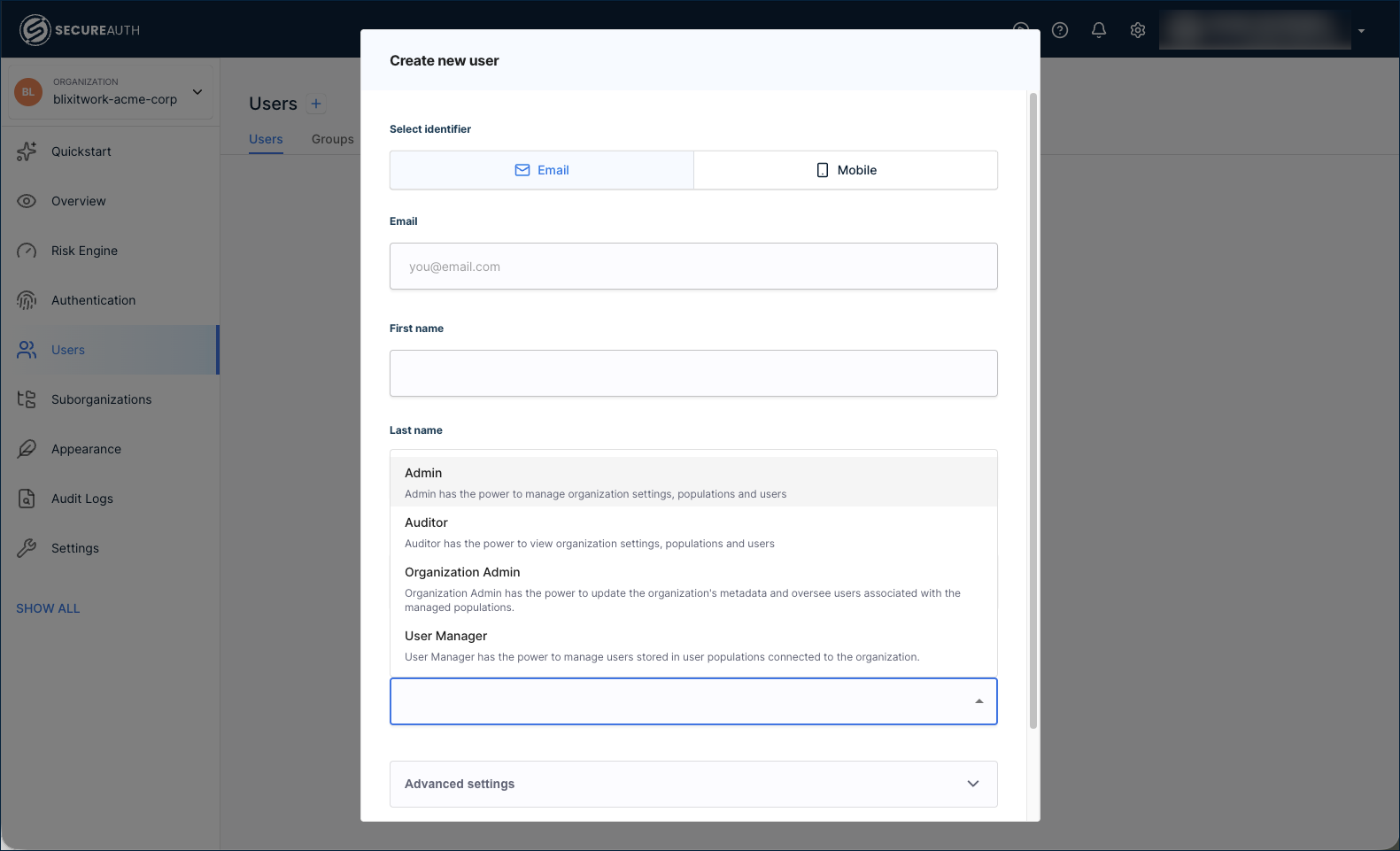
For the standard partner scenario, Organization Admin is the right starting role. The role list also includes:
- Admin – broad management of the organization.
- Auditor – read-only access. Useful for compliance owners who need visibility without write permissions.
- User Manager – manages users only.
The Settings > Administrators tab inside an organization shows only workspace administrators with delegated access, not organization administrators created through Users. To manage your admins (your team running the workspace), add them inside the workspace at Settings > Administrators. To grant a partner's IT contact admin access to their organization, create them as a user with the Organization Admin role as above.
Federate with each partner's identity provider
Most partners run their own identity provider already. SecureAuth Connect federates SAML and OIDC providers per organization with just-in-time user provisioning that creates the user record the first time someone signs in, so you never manually onboard a partner's user list. Federating with their IdP keeps you out of their user directory and removes responsibility for their password resets, MFA setup, and offboarding. When a partner's contract ends, deactivating the user in their own IdP cuts off access without you needing to touch their accounts.
Connect the identity provider inside each partner's organization, not the workspace. Click the workspace name at the top-left, go to Organizations, then select the partner's organization. In the left navigation, go to Authentication > Providers and click + Create Connection.
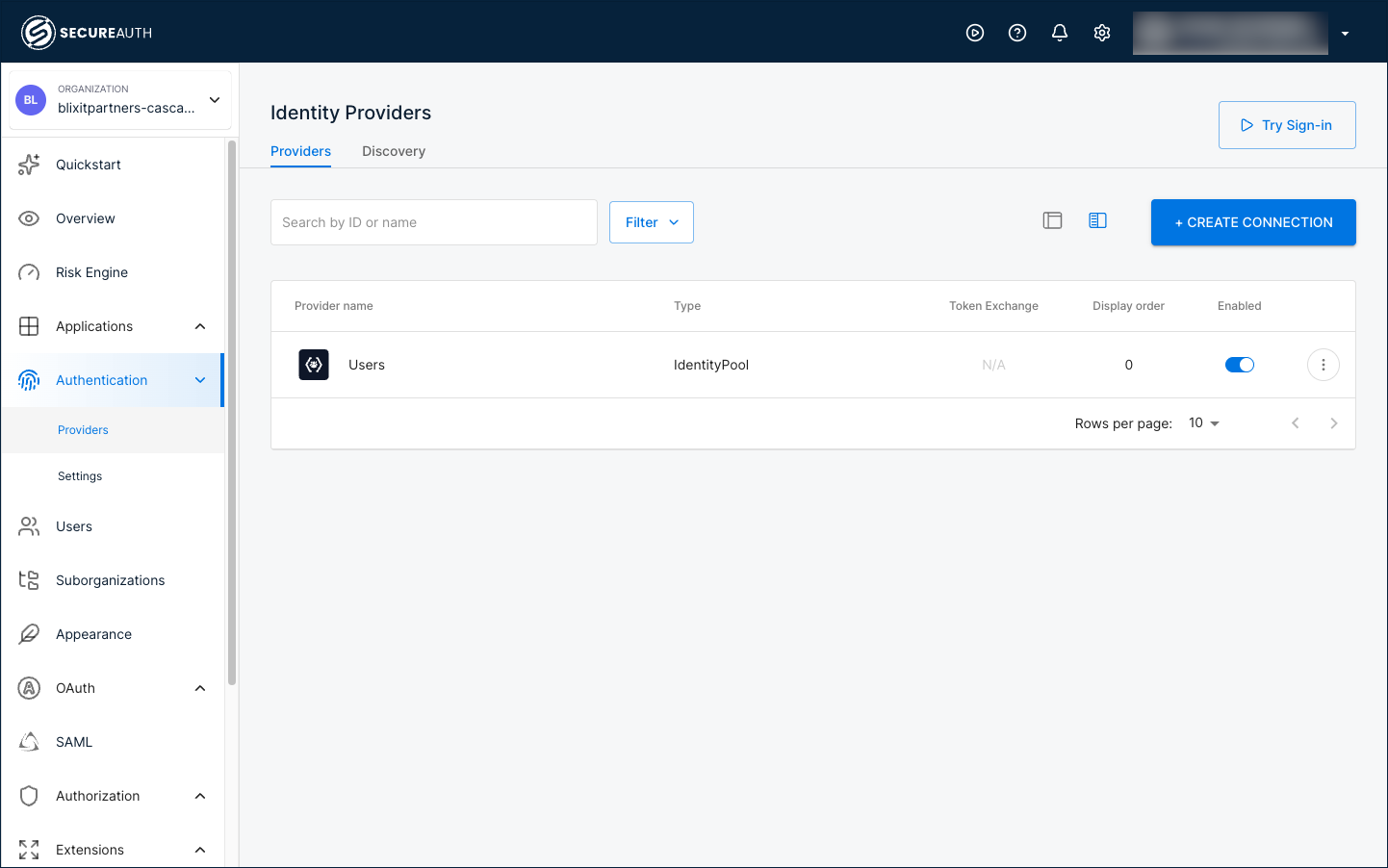
Pick a setup guide for the partner's IdP:
- Active Directory (CIAM) – common in enterprise B2B and partner scenarios, with LDAP Agent integration and automatic identity sync.
- Identity providers index – the full catalog of provider templates: Okta, Microsoft Entra ID, Auth0, Google Workspace, generic SAML/OIDC, and more.
For partners without an external IdP (sole proprietors, small contractor crews), use the User directory built into the organization. Each organization has its own, isolated from every other partner's.
Once you've added more than one provider, configure IdP Routing so users land on the right one automatically based on their email domain.
Register the applications each partner uses
Partners shouldn't see your full application catalog. In SecureAuth Connect, that scope happens through where you register applications: each partner's apps live inside their own organization, so Cascade Consulting sees only the apps registered inside the Cascade Consulting organization, and Forge Supplies sees only what's registered inside theirs. Registering is the scoping.
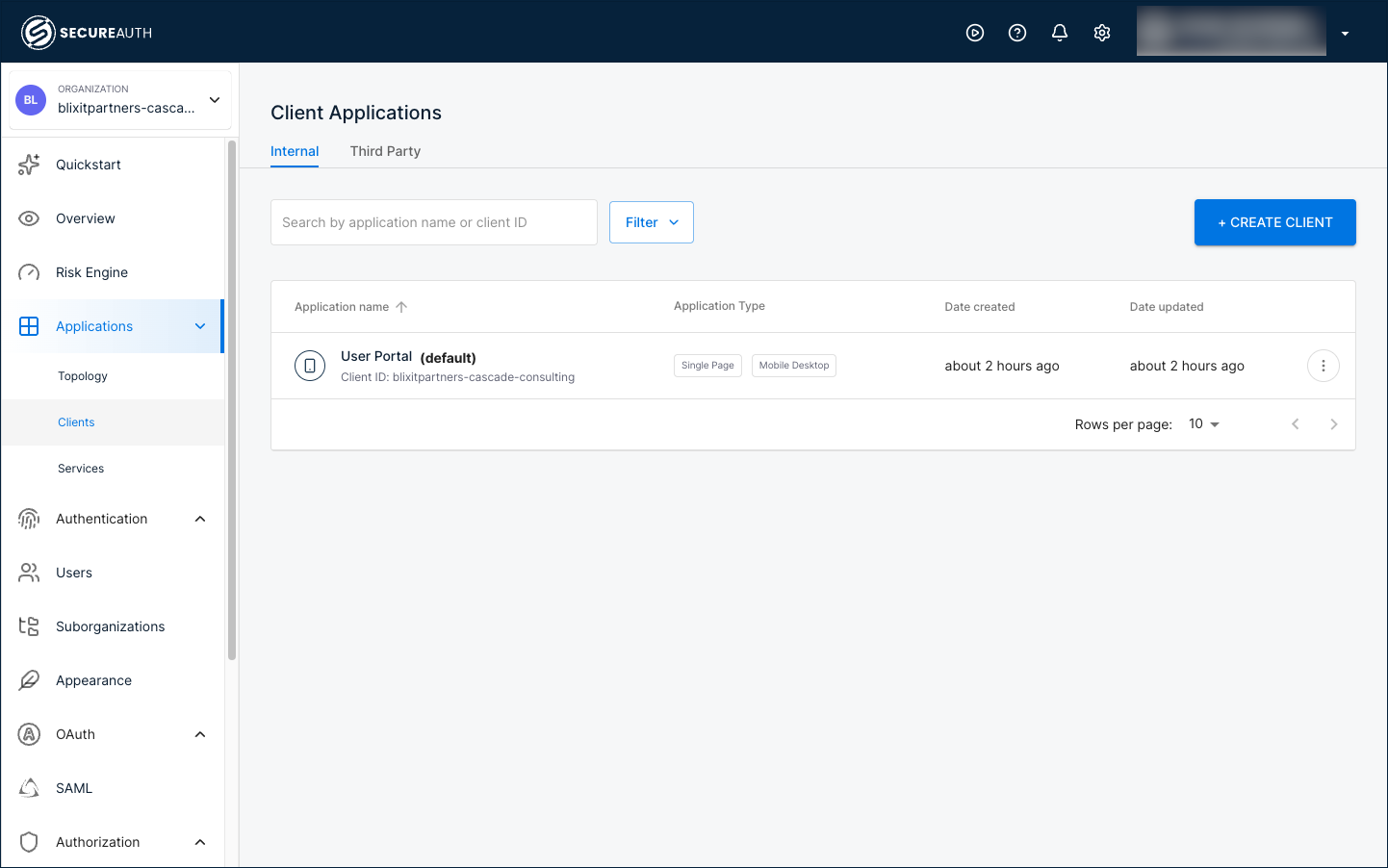
Inside the partner's organization, expand the left navigation by clicking Show All, then go to Applications > Clients and click + Create Client. Pick the client type that matches the partner-facing application:
- Custom application – for a partner application that signs users in with OpenID Connect. Custom gives you full control over the OAuth grants and authentication methods.
- SAML service provider – for a partner application that signs users in with SAML.
A SAML service provider includes a Quickstart tab with .NET, Java, and Node.js integration code, scoped to that partner's organization.
For finer control over what each application can do (read vs write operations, specific API endpoints), pair application registration with access control policies, and use an MFA policy to require step-up authentication for high-value partner actions.
For partner systems that call your APIs without a human in the loop (a vendor's system pulling purchase order data on a schedule), see Machine-to-machine clients. Register the M2M client inside the partner's organization too.
Set time-bounded access
Partner contracts are time-bounded, and partner access should be too. Build expiration into the grant, not into a calendar reminder. Set short access token lifetimes so that even if offboarding hits a snag, stale tokens expire quickly. Drive deactivation from identity pool attributes or partner-IdP claims that change when a contract attribute changes. Pair token TTLs with automated deactivation hooks from your partner-management system: when a contract ends, the corresponding organization or user is disabled.
Inside the partner's organization, go to OAuth > Tokens > Settings tab > Time to Live Settings. Most partner setups use 15 to 30 minutes for the access token, with refresh tokens scoped to the contract duration.
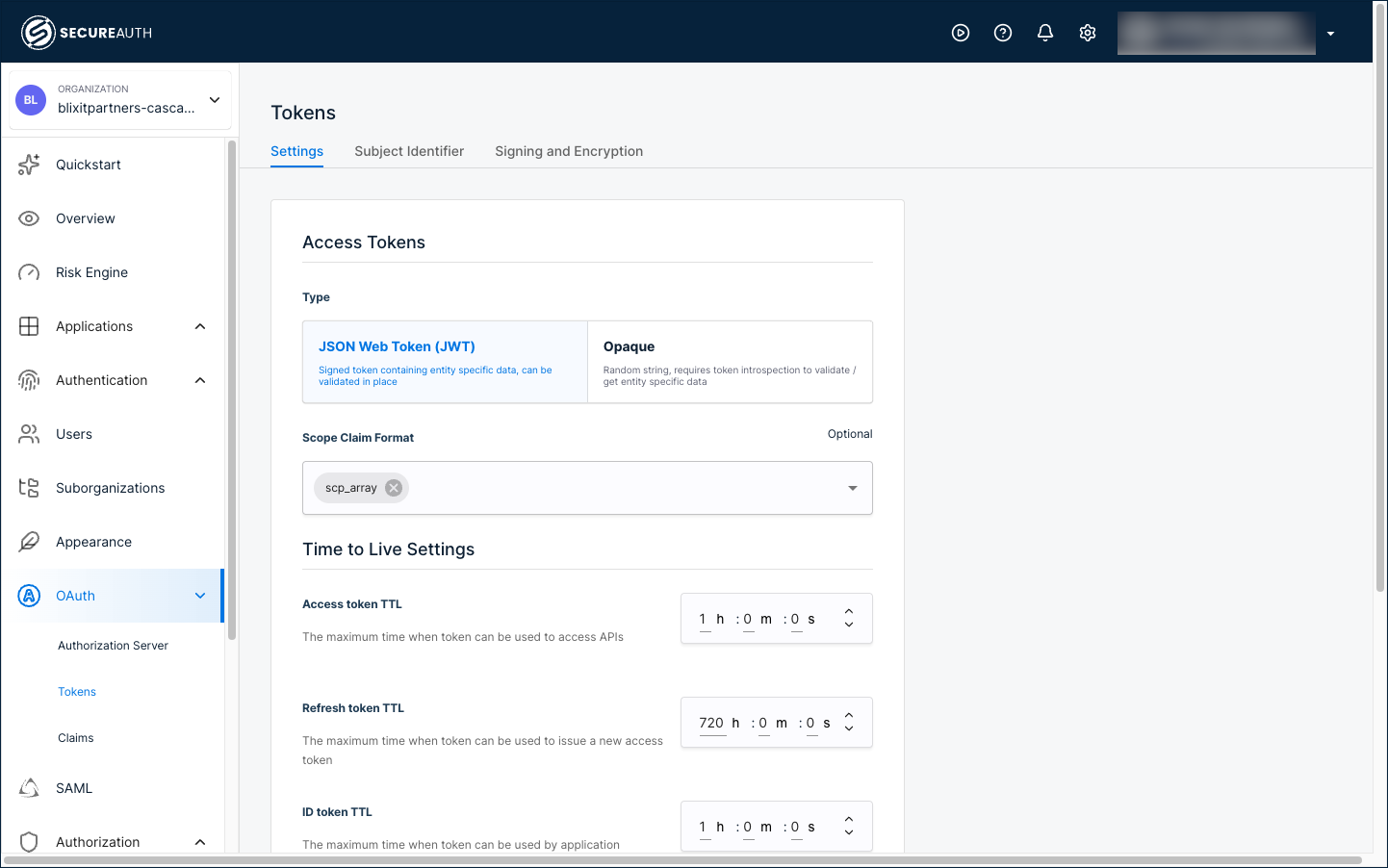
The same settings exist at the workspace level if you want to set baseline defaults that organizations inherit. Configure them per-organization when partner contracts have different durations.
- Configure custom token time-to-live – the full walkthrough including refresh token settings.
Identify each partner in every token
Your applications need to know which partner the user belongs to, in addition to who the user is. The token carries that partner identity through a claim. Without one, every request your app sees looks identical regardless of partner.
Because each partner's applications live inside their own organization, the token claim is configured per organization too. Inside the partner's organization, go to OAuth > Claims. On the Access Tokens tab, click + Add Claim and create:
- Name:
organization_id - Type: Organization
- Source: ID
Every access token issued from that organization's applications now includes the organization_id claim with the partner's ID (cascade-consulting, forge-supplies, pinnacle-logistics, and so on). For each new partner you onboard, set up the same claim, or use an organization template that includes the claim so it carries forward automatically.
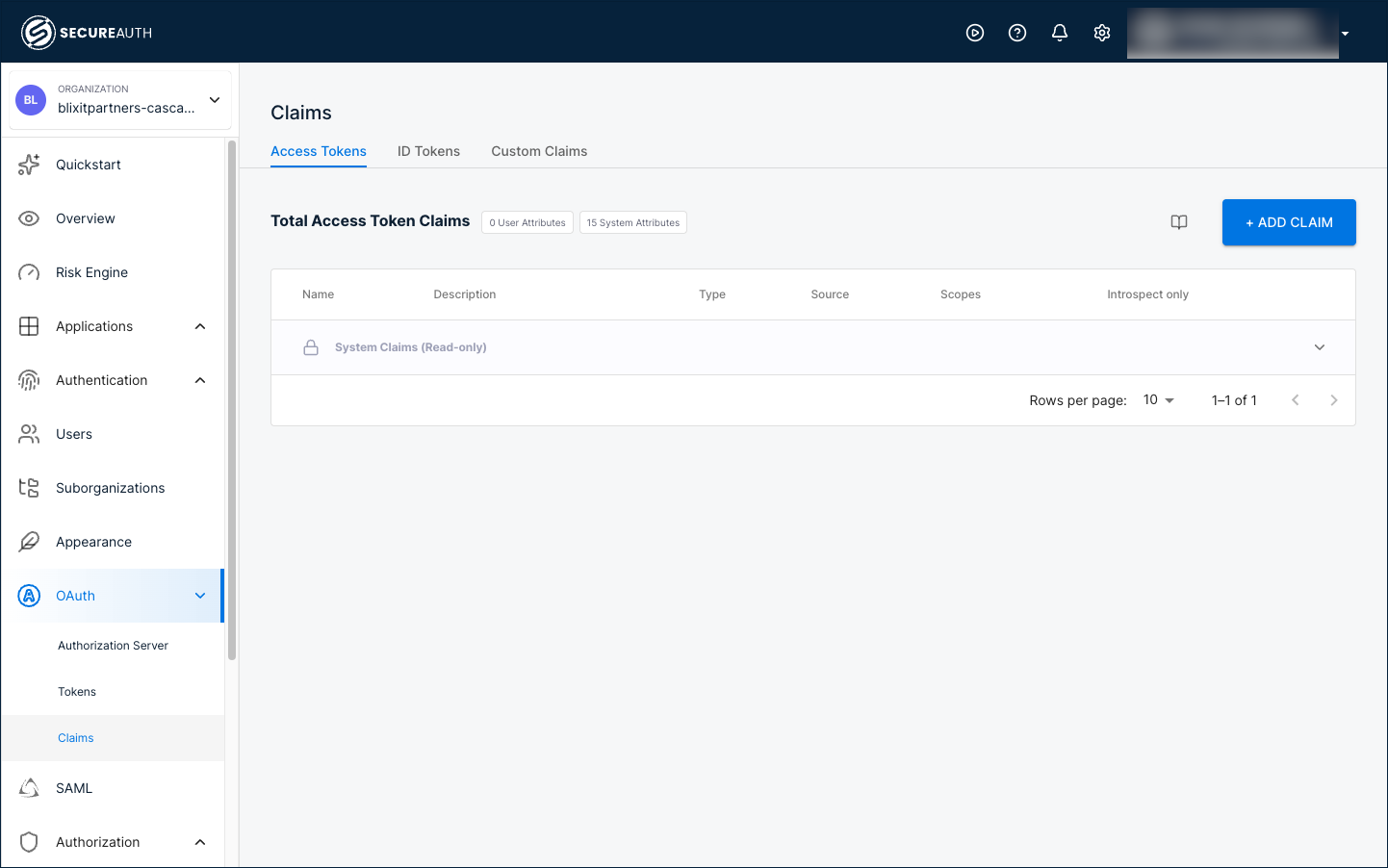
- Manage token claims – full walkthrough including every Type option and how to add custom audit claims like
partner_typeorcontract_idfor richer compliance metadata.
Add features
With each partner's applications registered and tokens configured, layer on optional features in any order.
Build a branded partner portal experience
A partner portal is the branded entry point partners hit before they reach your authorization layer. It isn't a SecureAuth Connect product feature on its own. It's a deployment pattern built from three SecureAuth features combined:
- Vanity domain – run sign-in at
partners.yourdomain.com/logininstead of the SecureAuth domain. - Per-organization branding – each partner sees their own logo, colors, and copy on the sign-in page after they're identified.
- IdP Routing – from one entry URL, users are forwarded to their company's IdP based on their email domain.
Combine the three and partners get a single unified entry point that knows about their organization, sends them to the right IdP, and presents their own branding throughout.
Enable act-on-behalf-of flows
Some partner integrations need a system to call your APIs on behalf of a partner user. A partner portal fetching invoices for a specific buyer is one example; a vendor system pulling shipment data for a particular customer is another. OAuth Token Exchange covers these cases without sharing the partner user's credentials.
- OAuth Token Exchange – the standard.
- On-behalf-of and impersonation flows – the patterns you can apply.
Enable delegated administration
Let each partner's IT contact onboard their own users, configure sign-in for their organization, and audit their own access without touching your support queue. Partner admins use a portal scoped to their organization, separate from the workspace admin console you use.
- Delegated administration – role-assignment walkthrough and what partner admins can manage.
- Delegated admin portal – portal URL, sign-in flow, and the admin experience.
Audit and attestation
Partner activity carries tighter compliance requirements than internal employee access. Every token issuance and policy decision is recorded in SecureAuth Connect's audit log, scoped by organization so you can filter activity by partner. For richer attestation metadata, add custom token claims (partner_type, contract_id, or any custom attribute) so downstream systems log partner context, not just user identity.
- Manage token claims – add custom audit claims alongside
organization_id. - Audit log filtering by organization scopes activity reviews to a single partner for compliance reporting.
Next steps
Before taking your partner platform to production:
- Token lifetimes verified – confirm short access token TTLs are enforced for each partner organization.
- Auto-deprovisioning hooks – your partner-management system can deactivate organizations or users when contracts end.
- MFA policies – require step-up authentication for high-risk partner actions (financial data, admin operations, sensitive APIs).
- Audit log integration – partner activity flowing into your compliance reporting system.
- Production redirect URIs – replace local development URIs with your production redirect URIs for each partner-facing application.
See also
- B2B SaaS access quickstart – the foundational organization architecture.
- Building B2B SaaS platforms with Organizations – when to choose a separate workspace versus extending an existing one.
- SecureAuth Developer Portals – for the developer-partner subset who self-register applications via a developer portal.
- OAuth Token Exchange – act-on-behalf-of flows.
- Delegated administration.
- Vanity domains – for branded partner portal URLs.