Configure voice message templates
Customize the text-to-speech content that users hear when they receive a voice call OTP verification code. Voice message templates use the same theme editor as email and SMS templates.
The same voice template applies to every voice provider (Twilio, Vonage, or TeleSign), so you configure it once regardless of which provider places the call.
Prerequisite
- A custom theme created and assigned to one or more workspaces.
Edit voice message templates
-
Go to Tenant Settings > Appearance > Themes.
-
Create a new theme or select an existing theme.
-
Select the Messages tab.
-
Expand VOICE MESSAGES > Verification Code.
-
Select Index Page to open the
index.tmplfile in the editor. -
Edit the template content. The template uses Go template syntax and supports the same variables as SMS templates.
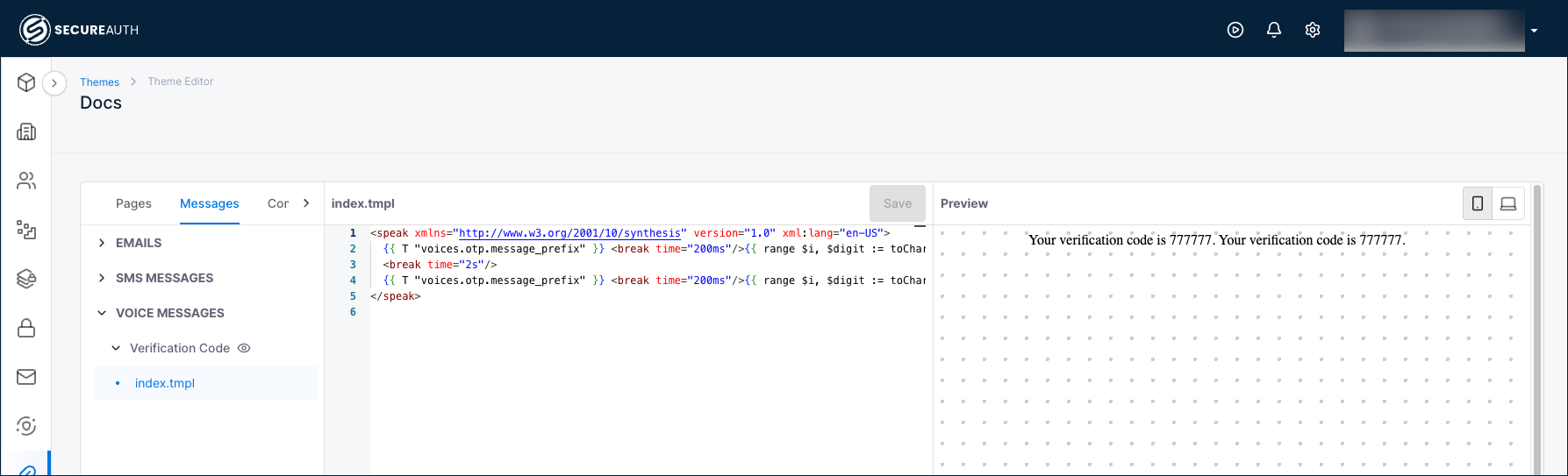
-
Click Save.
Voice template syntax
Voice templates use SSML (Speech Synthesis Markup Language) to control how the verification code is spoken aloud. The default template spells out each digit of the OTP code with pauses between digits, and repeats the code twice.
The template uses Go template syntax with these key elements:
| Element | Description |
|---|---|
{{ T "voices.otp.message_prefix" }} | Inserts the localized message prefix from the translations layer. |
{{ range $i, $digit := toChars .Data.OTP.Code }} | Iterates through each digit of the OTP code. |
<break time="500ms"/> | Adds a pause between digits for clarity. |
<break time="2s"/> | Adds a longer pause before repeating the code. |