Understanding Identity Provider Discovery
Identity Provider Discovery determines which authentication provider users are routed to when they initiate login. Instead of requiring users to manually select from a list of providers, SecureAuth Connect can intelligently identify the correct provider based on the user's identifier (email or username) and configured discovery rules.
Why use Identity Provider Discovery
Discovery improves both user experience and security:
- Seamless authentication: Users enter their identifier once and are automatically directed to the correct provider, eliminating unnecessary clicks
- Reduced login friction: In multi-tenant or multi-IdP environments, users don't need to navigate a provider list
- Improved security: Prevents username enumeration attacks by maintaining consistent behavior whether a user exists or not
- Multi-tenant support: Essential for B2B applications where different organizations authenticate through different providers
- Flexible routing: Route users based on email domain, organization membership, or custom logic
How it works
The discovery process happens in this order:
- User enters identifier - The login page displays an identifier field (email or username)
- System evaluates discovery rules - SecureAuth Connect checks the configured discovery method to find matching providers
- Matching providers are determined - The system returns zero, one, or multiple matching providers
- User is presented with options - Depending on configuration and matches found, the user either sees provider options, is automatically redirected, or sees a fallback provider
- User authenticates - User is directed to their matched provider to complete authentication
End-user login experience by mode
Disabled mode: User enters identifier → sees list of all providers → manually selects provider → authenticates
Intelligent Discovery mode: User enters identifier → system displays only matching providers → user authenticates (instant redirect if only one match)
Orchestrated Discovery mode: User enters identifier → custom logic routes to provider → user authenticates
Discovery modes
SecureAuth Connect offers three mutually exclusive discovery modes. Choose the one that best fits your authentication architecture. Intelligent Discovery is the recommended mode for most deployments.
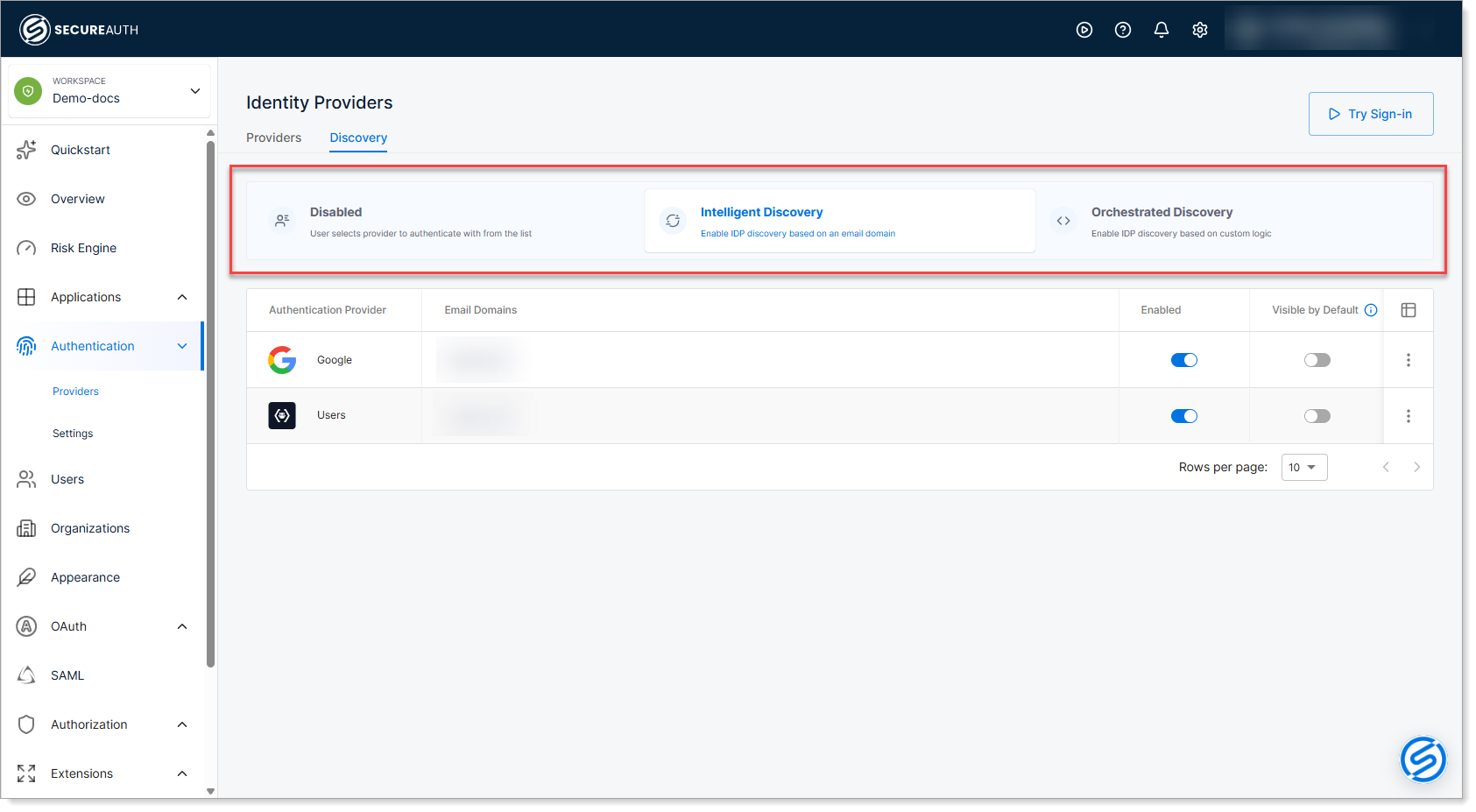
Disabled
End-user experience: Users manually select from a list of all enabled providers.
Use this mode when:
- Setting up or testing new authentication configurations
- Operating simple environments with only one or two providers
- You want users to explicitly choose their authentication method
Advantages:
- Simple to understand and troubleshoot
- No configuration required
Disadvantages:
- Extra step for users (manual selection)
- Not suitable for multi-tenant or multi-provider scenarios
Intelligent Discovery (recommended)
End-user experience: Users enter their identifier, and SecureAuth Connect automatically displays only the providers that match their identifier based on configured rules.
This is the recommended mode for most deployments. It provides an excellent balance of ease-of-use and powerful automation.
Use this mode when:
- Operating B2B or multi-tenant environments
- Different customer organizations use different authentication providers
- You want to simplify the login experience while maintaining flexibility
- You have predictable identifier patterns (email domains, organization membership)
Advantages:
- Easy to configure - uses email domains, user lookups, and simple rules
- Dramatically improves user experience
- Works well for most standard authentication scenarios
- Supports instant redirect for single-match scenarios
Disadvantages:
- Requires some configuration upfront
- Less flexible than custom scripting
Orchestrated Discovery
End-user experience: Users enter their identifier, and SecureAuth Connect runs custom JavaScript logic to determine which provider to route them to.
Use this mode when:
- You need advanced routing logic beyond simple domain matching
- Routing decisions depend on context like geographic location, device information, or time of day
- You want to implement multi-layer routing for complex multi-tenant environments
- You need risk-based provider selection
Advantages:
- Maximum flexibility - route based on any available context
- Supports sophisticated multi-tenant scenarios
- Can implement dynamic, context-aware authentication
Disadvantages:
- Requires JavaScript knowledge
- More complex to set up and troubleshoot
- Requires testing of custom logic
Supported providers
Identity Provider Discovery works with:
- Local authentication - Users stored in an identity pool in SecureAuth Connect
- Enterprise identity providers - Azure AD, Okta, Ping Identity, and other SAML/OIDC providers
- Social providers - Google, Apple, GitHub, and other social login providers
- B2B organizations - Each organization in your SecureAuth Connect workspace can appear as an authentication option
- Custom identity sources - Any custom provider configured in your workspace
For setup instructions for specific providers, see Supported providers.
Key discovery concepts
Email domain-based discovery
The most common discovery method. You configure which email domains map to which providers. When a user enters an identifier with a matching domain, the system displays that provider.
Example: You configure gmail.com as a domain for Google authentication. When a user enters johndoe@gmail.com, Google is automatically presented as their authentication option.
User record lookup
The system checks if the identifier exists in your organization's user directory. If found, the user is presented with their organization's configured provider.
Use case: Your workspace has customers using many different email domains. Rather than configuring each domain, you enable user lookup so SecureAuth Connect finds users in your directory and displays the appropriate provider.
Instant redirect
When discovery identifies exactly one matching provider, users are automatically redirected to that provider without viewing a provider selection page.
Benefit: Eliminates the extra click for users with a clear single authentication path.
Fallback provider
A default provider displayed when discovery doesn't find any matches. The fallback provider serves two purposes:
Security: Prevents username and domain enumeration attacks. Instead of showing "no match found" or an error, the system displays the fallback provider, preventing attackers from inferring which domains or usernames exist in your system.
User experience: Ensures users always have an authentication path, even if their identifier doesn't match configured discovery rules. Users aren't blocked by a dead end when discovery rules don't apply to them.
Visible by default
A provider configured to always appear on the login page during initial load, even if discovery hasn't identified any matches yet.
Common use case: Local authentication or social login providers that should always be available.
Which mode should you choose?
| Scenario | Recommended Mode |
|---|---|
| Simple setup with one or two providers | Disabled |
| B2B multi-tenant environment | Intelligent Discovery |
| Customers with multiple email domains | Intelligent Discovery with user lookup |
| Need automatic redirect for matched users | Intelligent Discovery with instant redirect |
| Complex routing logic required | Orchestrated Discovery |
| Geographic or risk-based routing | Orchestrated Discovery |
| Existing control-login-flow setup | Already configured in workspace |
Next steps
Ready to set up discovery? Choose your configuration topic based on your needs:
- Recommended: Configure Intelligent Discovery - Automatic routing for most use cases
- Configure Disabled Mode Discovery - Manual provider selection
- Configure Orchestrated Discovery - Advanced custom logic
For related information, see:
- Control Login Flow - Manage provider selection and session behavior
- Supported providers - Provider-specific setup instructions