SMS OTP
SecureAuth Connect SMS OTP delivers one-time password (OTP) verification codes to users by text message. You can deliver messages through Twilio, Vonage, or TeleSign. When a user selects SMS during authentication, SecureAuth Connect sends a text message containing the verification code to their registered phone number.
Use cases
SMS OTP fits when you need a phone-based factor that most users can receive without installing an app.
- Broad device support: Almost every mobile phone can receive text messages, including older devices that do not support push notifications or authenticator apps.
- Quick onboarding: Users do not need to install anything or pair a device. If they have a phone number on file, SMS OTP works immediately.
- Step-up verification: Use SMS OTP as a second factor during sensitive actions like scope granting or account recovery, without requiring users to set up a dedicated authenticator.
- Fallback for email delivery issues: Some corporate email systems delay or filter OTP messages. SMS delivery bypasses that path.
SMS OTP is not the best fit when users are in regions with unreliable carrier delivery, when SIM-swap attacks are a concern for high-value accounts, or when cost per message is a constraint at very high volume.
How SMS OTP delivery works
When a user selects SMS as their OTP delivery method, SecureAuth Connect sends a text message to the user's registered phone number. The message contains the OTP code. The user enters the code on the verification screen in their browser.
SMS OTP uses the same phone number as Voice OTP. Users do not need to register a separate number for each delivery channel.
You can configure more than one phone provider. If the first provider fails to deliver a message, the next configured provider is used, which improves delivery reliability.
Use a phone number or messaging service that is verified and enabled for outbound SMS in your target regions. Check your provider's geographic permissions to confirm it can deliver messages to the countries where your users are located.
Prerequisites
- Tenant administrator access
- An account with a supported provider:
- A phone number, short code, or sender ID enabled for outbound SMS in your target regions
Set up a phone provider
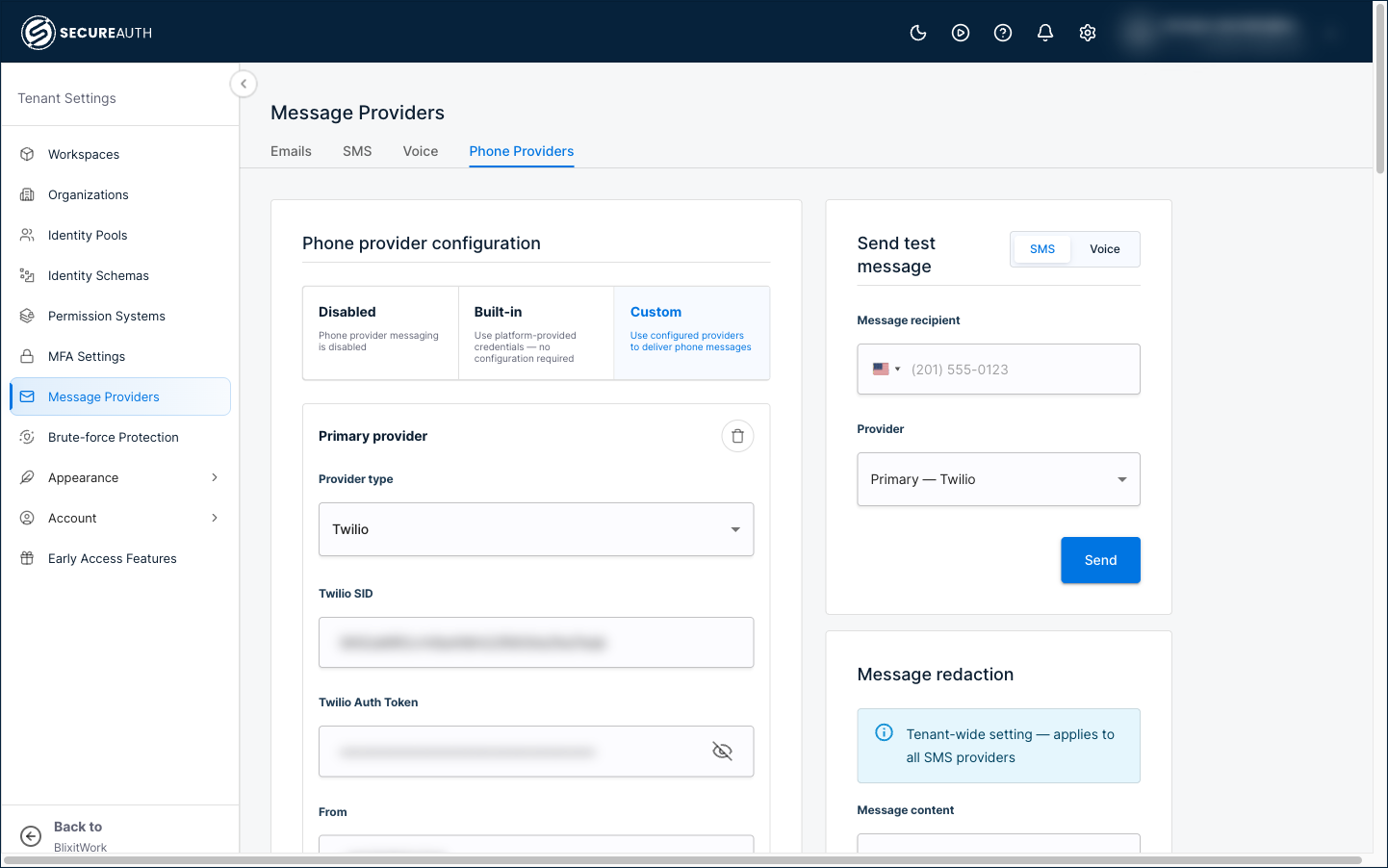
SMS OTP and Voice OTP share the same phone providers, so the provider you set up here delivers both. Configure providers in Tenant Settings > Message Providers > Phone Providers.
Set the configuration mode to Custom to use your own provider accounts. (Built-in uses platform-provided credentials with no setup, and Disabled turns off phone messaging.)
Add a Primary provider, and optionally one or more fallback providers. For each entry, select a Provider type (Twilio, Vonage, or TeleSign) and enter that provider's credentials. A single entry handles both SMS and voice for that provider.
Providers are tried in order: the primary provider first, then each fallback in turn. If a provider fails to deliver a message, the next provider is used. List your most reliable provider first.
Twilio
Enter your Twilio SID, Auth Token, and a From value in E.164 format (for example, +16175551212). The From value can be a phone number, short code, or messaging service registered with Twilio.
Vonage
Enter your Vonage API Key, API Secret, and a From (SMS) value, which is a Vonage virtual number or alphanumeric sender ID. To also deliver voice OTP through Vonage, complete the voice fields described in Voice OTP.
TeleSign
Enter your TeleSign Customer ID and API Key. From is optional and sets the TeleSign sender ID.
Each provider entry has a Disable delivery callback URL toggle. Leave it off unless you manage your own delivery-status webhook in your provider account. SecureAuth Connect uses this callback URL to receive delivery status (such as delivered or failed) from the provider; when you turn the toggle on, it stops sending that URL. The setting applies to both SMS and voice.
Test your configuration
After you save a provider, use the test panel on the Phone Providers page to confirm SMS delivery:
-
In Send test message, select SMS.
-
Enter a recipient phone number in E.164 format and select the provider to test.
-
Click Send.
The recipient should receive a text message with a test code. Confirm that the message arrives and the code displays correctly.
Set code length and lifetime
These are tenant settings and apply to all workspaces.
-
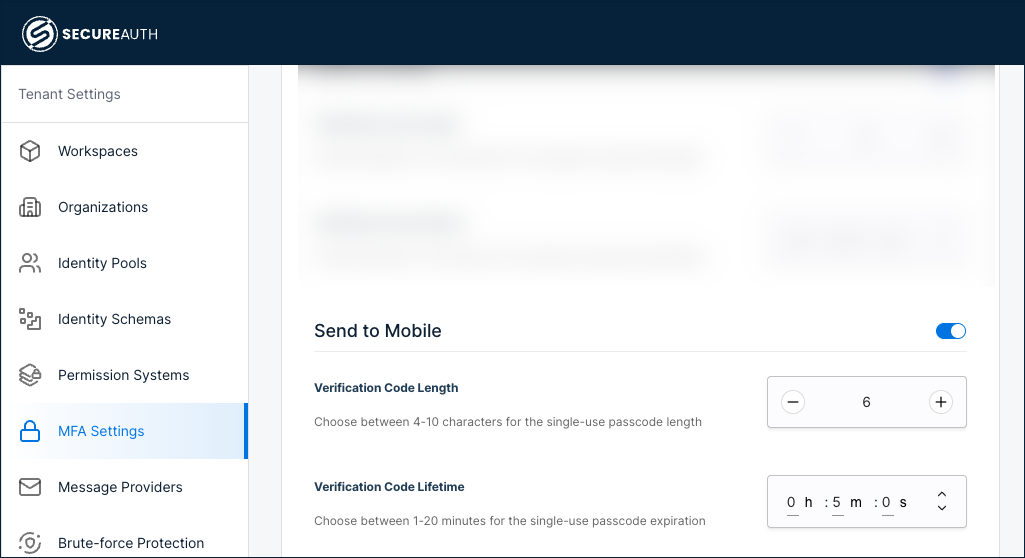
Go to Tenant Settings > MFA Settings.
-
Enable Send to Mobile (SMS).
-
Configure the verification code settings:
Setting Description Verification Code Length The number of digits in the code (for example, 6).Verification Code Lifetime How long the code remains valid (for example, 5minutes). -
Click Save.
Enable SMS OTP as an authentication method
After configuring the SMS provider, enable SMS OTP as an authentication method:
-
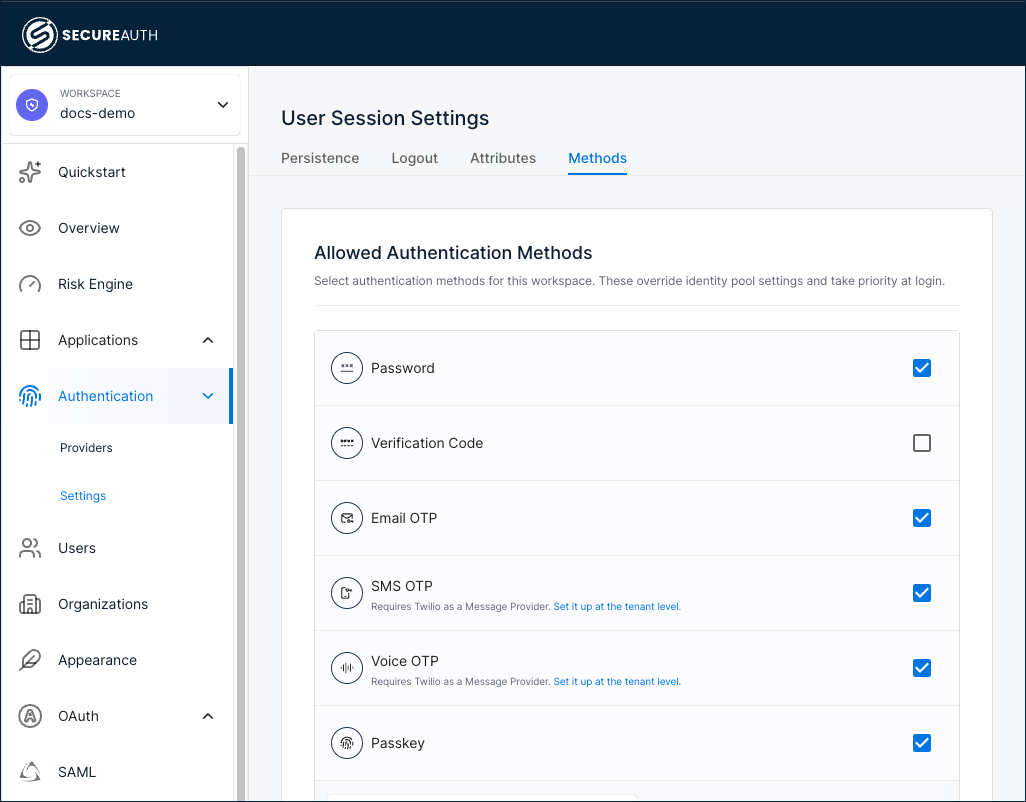
In your workspace, go to Authentication > Settings.
-
Select the Methods tab.
-
Select the SMS OTP check box.
-
Click Save.
If you have not set up the SMS provider yet, the Allowed Authentication Methods page shows a link under SMS OTP that takes you to the configuration page.
Add SMS OTP as a sign-in method
Add SMS OTP as a first-factor or second-factor authentication method for your users.
-
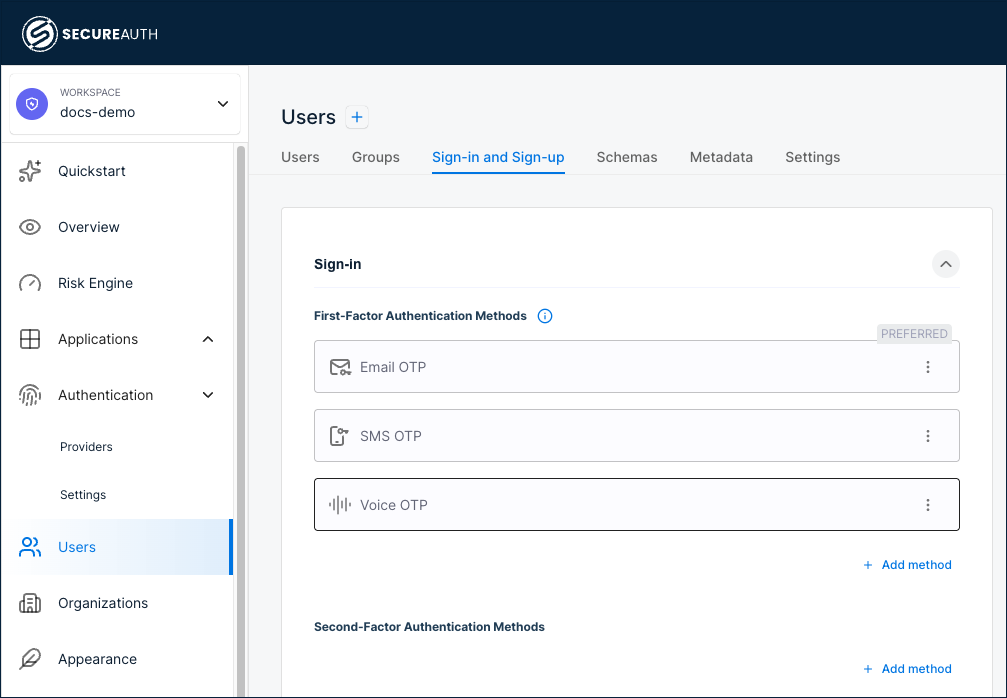
Go to Users > Sign-in and Sign-up.
-
Under First-Factor Authentication Methods or Second-Factor Authentication Methods, click + Add method and select SMS OTP.
-
(Optional) To make SMS OTP the preferred method shown at sign-in, click the three-dot menu and select Make Preferred. Only one method can be preferred per identity pool.
-
Click Save.
OTP rate limiting
Two different limits apply to OTP, and they guard against different attacks. Check which one a blocked request has hit before you change any settings.
How many codes can be sent
OTP send requests are capped at 2 per minute, counted separately for each user and each address (phone number or email). Separate counters mean that a flood aimed at one address does not use up another user's allowance.
The cap is on by default and applies to every OTP flow: sign-in, activation, self-registration, credential reset, resend requests, and the OTP endpoints in the Admin and System APIs. Requests over the limit return HTTP 429 with the message Rate limit exceeded.
The cap protects against attackers triggering large volumes of messages to inflate carrier charges (known as SMS pumping or toll fraud on phone channels), and against repeated resend requests aimed at a single user.
You cannot change this limit from the admin portal. In self-managed deployments, adjust limits.send_otp_limit in the platform configuration. See SecureAuth Platform Configuration Reference.
How many times a code can be guessed
Limits on incorrect code submissions are configured separately, under Tenant Settings > Brute-force Protection. Use the Identity code verify protection type for SMS and email codes, and MFA for codes used as a second factor. See Configure brute force protection.