Assessments
Grade the data your coding agents reach, and find over-broad delegation before it leads to a data leak
When one person's coding agents can read customer data, change records, and send email, a misused agent could take that data out of your systems. In SecureAuth Agent Authority, Assessments grade each tool call from your coding agents by its system's data class and the tool's sensitivity. They also find the identities whose agents called tools that read protected data, change data, and send data out. Use them to find over-broad delegation before it leads to a data leak.
Where to find it
The Assessments page is under Activity in the sidebar, and has two tabs:
- Agent Access answers "which data do our agents reach?" It grades every call by the data class of the system and the sensitivity of the tool.
- Agent Risk answers "what can our agents change?" It finds identities that can read protected data, change data, and send data out.
The same two analyses, filtered to one person, are on each person's page: see Assessments for one person.
Where the data comes from
Assessments read the OpenTelemetry tool calls your coding agents send to the gateway, not gateway traffic. They cover MCP servers the agent calls directly, and the agent's own shell and file tools, in addition to MCP servers behind the gateway. They don't match the counts on Enforcement traffic, which reads gateway traffic only.
Tool calls come from Claude Code, Codex, and GitHub Copilot. Gemini CLI telemetry isn't included yet.
Each call goes to a system:
the MCP server the agent called, named the way the agent reports it, such as github or salesforce.
The agent's built-in shell, file, and web tools count as one system, local, shown as local shell + files.
A server named differently from the catalog, such as github-mcp-server, counts as the closest catalog system, github.
Each call belongs to an identity: the email address the agent reports in its telemetry. Calls with no email count in the call, system, and hourly totals, but toward no identity.
No agent tool calls in this window
Both tabs show this empty state when the date range holds no tool calls, with a link to Telemetry. Widen the date range, or set up telemetry for at least one agent.
How SecureAuth grades a call
SecureAuth keeps a classification of the systems and tools agents call. Each call carries three properties from it.
Data class is the most protected kind of data the system holds. SecureAuth grades each system by the worst case, because an agent that can reach a system can reach its most protected data:
| Data class | What it means | Example systems and why they fit |
|---|---|---|
| Regulated | Data that laws, regulations, or contracts protect. A leak can carry legal or compliance consequences. | Salesforce and HubSpot hold customer personal data. Stripe handles payment data. Microsoft 365 and DocuSign hold email, contracts, and signed legal documents. |
| Confidential | Company data limited to authorized people. A leak can cause serious harm, but no regulation governs it directly. | GitHub holds source code and can hold secrets. Box holds business files. Supabase holds app databases. Sentry error reports can include request data and stack traces. |
| Internal | Everyday company information for employees and collaborators. Not public, but less harmful if it leaks. | Slack conversations, Jira issues and Confluence pages in Atlassian, Linear issues, and Notion pages. |
| Operational | Data about running infrastructure: logs, metrics, deployments, and network traffic. It describes systems more than business content. | Datadog holds logs and metrics. Cloudflare holds network and traffic settings. Vercel holds deployments and build output. |
Sensitive marks a tool that reaches the protected part of its system. The same system can have both kinds of tool:
| Tool kind | What it means | Examples |
|---|---|---|
| Sensitive | Reads in bulk, downloads files, deletes records, or shares data. One call can expose or destroy much more than one record. | salesforce soqlQuery queries any CRM records. microsoft365 DownloadAttachment downloads email attachments. github get_file_contents reads source code. box add_file_shared_link shares a file by link. |
| Routine | Any other tool, such as one that creates an issue or updates one record. | salesforce createSobjectRecord creates one record. github create_pull_request opens a pull request. atlassian createJiraIssue files an issue. |
Actions list what a tool can do. A tool with no actions is read only. A tool with at least one action is write-capable:
| Action | What it means | Examples |
|---|---|---|
| Create | Adds new data to the system. | github create_pull_request, salesforce createSobjectRecord |
| Update | Changes data that already exists. | github merge_pull_request, salesforce updateSobjectRecord |
| Delete | Removes data from the system. | github delete_file, salesforce deleteSobjectRecord |
| Send out | Moves data to people or places outside the system, such as an email, a share link, or a message. | microsoft365 SendEmailWithAttachments, box add_file_shared_link, slack slack_send_message |
| Admin | Changes who can access the system or how it's configured. | box update_collaboration, docusign generateAccessToken, supabase apply_migration |
The agent's local shell tools (Bash, shell, exec_command) can do all five, because a shell can run any command.
The data class and the sensitive flag set the call's severity:
| Data class | Sensitive tool | Routine tool |
|---|---|---|
| Regulated | Critical | High |
| Confidential | High | Medium |
| Internal | Medium | Low |
| Operational | Low | Low |
Each severity tells you how much a misused call can expose:
| Severity | What it means | Example |
|---|---|---|
| Critical | A tool that reads, deletes, or sends in bulk, in a system with regulated data. The highest exposure an agent can hold. | salesforce soqlQuery |
| High | Routine access to regulated data, or bulk access to confidential data. | salesforce createSobjectRecord, github get_file_contents |
| Medium | Routine access to confidential data, or bulk access to internal data. | github create_pull_request, slack slack_search_public_and_private |
| Low | Routine access to internal data, or any access to operational data. | atlassian createJiraIssue, any Datadog tool |
A system or tool that SecureAuth hasn't classified shows as Unclassified. Unclassified calls count in the call totals but get no severity, so they can hide real exposure. Contact SecureAuth to have a system with many unclassified calls classified.
SecureAuth maintains the classification, and you can't edit it. When SecureAuth reclassifies a tool, past date ranges show the new grade too.
Using the Agent Access tab
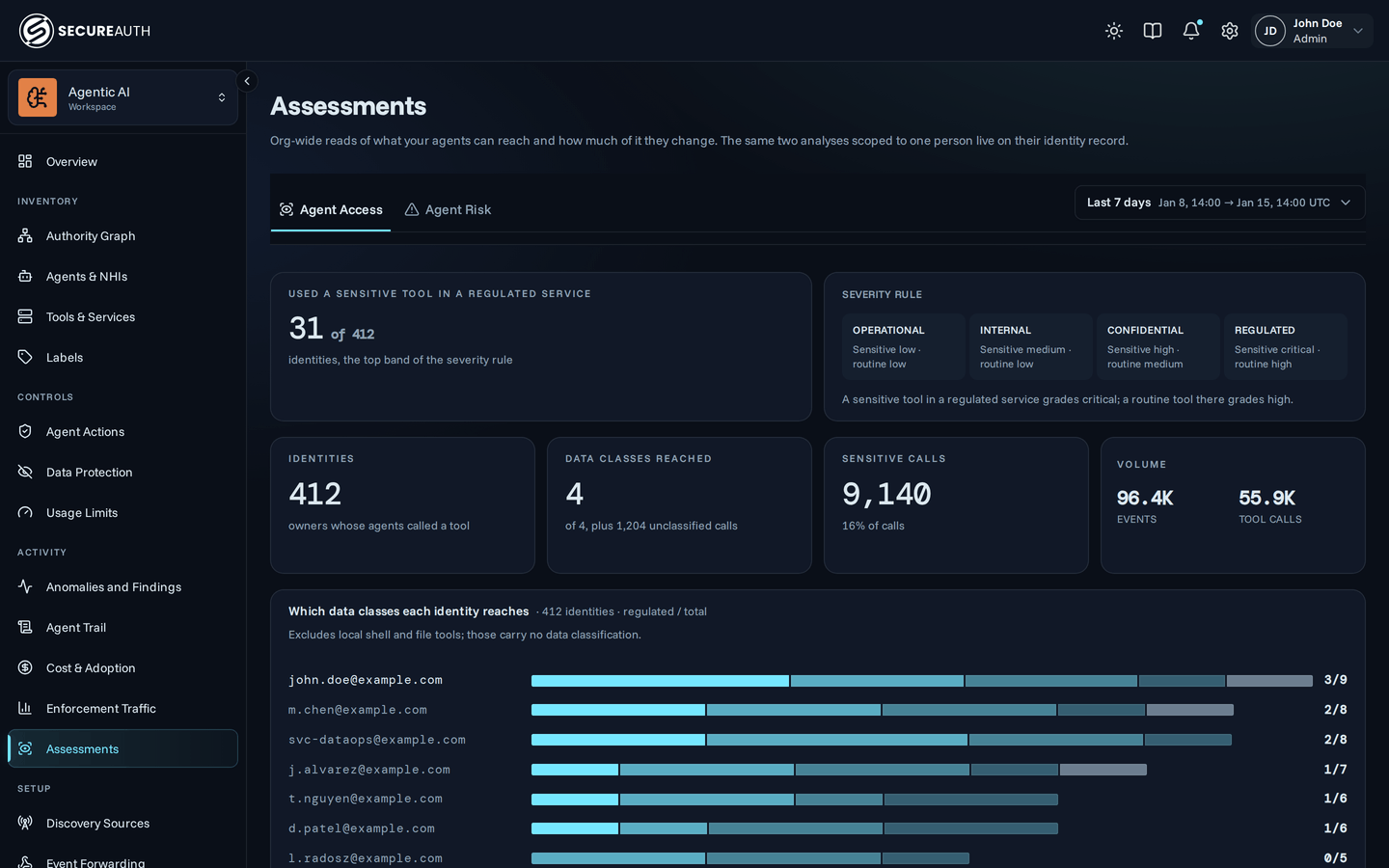
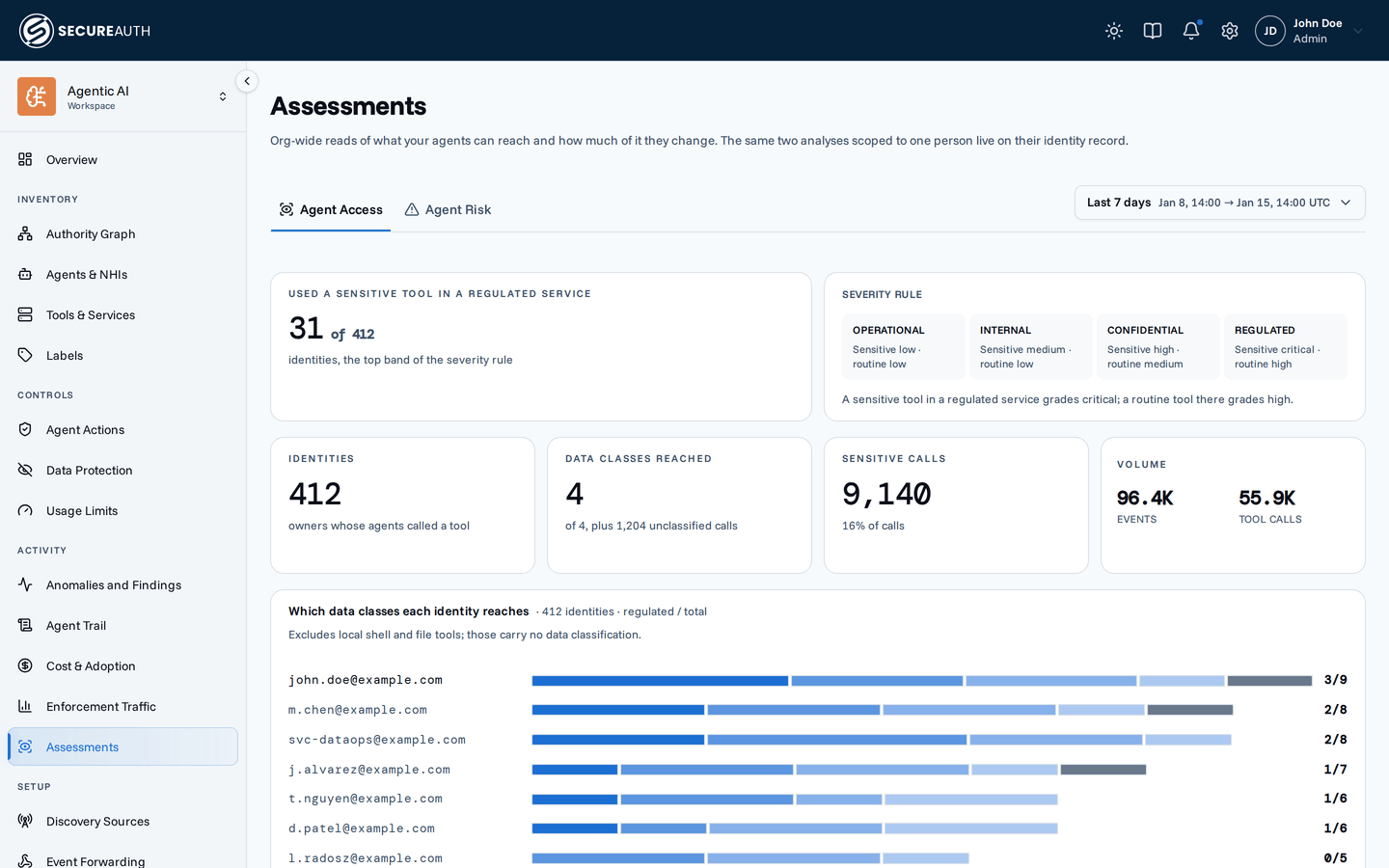
Agent Access leaves out the agent's local shell and file tools. They run on the agent's own machine, so they say nothing about which of your systems the agents reach.
- Used a sensitive tool in a regulated system counts the identities with at least one critical call.
- Identities, Data classes reached, Sensitive calls, and Volume summarize the date range. Volume shows every telemetry event your agents sent in the date range, next to the tool calls among them.
- Which data classes each identity reaches ranks the eight identities that reach the most regulated systems. Each bar splits that identity's systems by data class. The number on the right reads regulated systems over all systems.
- Where the calls went shows the six busiest systems, split into sensitive and routine calls.
- How reach grades out counts identity and system pairs in each cell of the severity rule.
Using the Agent Risk tab
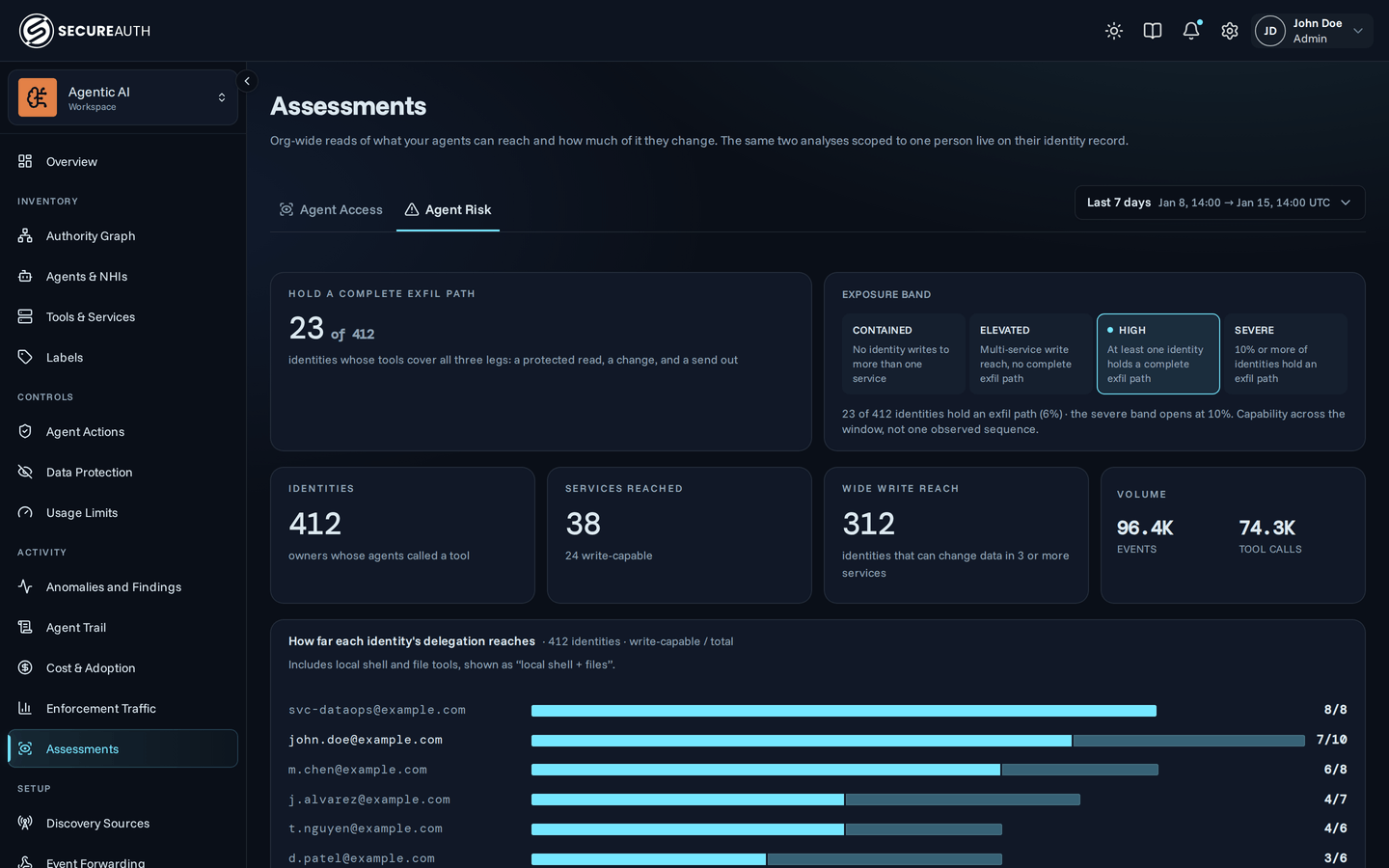
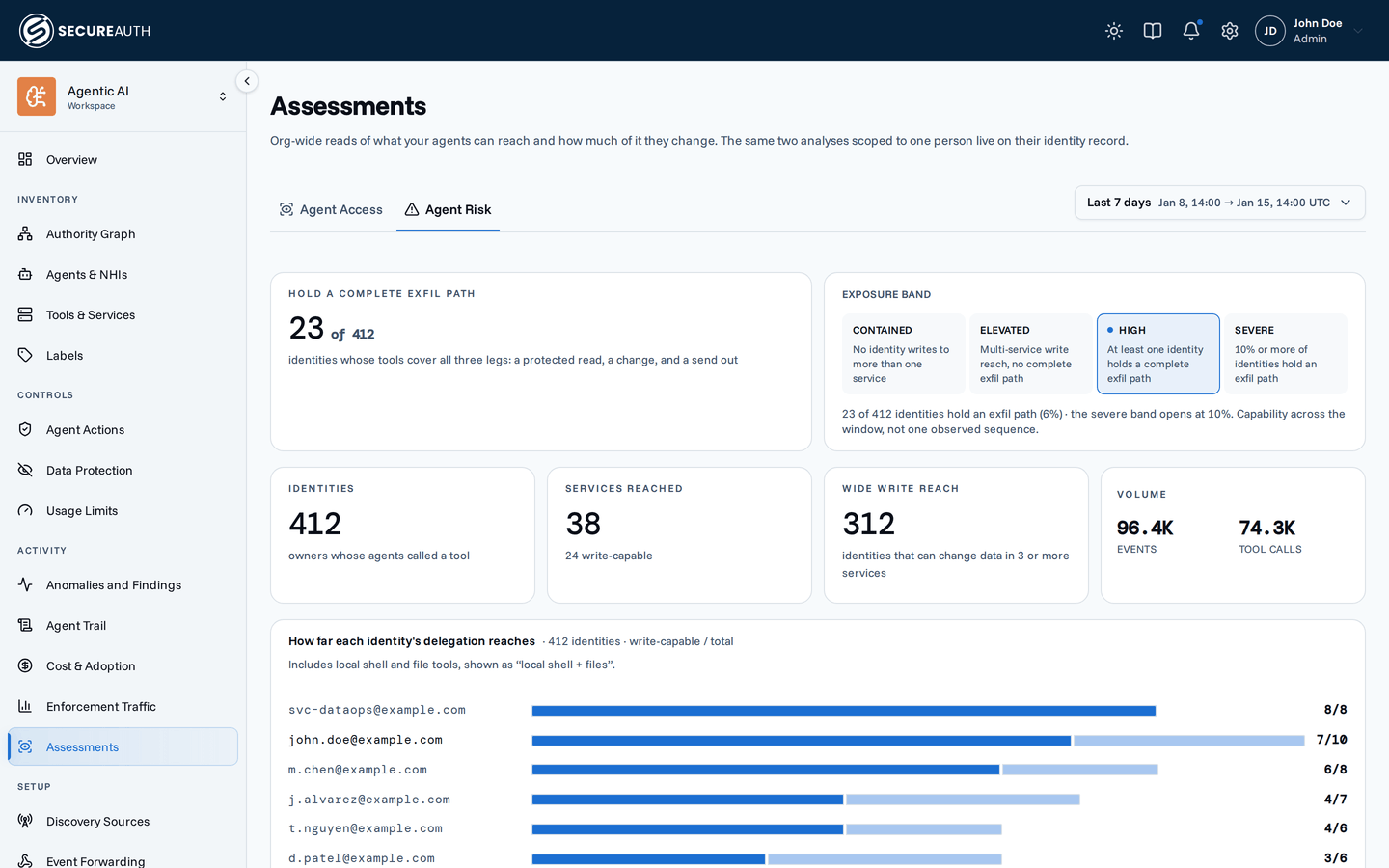
Agent Risk includes the agent's local shell and file tools, shown as local shell + files, because an agent can change data on its own machine.
- Hold a complete exfil path counts the identities that hold an exfil path, next to the exposure band.
- Systems reached counts the systems in the date range, and how many of them are write-capable.
- Wide write reach counts the identities that can change data in three or more systems.
- How far each identity's delegation reaches ranks the eight identities with the most write-capable systems.
- Where the calls went shows the six busiest systems, split into calls that can change data and read-only calls.
- Calls by ingest hour (UTC) and Overnight show when calls arrive. Overnight reports the share of calls between 22:00 and 06:00 UTC, and the share of those that can change data.
On both tabs, an identity whose email matches a person under Inventory > Human Identities links to that person's matching tab, and so does the Follow button at the bottom. An email with no matching person shows as plain text.
Exfil path
In Assessments, an exfil path (exfiltration path) is a combination of three tool capabilities, called legs in the dashboard: reading protected data, changing data, and sending data outside a system. An identity holds an exfil path when its agents called tools covering all three legs during the selected date range. Reviewing these capabilities together helps you understand what the agents could do if misused.
| Leg | A tool qualifies when | Why it matters | Examples |
|---|---|---|---|
| Read | It is read only, in a confidential or regulated system. | It gives the agent protected data to work with. | github get_file_contents, salesforce soqlQuery |
| Change | It can create, update, or delete data. | It lets the agent alter records, code, or files. | github push_files, salesforce deleteSobjectRecord, the local Bash tool |
| Send out | It can send data outside its system. | It gives data a way to leave. | slack slack_send_message, microsoft365 SendEmailWithAttachments |
The read and send-out legs must be in a system other than local shell + files. The change leg can be anywhere. A local shell can send data out, but the send-out leg counts only a remote system.
The tools may have been used in different sessions and on unrelated data. This does not confirm that an agent read, changed, and sent the same data. For calls made through the gateway, Agent Trail shows the recorded activity.
Exposure band
The Exposure band grades the whole organization:
| Band | When | What it means |
|---|---|---|
| Contained | No identity can write to more than one system. | A misused agent can change data in one system at most. |
| Elevated | At least one identity can write to more than one system, and no identity holds an exfil path. | A misused agent can change data across systems, but no single identity's agents can complete an exfil path. |
| High | At least one identity holds an exfil path. | At least one person's agents could read protected data and send it out. Review that person's Agent Risk tab. |
| Severe | 10% or more of identities hold an exfil path. | Broad delegation is common across the organization, not limited to a few people. |
Assessments for one person
Open a person under Inventory > Human Identities. Their page carries Agent Access and Agent Risk tabs, filtered to that person's email address. The date-range picker at the top of the page drives both tabs.
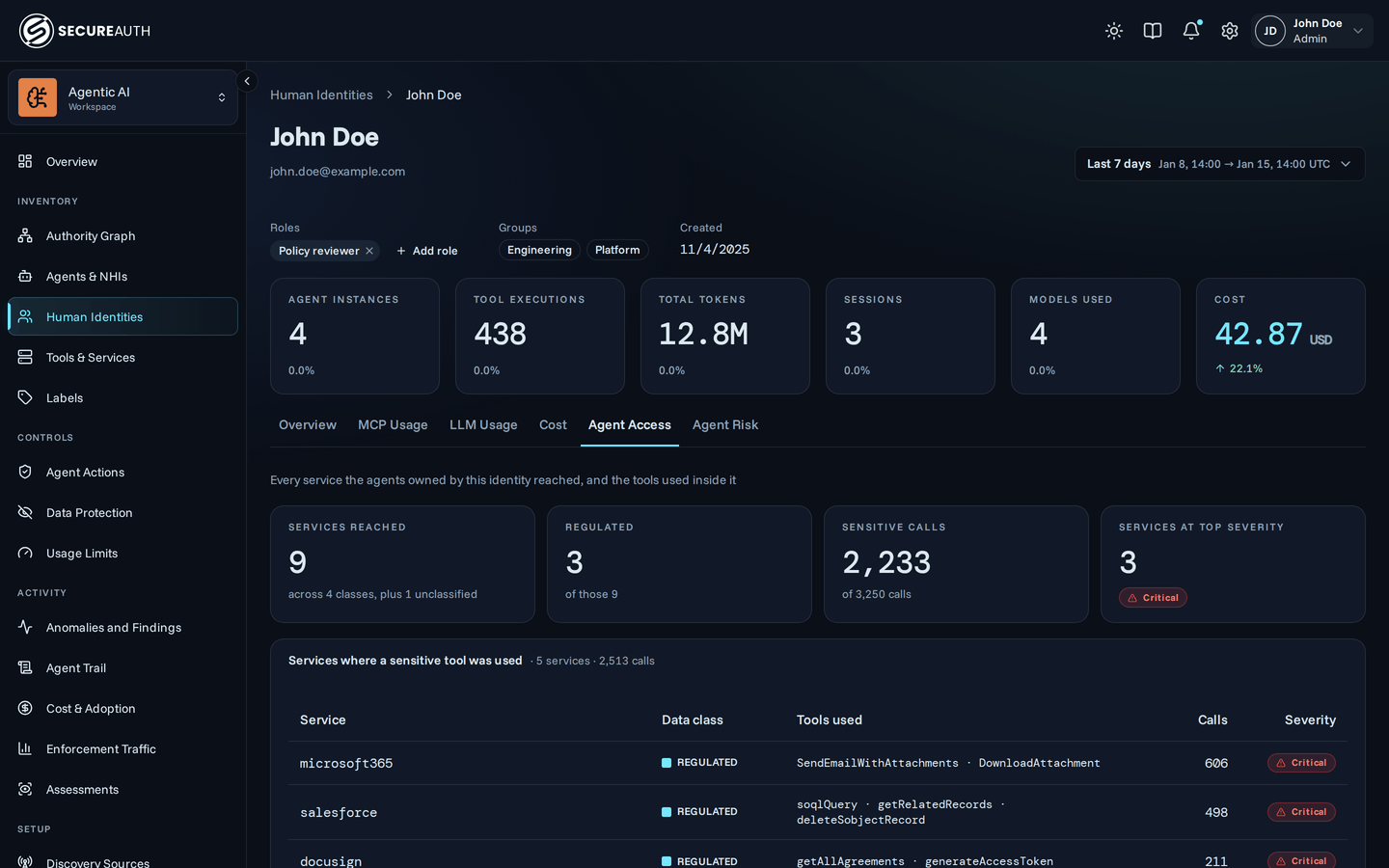
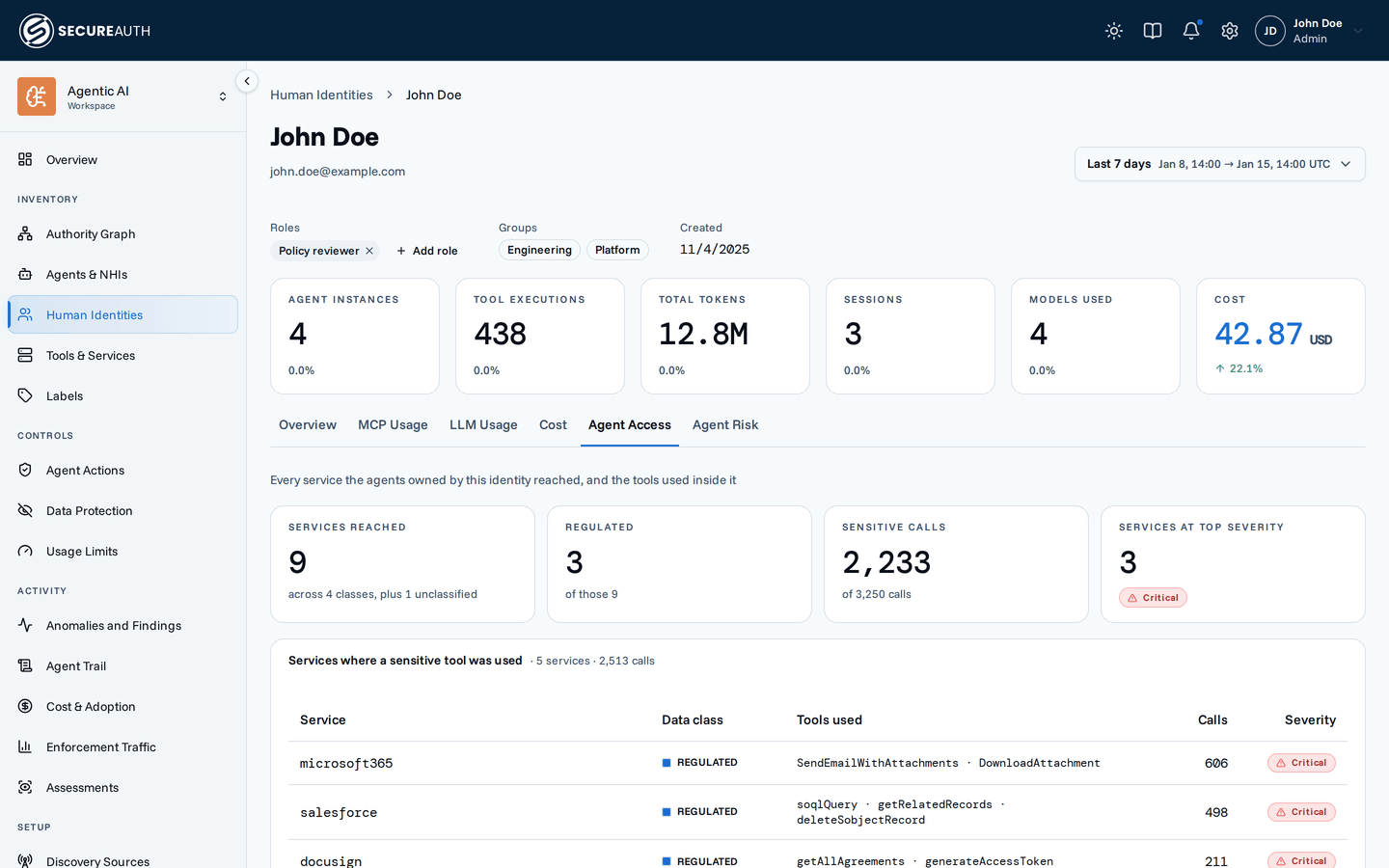
Agent Access lists every system the person's agents reached:
- Systems where a sensitive tool was used shows each system's data class, the tools used, calls, and severity, most severe first. A line below the table lists systems where the agents used routine tools only.
- Regulated systems shows one card per regulated system, with each tool's call count. A sensitive tool carries a sensitive label.
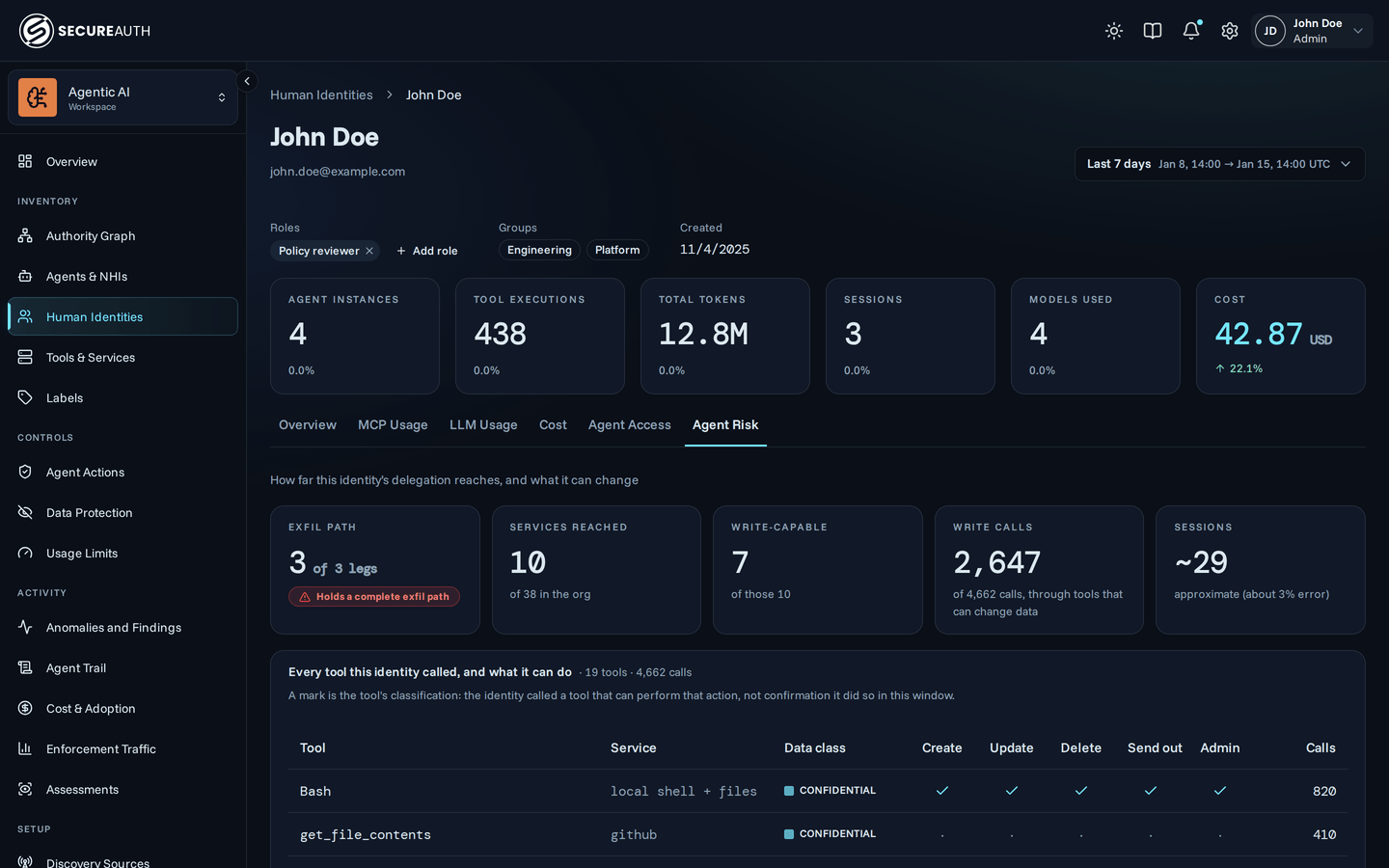
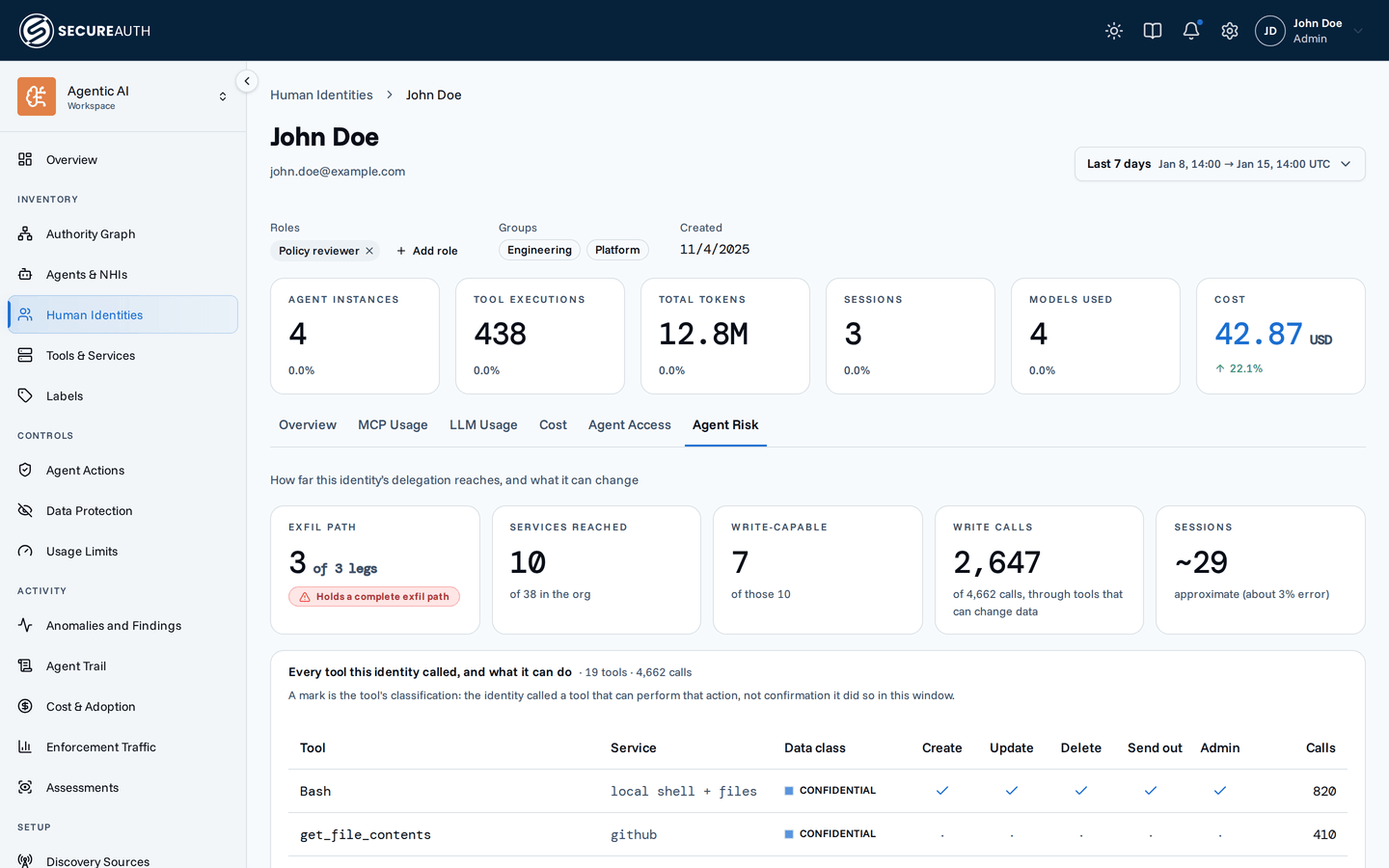
Agent Risk shows what the person's agents can change:
- Exfil path shows how many of the three legs the person holds.
- Every tool this identity called, and what it can do marks each tool's actions. A mark comes from the tool's classification. It shows the tool can perform the action, not that the agent performed it.
- Read, change, send out under one identity appears when the person holds an exfil path. It names the busiest tool for each leg.
Telemetry names a person by email address. If a person has no email address on their record, both tabs say so and show no data.
Next steps
- Send agent telemetry so your agents' tool calls reach Assessments.
- Write a policy to limit which tools an agent can call through the gateway.
- Review anomalies for activity that breaks from an identity's usual pattern.