SecureAuth Platform Expected Headers
When your requests are forwarded to the SecureAuth platform, all HTTP request headers must be correct for the firewall to allow the request. In this article, you can check the list of all HTTP headers SecureAuth expects, their descriptions, and expected values examples.
Why Headers Matter and How Reverse Proxies May Alter Them
A reverse proxy is a server that sits in front of web servers. It is responsible for intercepting and forwarding client requests (for example, browser's request) to the web server. Once the web server responds to the proxy, the resources returned to the client appear as if they originated from the web server itself. Usually, reverse proxies are used to help with increasing security, performance, and reliability of offered services. Some of the most commonly reverse proxies include solutions offered by, for example, NGINX, Cloudflare, or Akamai.
Customers that deploy the SecureAuth platform themselves, may want to set up a reverse proxy that will sit in front of the platform and will forward client requests to SecureAuth.
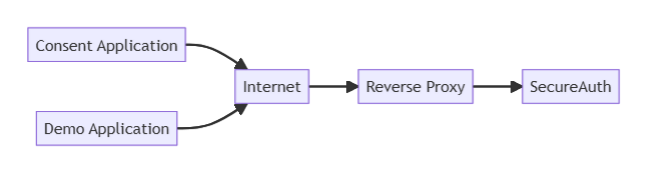
Because a reverse proxy intercepts and forwards the requests to the SecureAuth platform, it is critical for the proxy to correctly forward request headers to SecureAuth in order to keep all of the platform's functionalities and features working properly. For example, some of the reverse proxies could provide SecureAuth with the IP address of the proxy itself instead of the IP address of the client requesting resources from the platform. Such practice could falsify, for example, the audit events data.
To keep SecureAuth working up to its full potential, make sure that all the headers listed in the tables below are forwarded or set properly by your reverse proxy.
Expected Custom Request Headers Reference
| Header | Description | Expected Value |
|---|---|---|
| True-Client-IP | The True-Client-IP request header identifies the originating IP address of a client connecting to the server through a proxy server. SecureAuth checks it first when it resolves the client IP address. | End user's IP address, for example, 100.0.0.1 |
| X-Forwarded-For | The X-Forwarded-For request header contains the original client IP address followed by the addresses of all involved proxy servers. SecureAuth uses its first entry. | Comma-separated list of IP addresses, for example, 100.0.0.1,100.0.0.2,200.0.0.1 |
| X-Real-IP | The X-Real-IP request header contains the original client IP address. Some proxies, such as NGINX, set it instead of True-Client-IP. | End user's IP address, for example, 100.0.0.1 |
Client IP address resolution
SecureAuth resolves the client IP address, for example the ip field of audit events, from the first of these that holds a valid IP address:
- The
True-Client-IPheader. - The first entry of the
X-Forwarded-Forheader. - The
X-Real-IPheader. - The source address of the connection.
Client IP information header reference
The X-Client-Ip-Info header lets your edge proxy pass the client's location and network to SecureAuth. The header is a SecureAuth contract. SecureAuth defines the header name, the format, the keys it recognizes, and how it validates their values. Your edge proxy maps its own geolocation data to this contract.
The format is compatible with Akamai EdgeScape output. If Akamai sits in front of SecureAuth, it can forward its EdgeScape data in this header without rewriting it. Any other edge, such as another CDN or a load balancer, can produce the same header from its own data.
The platform reads this header only when the server.client_ip_info_header configuration option is enabled. The option is disabled by default.
The platform reads the header only on vanity and custom domains. On the default platform domain, it ignores the header even when the option is enabled.
Header format
The header value is a comma-separated list of key=value pairs, for example:
X-Client-Ip-Info: country_code=GB,city=LONDON,lat=51.50,long=-0.12,asnum=1234
Akamai EdgeScape output already uses this format, so the platform accepts it as is and ignores the EdgeScape keys it doesn't use:
X-Client-Ip-Info: georegion=246,country_code=GB,city=LONDON,lat=51.50,long=-0.12,timezone=GMT,asnum=1234+5678,network_type=mobile
The platform parses the value as follows:
- It splits the value on commas, so a value must not contain a comma.
- It splits each pair on the first
=. Everything after it is the value, socity=A=Bsets the city toA=B. - It matches keys exactly, so keys are case-sensitive.
- It ignores unknown keys, such as
georegionandtimezone, and parts without=. - It treats a key with an empty value, for example
city=, as absent. A proxy that builds the value from fixed keys can send keys with empty values when it has no data for them. - If a key appears more than once, the first non-empty value wins.
Recognized keys
| Key | Description | Expected Value |
|---|---|---|
| country_code | Country of the client as an ISO 3166-1 alpha-2 code. Used as sent, converted to upper case. | Two-letter country code, for example, GB |
| city | City of the client. Used as sent. | City name, for example, LONDON |
| lat | Latitude of the client in decimal degrees, between -90 and 90. If either coordinate is missing, isn't a decimal number, or is out of range, the platform ignores both. | Decimal number, for example, 51.50 |
| long | Longitude of the client in decimal degrees, between -180 and 180. If either coordinate is missing, isn't a decimal number, or is out of range, the platform ignores both. | Decimal number, for example, -0.12 |
| asnum | Autonomous system number of the client's network. When the value lists several numbers joined with +, the platform uses the first one. The number must be a decimal integer between 1 and 4294967295, otherwise the platform ignores it. The platform forwards it to the risk engine. It doesn't affect which location source the platform uses. | Decimal integer, for example, 1234 or 1234+5678 |
| network_type | Type of the client's network connection. The platform trims surrounding whitespace, converts the value to lower case, and ignores values longer than 64 characters. It forwards the result to the risk engine as is. | Network type, for example, mobile or cable |
Set the X-Client-Ip-Info header at your edge proxy only from a trusted source, such as the proxy's own geolocation data. Configure the proxy to overwrite the header, not to append to it or pass it through, so that a value sent by the client never reaches the platform. If the proxy has no data for a request, it must still remove the client's header. Route every path to your vanity and custom domains through that edge proxy. The platform trusts the value as received, so a client-supplied header that reaches a vanity or custom domain lets the client spoof its location or network.
Location source precedence
The platform resolves the client's location from the first available source, in this order:
- The
X-Client-Ip-Infoheader, whenserver.client_ip_info_headeris enabled, the request is sent to a vanity or custom domain, and the header sets a country, a city, or a valid coordinate pair. The platform then skips the IP intelligence lookup for the request. - IP intelligence lookup, when configured and it returns a location.
- Cloudflare
Cf-Ipcountry,Cf-Ipcity,Cf-Iplatitude, andCf-Iplongitudeheaders, whenserver.cloudflare_headersis enabled. These are read only on the default platform domain, not on vanity domains.
Fields that the header leaves empty aren't filled from IP intelligence or the Cloudflare headers. The platform falls back to those sources only when the header sets no country, no city, and no valid coordinate pair.
The asnum and network_type keys don't change this order. A header that sets only these keys still falls through to IP intelligence, and the platform forwards them to the risk engine with whichever location it resolves.
Expected FAPI/Openbanking Request Headers Reference
| Header | Description | Expected Value |
|---|---|---|
| x-fapi-auth-date | Indicates the last time a customer logged into the client. | x-fapi-auth-date: <date> where the date is supplied as a HTTP-date as defined in section 7.1.1.1 of RFC7231 |
| x-fapi-customer-ip-address | The customer's IP address if the customer is currently logged in within the third party provider's application. | x-fapi-customer-ip-address: <ip-address> |
| x-fapi-interaction-id | A RFC4122 UUID to the server to help correlate log entries between the client and the server. | x-fapi-interaction-id: <UUID> |
| x-customer-user-agent | Used in UK Open Banking the header indicates the user-agent the customer is using. | x-customer-user-agent: <product> / <product-version> <comment> |
| x-jws-signature | Contains a detached JWS signature of the body of the payload | x-jws-signature: <jws> where the <jws> is a signature as defined in the RFC7515 |
| x-idempotency-key | Unique request identifier to support idempotency. Used in UK Open Banking | x-idempotency-key: <unique-key> |
| x-v | Used in Consumer Data Right. Version of the API end point requested by the client. Must be set to a positive integer. | x-v: <version> where the version is the highest supported by the Data Holder API version between the x-min-v and x-v. |