Add Split Profile data store
In the SecureAuth® Identity Platform, a Split Profile data store combines properties from two or more separate data stores into a single data store that you can assign to applications.
For example, an organization may store user authentication credentials in Active Directory and other user data such as PINs in a SQL database. A Split Profile data store lets you map each property to its source data store while presenting both to applications as a single data store.
Once you create a Split Profile data store, you can add it to any application or internal application as a data store.
Prerequisites
Identity Platform release 26.0.0 or later
Minimum of two membership enabled data stores added to the Identity Platform
Each member data store you plan to use as the Unique User ID source has a valid Unique user iD value mapped. See Unique User ID mapping.
Added in SecureAuth IdP release 26.2.0
Configuration steps
Note
Split Profile data stores can only pull information from data stores that has membership validation enabled.
On the left side of the Identity Platform page, click Split Profile.
Click Add New Split Profile.
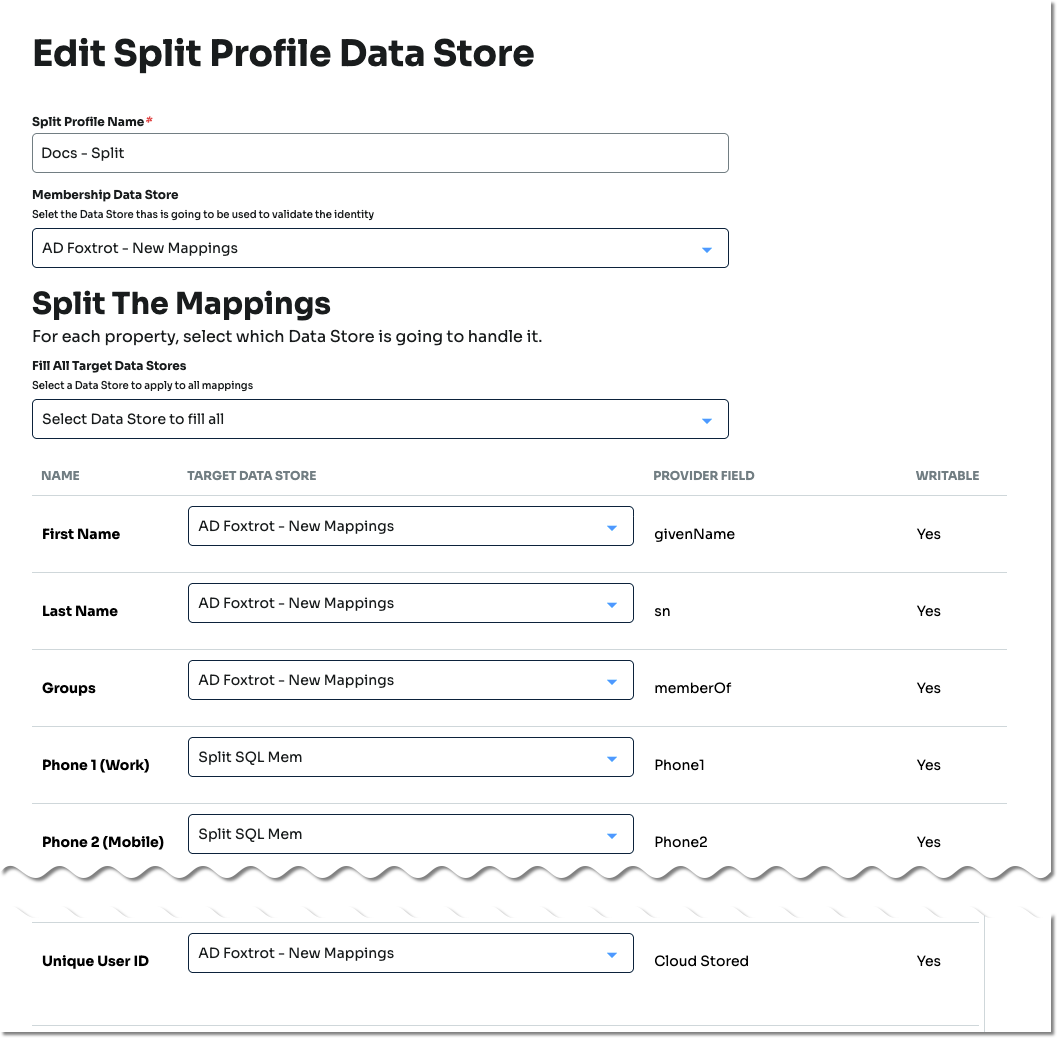
On the Create Split Profile Data Store page, set the following:
Split Profile Name
Provide a name for the Split Profile data store.
Membership Data Store
Select the membership data store. This data store will verify identity.
Split The Mappings
For each property, select which Data Store to draw information from.
Click Save.
Create or edit an existing application or internal application and add the Split Profile data store.
For more information, see Application Manager overview and Using the Internal Application Manager.
See also
Unique User ID mapping – Added in SecureAuth IdP release 26.2.0