Tools & Services
List the MCP servers and other resources your agents can reach, add new ones, and act on users' requests for more.
In the console: Inventory › Tools & Services
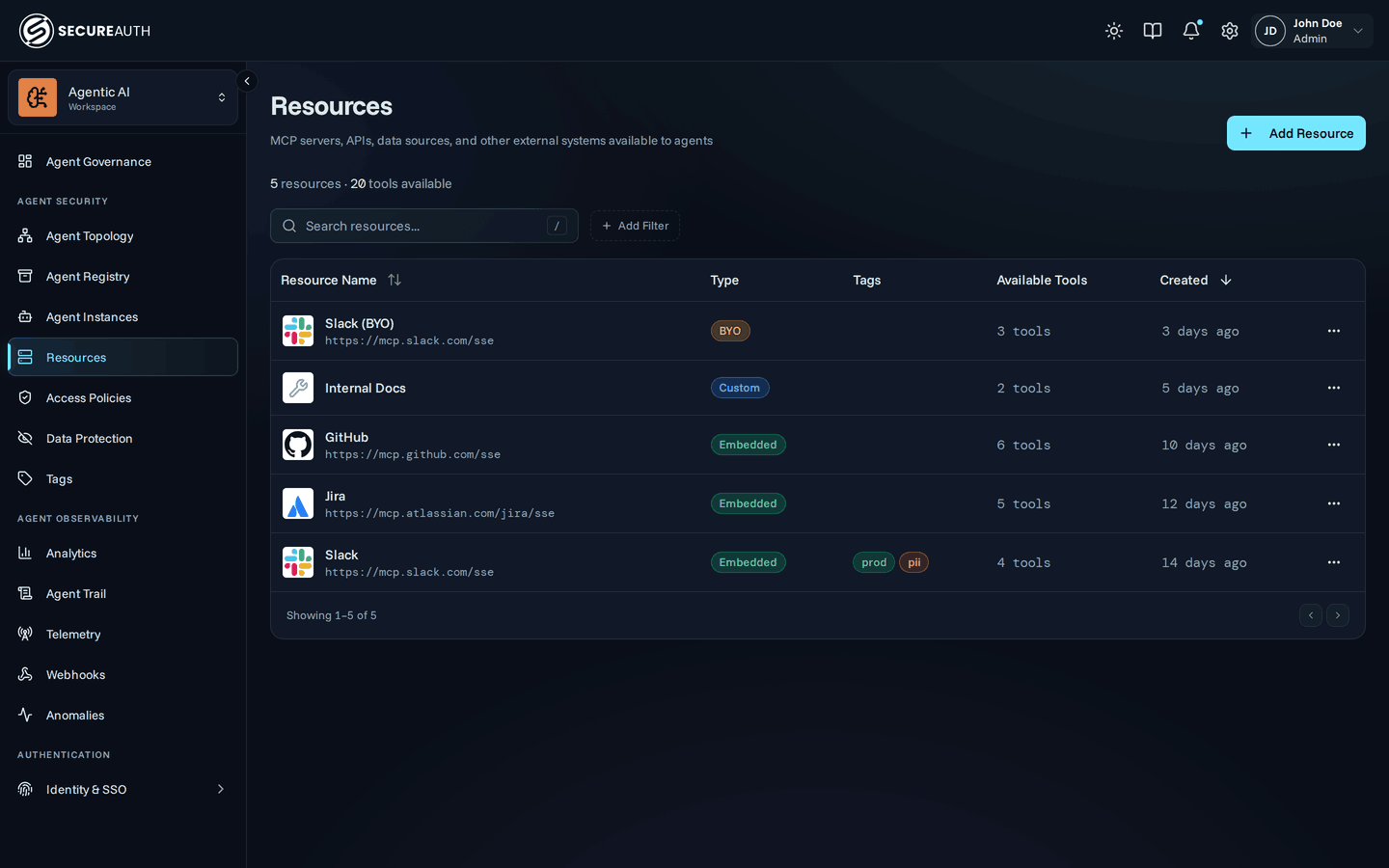
Tools & Services lists the resources registered in your gateway: MCP servers, APIs, data sources and other systems your agents call. Use it to add a resource, open one to change its access or settings, spot a resource users can't connect to, or answer users' requests for a new one.
Resources
A summary line above the table counts your resources and the tools they make available.
| Column | Shows |
|---|---|
| Resource Name | The resource's name and server URL. Select the name to open the resource. |
| Type | How the resource connects: Built-in, Custom, BYO (your own OAuth app), DCR (dynamic client registration), Embedded (an OAuth app SecureAuth manages), or Public (no credentials). Hover the badge for its meaning. |
| Tags | The labels on the resource. |
| Available Tools | How many tools the resource offers. |
| Health | A warning when users can't connect, such as Sign-in failing, Authorization failing or Unreachable. Select it to open the resource's Health tab. |
| Created | When the resource was added. |
Search with Search resources... to match a name, and filter by Tag. Sort by Resource Name or Created; the default is newest first.
Resource page
Selecting a name opens the resource's page, with these tabs:
- Overview
- Health – with organization-wide
view_audit. - Access Control – with
view_policies. - Settings – with
manage_mcps, for a custom resource or one users connect to with their own account.
Requests
Requests from users for an MCP server that isn't enabled yet. Users request a server from their Connections page. The tab label shows how many resources have pending requests.
| Column | Shows |
|---|---|
| Resource | The requested resource. |
| Requested by | Who asked. Hover to see every requester. |
| Requests | How many requests there are. |
| First asked | When the first request arrived. |
| Last asked | When the latest request arrived. |
With no requests, the tab shows No pending requests.
Actions
- Add Resource – opens the resource catalog, where you pick a catalog server or set up a custom one.
- Edit – from a row's actions menu, change the Description, and for a custom resource its Display name, Slug and Server URL.
- Delete – from a row's actions menu, removes the resource after you confirm. This can't be undone.
- Enable – on Requests, opens the requested server in the catalog so you can add it.
- Dismiss – on Requests, clears the requests for that server after you confirm. Users can request it again later.
Permissions
The screen needs view_mcps, for all users.
The Requests tab also needs the mcp_requests feature.
Add Resource, Edit, Delete, Enable and Dismiss need manage_mcps.
The Health column needs organization-wide view_audit.
Related
- Resources – what a resource is and how agents reach its tools
- Add MCP server – step-by-step setup for your first resource
- Connections – how users connect to a resource with their own account