Release notes: SessionGuardian Admin Console Server
Review new features, improvements, and fixes by release for SessionGuardian Admin Console Server.
SG Admin Console Server 2.8.5
August 2026
This release adds pose tracking and device detection tuning options for the desktop client, removes a face detection setting that had no effect, and includes API correctness fixes along with security and dependency updates.
New features
Pose tracking options for desktop sessions. You can now enable pose tracking for the desktop client, run it in shadow mode so that it monitors without taking action, suppress face mismatch actions while you tune it, and set a limit on how long pose is tracked.
Device detection confirmation controls. New settings require a configurable number of confirmation frames within a set time window before the server acts on a device recognition result, which reduces false detections. Device recognition settings are now grouped into separate mobile and camera sections.
Bug fixes
Correct “not found” response for security groups. When you request a security group that no longer exists, the server now returns a “not found” response instead of a generic error, which makes API integrations easier to handle.
Security and maintenance
The latest security patches and third-party dependency updates are applied across the server and the UI, including an updated HTML sanitization library (DOMPurify) and other frontend security fixes.
Improved release safety. The database schema changes in this release are designed to roll back cleanly if the release needs to be reverted.
Upgrade notes
This is a drop-in upgrade from 2.8.4. Database schema migrations are applied automatically on first startup, with no manual steps required.
SG Admin Console Server 2.8.0
May 2026
Analytics Dashboard – a redesigned, dynamic dashboard replacing the legacy one. See Analytics dashboard.
Angular framework upgrade to version 17
Security hardening via project-wide vulnerability scan and Jasper Reports library upgrade to v7
SG Admin Console Server 2.7.7
January 2026
Version 2.7.7 is a security-focused patch release that includes critical security fixes and hardening improvements.
Security updates
Security patch release
Aggregates security fixes and hardening improvements delivered since 2.7.6
Updates security-related dependencies
Includes configuration hardening enhancements
No functional changes for end users
Upgrade information
Safe in-place upgrade from any 2.7.x version
No schema changes
No breaking API changes
No changes required in client configuration or integrations
Direct upgrade from 2.7.6 to 2.7.7 supported
No downtime required for upgrade
SG Admin Console Server 2.7.6
January 2026
This release adds flexible AWS-based log ingestion options for session event logs.
New features
Log ingestion enhancements
SessionGuardian now supports multiple AWS-based intermediate ingestion destinations for session event logs before they are written to OpenSearch. Choose the ingestion method that best fits your SIEM integration and custom processing requirements.
Supported ingestion destinations:
Destination | Configuration Parameter | Use Case |
|---|---|---|
Amazon SQS |
| Use an SQS queue as a buffered intermediary for session events |
Amazon Kinesis Data Streams |
| Stream events for near real-time processing, transformation, or enrichment |
AWS Lambda |
| Trigger custom Lambda functions for fully customized processing workflows |
Amazon Kinesis Firehose | Existing configuration | Continue using Kinesis Firehose as before |
Important notes
Configure only one ingestion destination at a time (SQS, Kinesis Data Streams, Lambda, or Firehose)
These are intermediate ingestion points that complement the existing Kinesis Firehose destination
OpenSearch remains the only supported data warehouse for session events
Your pipeline must deliver processed logs into OpenSearch for SessionGuardian to function correctly
New ingestion options provide flexibility for SIEM integration
Custom processing pipelines can now use AWS services that best fit your architecture
Existing Kinesis Firehose configurations continue to work without changes
SG Admin Console 2.7.5
November 2025
This release focuses on security fixes, improved stability, and better log clarity across WebSocket session lifecycle management and agent logout handling.
Security Updates
Updated multiple dependencies to their latest stable versions to address security vulnerabilities.
All library patches updates are focused on security patches and vulnerability remediation.
Bug Fixes
Agent Logout Command Error
Fixed a WebSocket session error that caused excessive error logs in the SG Console.
Root cause: Logout commands attempted to send messages to WebSocket sessions that had already closed.
Added session state validation to prevent the system from sending logout commands to closed WebSocket sessions.
Impact:
Eliminates repeated
IllegalStateException: The WebSocket session has been closedlog errors.No user-facing issues occurred, but unnecessary log noise has been significantly reduced.
Improves system monitoring and reduces alert fatigue.
Technical Improvements
Enhanced WebSocket session lifecycle management.
Improved error handling in agent logout messaging.
Cleaner application logs that improve operational visibility.
SG Admin Console 2.7.4
October 30, 2025
This release improves stability, security, and accuracy across security groups, user management, and system integrations.
Security Group and Cache Management
Corrected cache clearing logic that caused
EntityNotFoundExceptionerrors when the server did not fully clean the query cache.Fixed an issue that removed auto-assigned user geolocation when you updated a user record without making changes.
Resolved a display problem where auto-assigned geolocation did not appear when a security group was assigned.
Fixed grouping logic during security group updates to prevent errors during user updates.
Added validation to prevent duplicate country assignments in security group configurations.
Screen Capture Configuration Fixes
The server no longer initializes screen capture components when the
sge.escalated-alerts.screen-capture.enabledproperty is set tofalse.The server now ignores image data from clients when screen capture is disabled.
The image capture option is now hidden in the alerts configuration when the feature is disabled.
User Management and Security Enhancements
Updated the unlock error message to clearly explain when a matching unregistered profile already exists.
Added a clear limit message for bulk user resets: you can reset up to 100 users per request.
Removed unused API endpoints related to shoulder surfing and configuration images.
Restricted access to photo retrieval endpoints for better data protection.
Added a maximum limit of 100 users for all bulk user actions
Status code now properly returns 404 (instead of other codes) when user is not found in lock/unlock, support mode update, and delete operations.
Fixed a Null Pointer Exception (NPE) in audit trail processing during error cases.
Removed deprecated conditional OAuth annotations to reduce technical debt.
AWS SDK Upgrades
Updated AWS S3 SDK to version 2.
Updated AWS SES SDK to version 2.
SG Admin Console 2.7.2
May 14, 2025
You can now export the user list and related data from the Admin Users page.
Resolved security issues.
SG Admin Console 2.7.1
April 23, 2025
Resolved an issue where users were unexpectedly logged out of secure sessions after 10 minutes without error messages.
SG Admin Console 2.7.0
April 19, 2025
Added support for SSO admin logins to the SG Admin Console using any OIDC-compliant identity provider, such as Microsoft Entra ID. Setup requires backend configuration by SecureAuth Support.
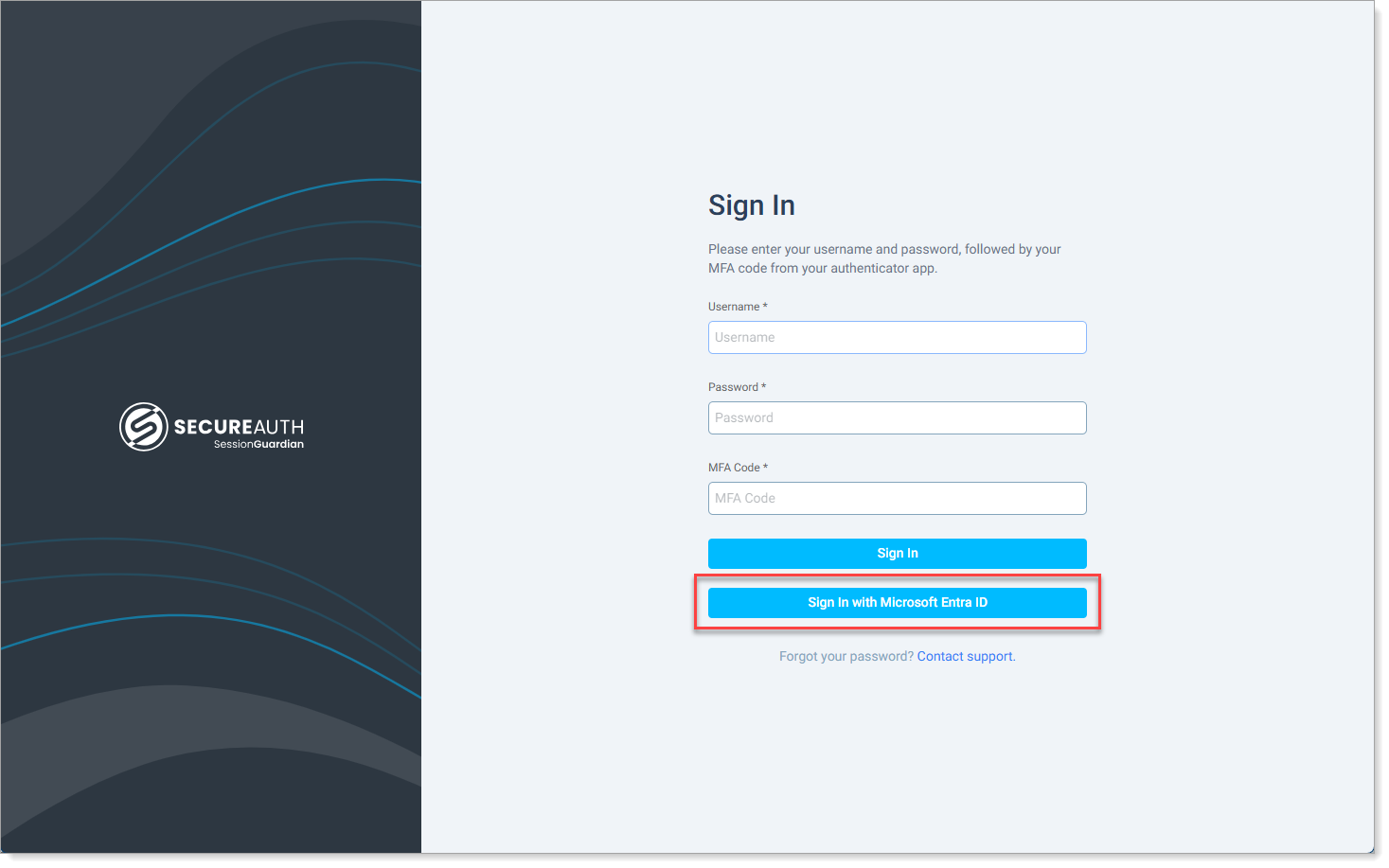
Improved overall User Import feature with performance enhancements and bug fixes.
Upgraded the log system for better clarity and tracking; renamed Change History to Audit Trail. To learn more, see View and filter Audit Trail logs.
During profile photo registration, end users can select their preferred web camera from the list if more than one camera is available.
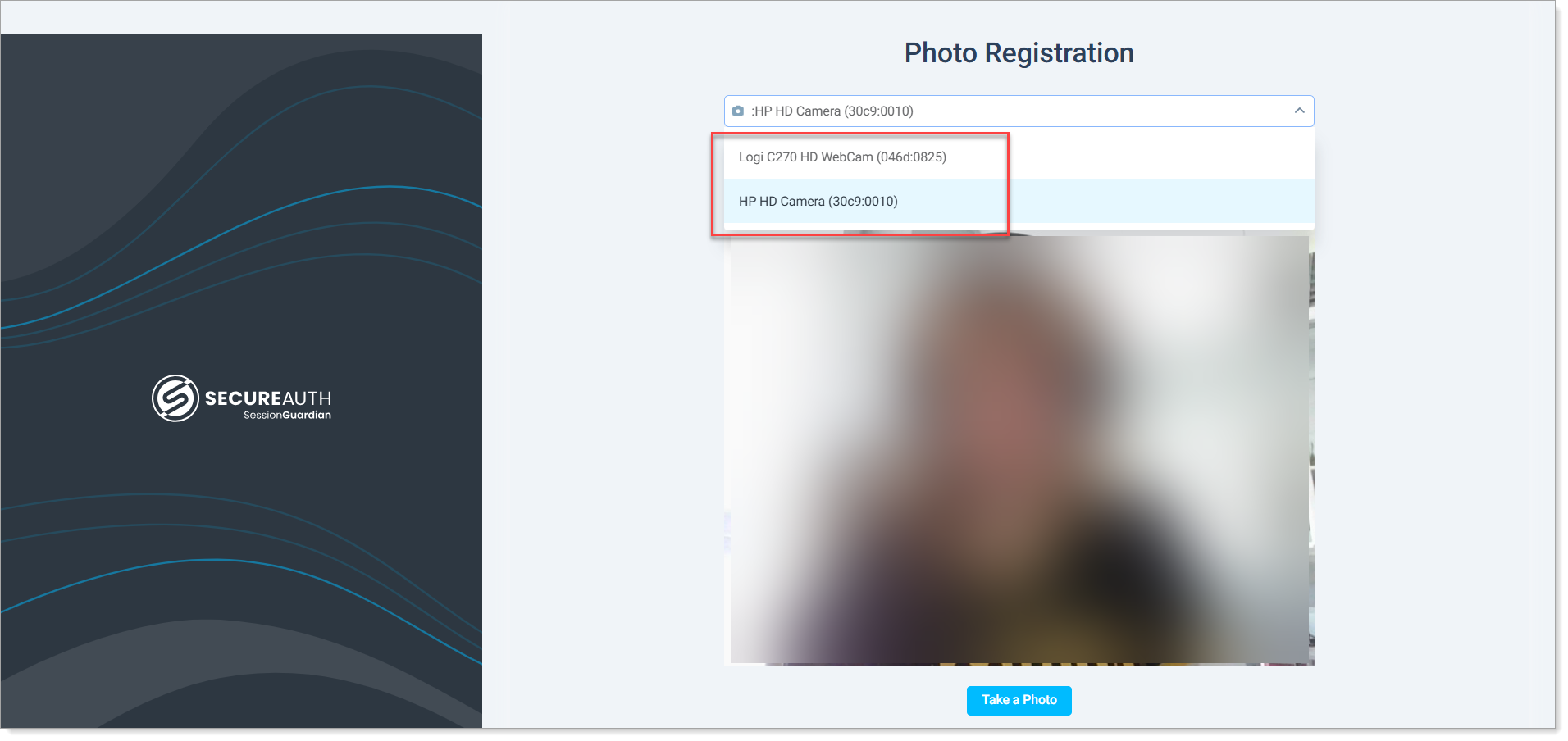
Face in the screenshot is blurred for privacy reasons.
SG Desktop now defaults to the same camera selected during photo registration when users start a session.
SG Admin Console 2.5.4
November 27, 2024
Improvements
Updated Server side logic to handle cases when the Database is down.
When the Server experiences a database connection failure and the Client initiates a request to the start endpoint, the system will return a 503 Service Unavailable response with a 'Retry-After: 60' header.
In cases where connection loss occurs during an active Client session, the system will respond with a 500 Internal Server Error status code.
All other HTTP status codes remain unchanged:
401 Unauthorized: Returned when user authentication fails (e.g., user account removed or credentials reset)
403 Forbidden: Returned when Client access is restricted (e.g., IP restrictions, resource deletion during active session)
SG Admin Console 2.5.3
October 25, 2024
Improvements:
Changes in code response from Server to Client on registration check: Added more informative message on unsuccessful device registration
Performance improvement on Users page
Fixed library vulnerability
Bug fixes:
Fixed floating bug on end user connection
SG Admin Console 2.5.2
September 12, 2024
Improvements:
Disable Service Based on IP Range field now accepts CIDR format for IP addresses
Security update: Password reset request after 90-day expiration is triggered only after all (username, password, MFA) values are validated.
SG Admin Console 2.5.1
August 12, 2024
Improvements:
Enabling Manage desktop screenshots (evidence) permissions now automatically enables View desktop screenshots (evidence) permission
Bugs:
Error fixed: Service: Amazon S3; Status Code: 403; Error Code: 403 Forbidden
SG Admin Console 2.5.0
August 5, 2024
New features:
Audit logs (Splunk) - please see Audit Trail documentation provided in Customer-SessionGuardian collaboration site on Sharepoint
Screenshot deletion (MVP)
Improvements:
Password Requirements: tracking failed OTP rather than username/password combination only
Automated Log Out redirects Console users to login page
Customer Penetration Test Result: Critical Issue with snakeyaml
Bugs:
Password related Admin unlock feature fix
Incorrect data format on Logs page
Screenshot deletion (MVP)
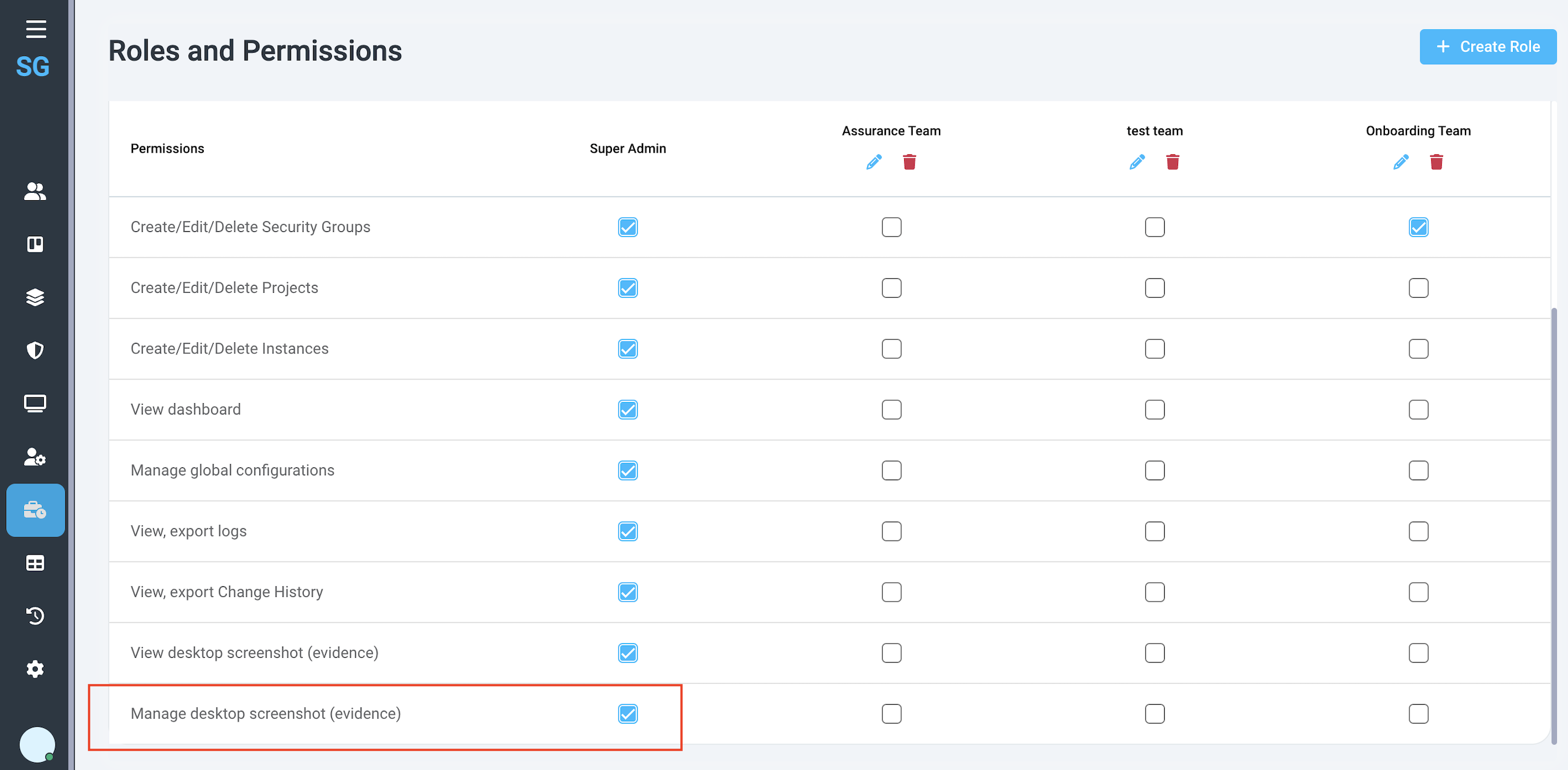
Screenshot Deletion feature allows an Admin user with the permissions to Manage desktop screenshots (evidence) to delete screenshots that are received along with Alerts on violations.
In order to grant that permission to a Console User, make sure you tick the box for the role that Console user is assigned.
 |
In the scope of Screen capture access feature, we check who has access to view screenshots of the content that was on display during a violation. Those screenshots are included, if configured, in the Alerts.
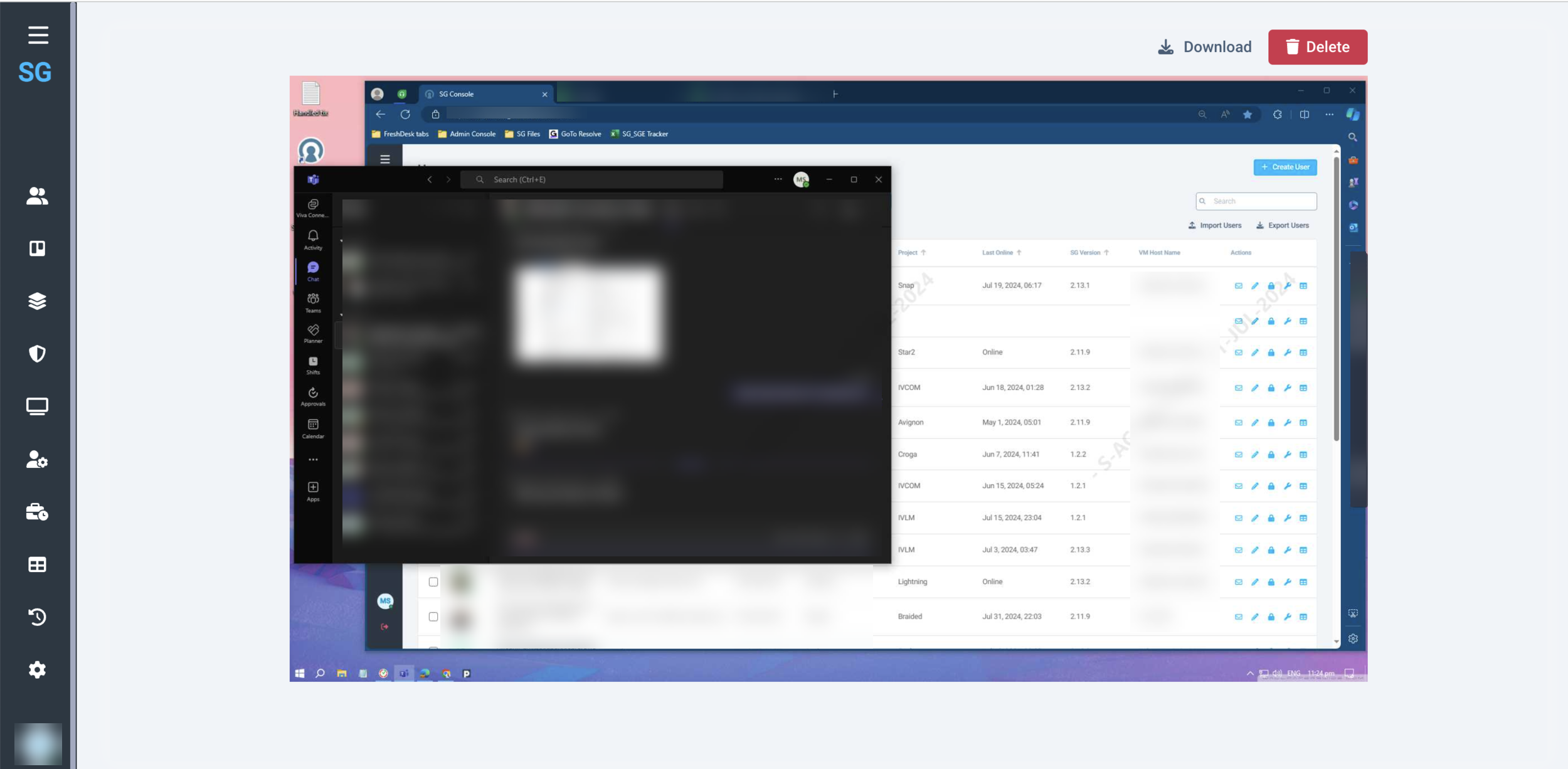
Following the same logic, when a console user wants to delete a screenshot, he/she must have the appropriate permission assigned. If so, on the screenshot preview page that user will see a button [Delete] which will trigger the image removal from the system.
 |
When a user deletes a screenshot, he/she must confirm the action and then provide a reason (for audit purposes). In the scope of the MVP the action cannot be undone so the system warns the user about that.
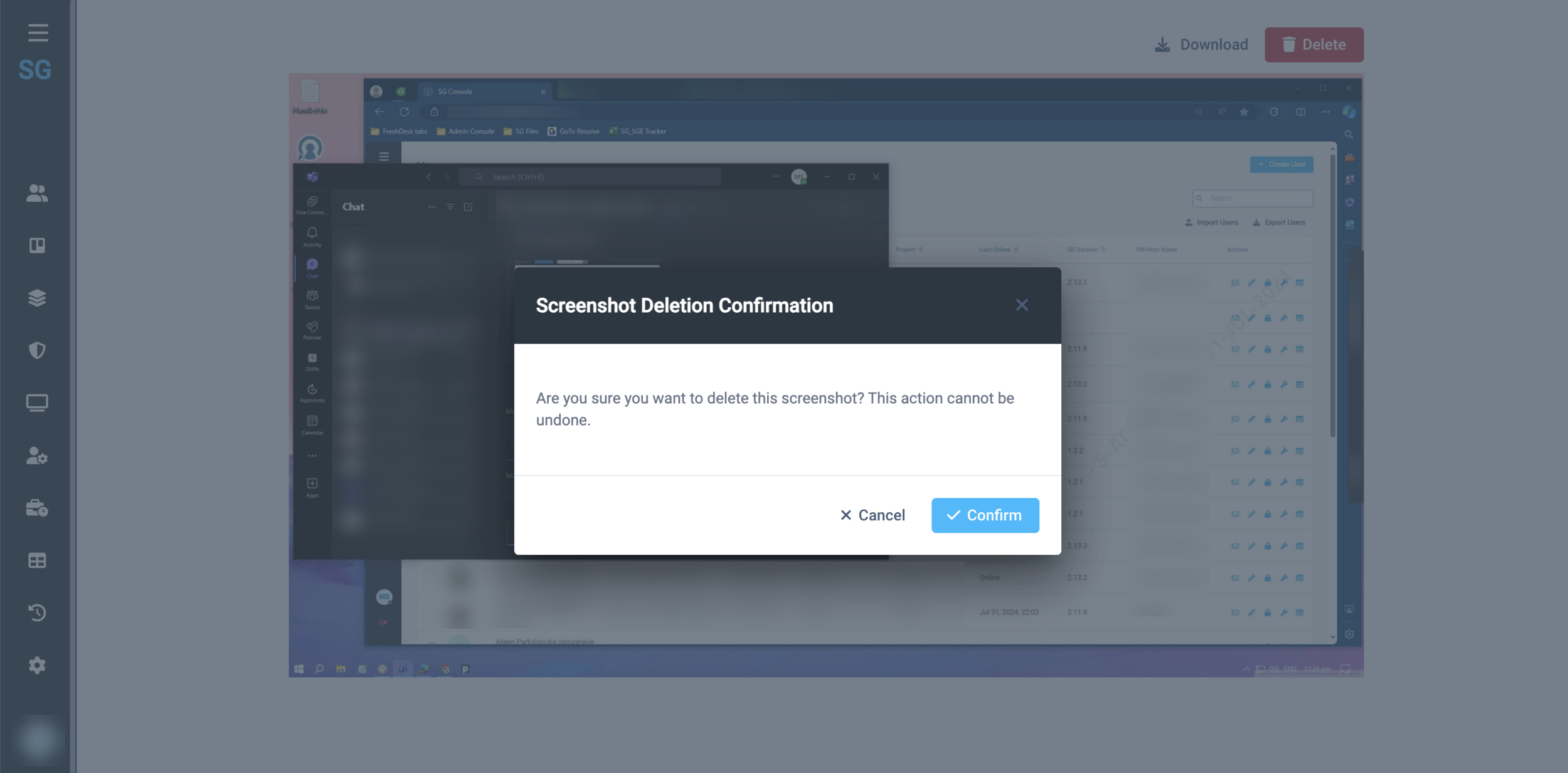 |
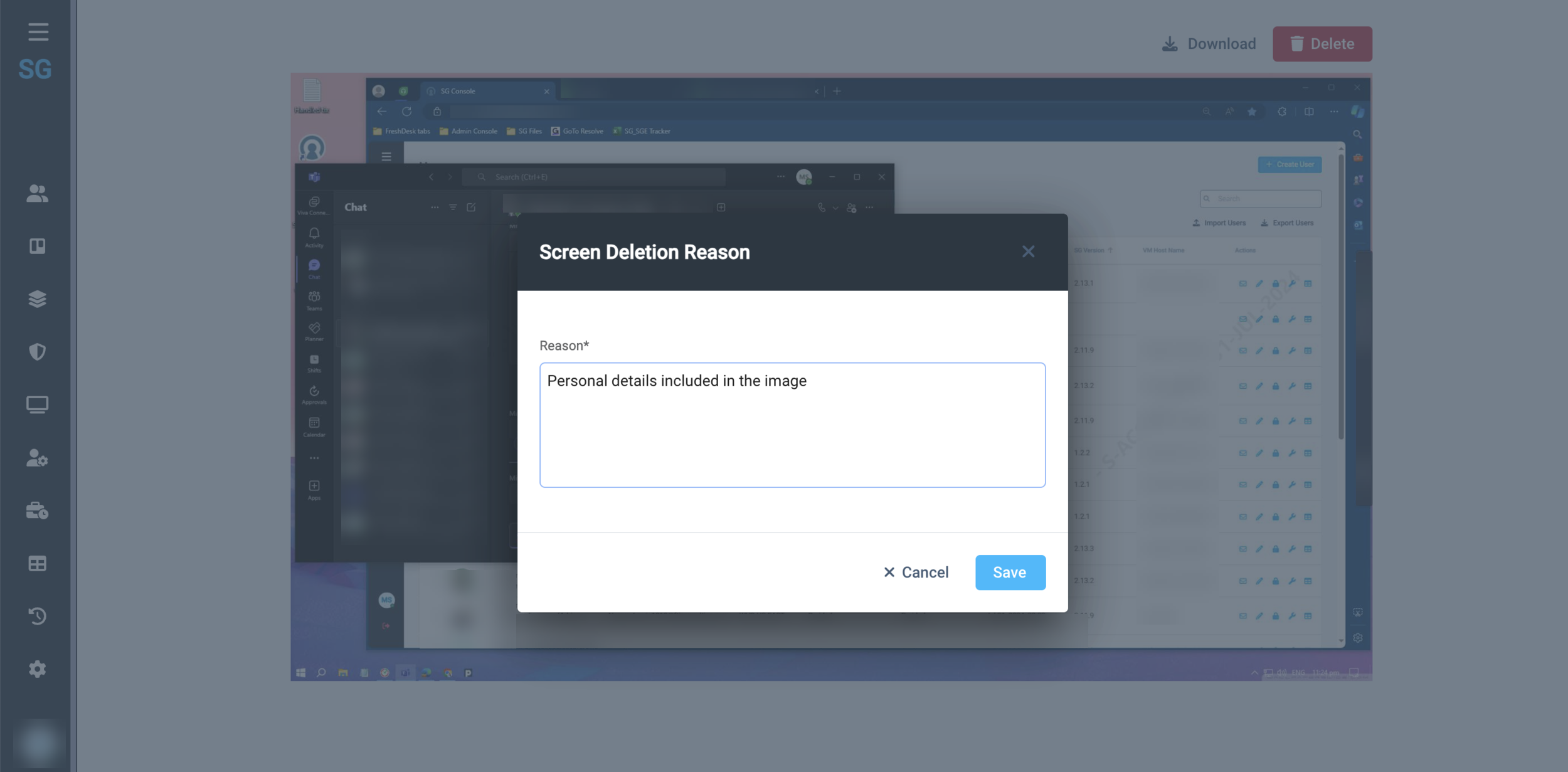 |
Once the image is removed, the user sees a success notification and the following message:
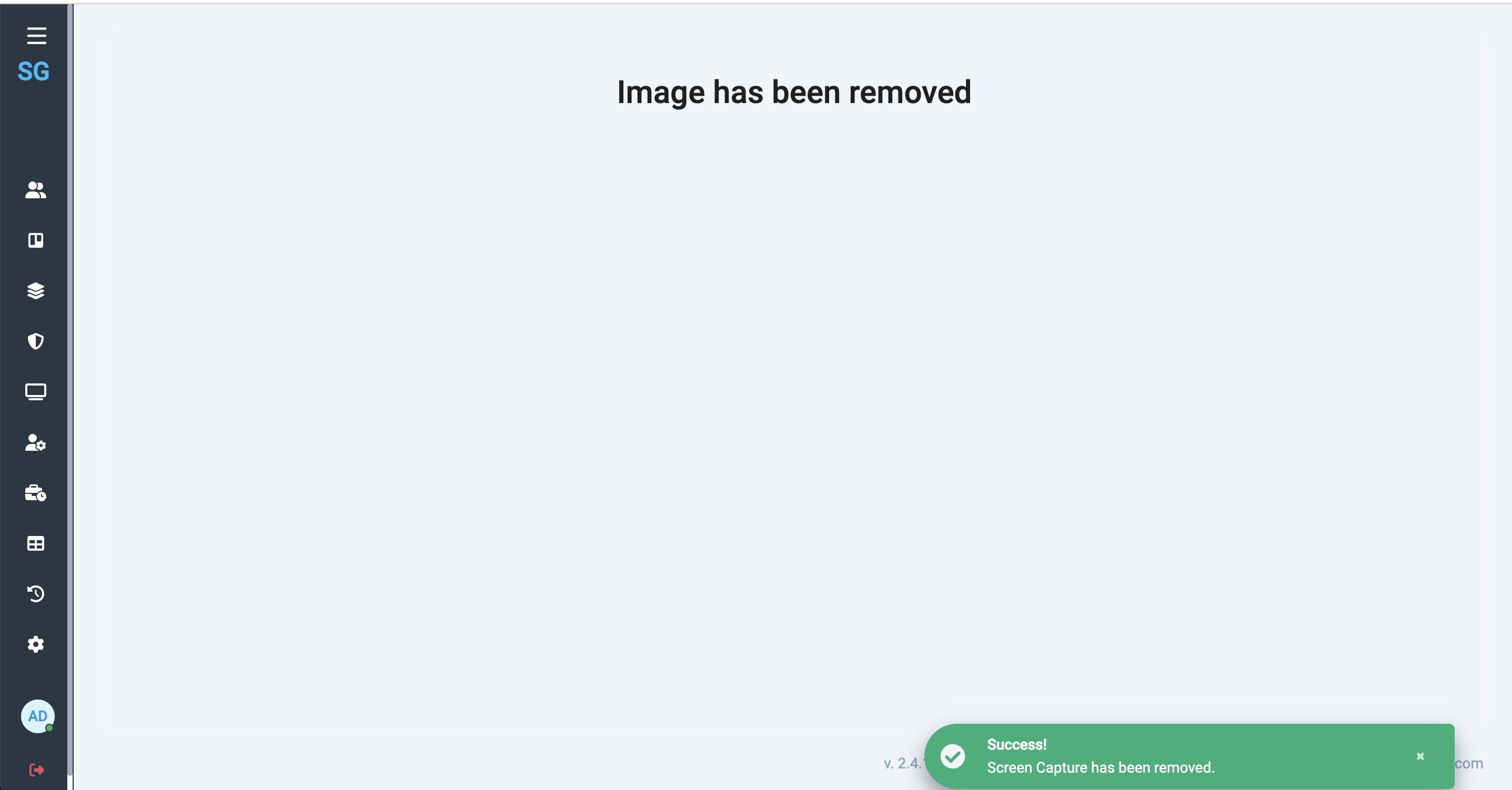 |
All Screenshot deletion events are logged in Change History.
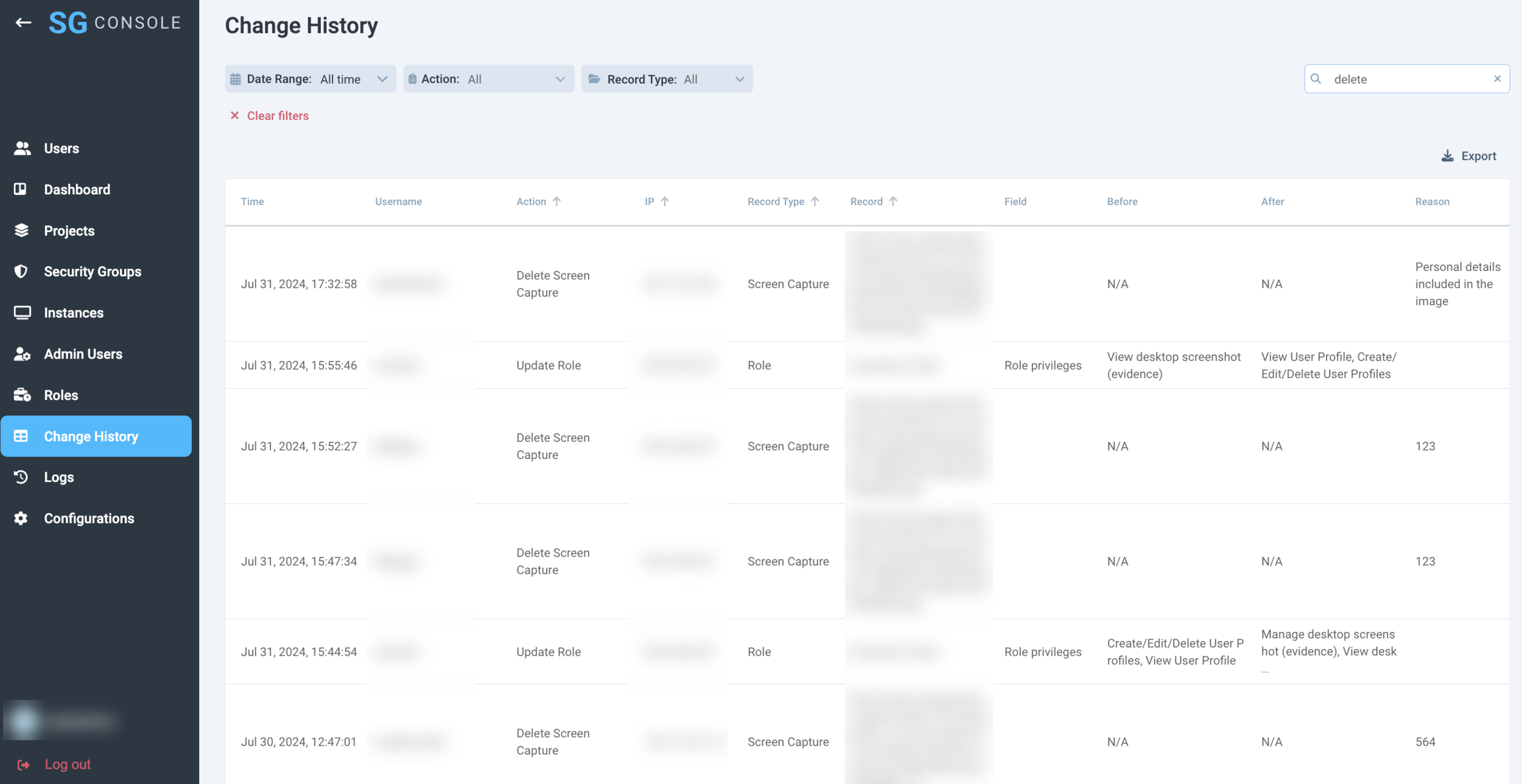 |
SG Admin Console 2.4.1
June 19, 2024
New features:
Password History Requirements
Camera Device Detection (Server side configuration)
Improvements:
Updated and New Environment Variables
Screen Capture access through SG Console Permissions
Safe IP Range field validation
Set up trust relationship between SG and customer staging accounts on AWS
Bugs:
SW Update configuration changes were not logged
Password Security and History Requirements
According to the requirements that were shared by a customer team, SessionGuardian team implemented the following features:
User Password Refreshed every 90 days;
A password history, minimum the last four passwords must be maintained to prevent reuse;
After a maximum of six unsuccessful password attempts the User ID shall be locked. The lockout duration shall last at least thirty minutes or less if an administrator enables the User ID again.
 |
 |
Camera Device Detection
Camera Device Detection is a separate feature with its own parameters that can and should be configured separately from Mobile Device Detection.
There are three parameters that affect and determine Camera detection performance:
Frequency - period of time during which the system checks for cameras
Protection Screen Timeout - delay of lock screen appearance once a camera is detected
Match confidence - level of confidence at which we show that a camera device is recognized
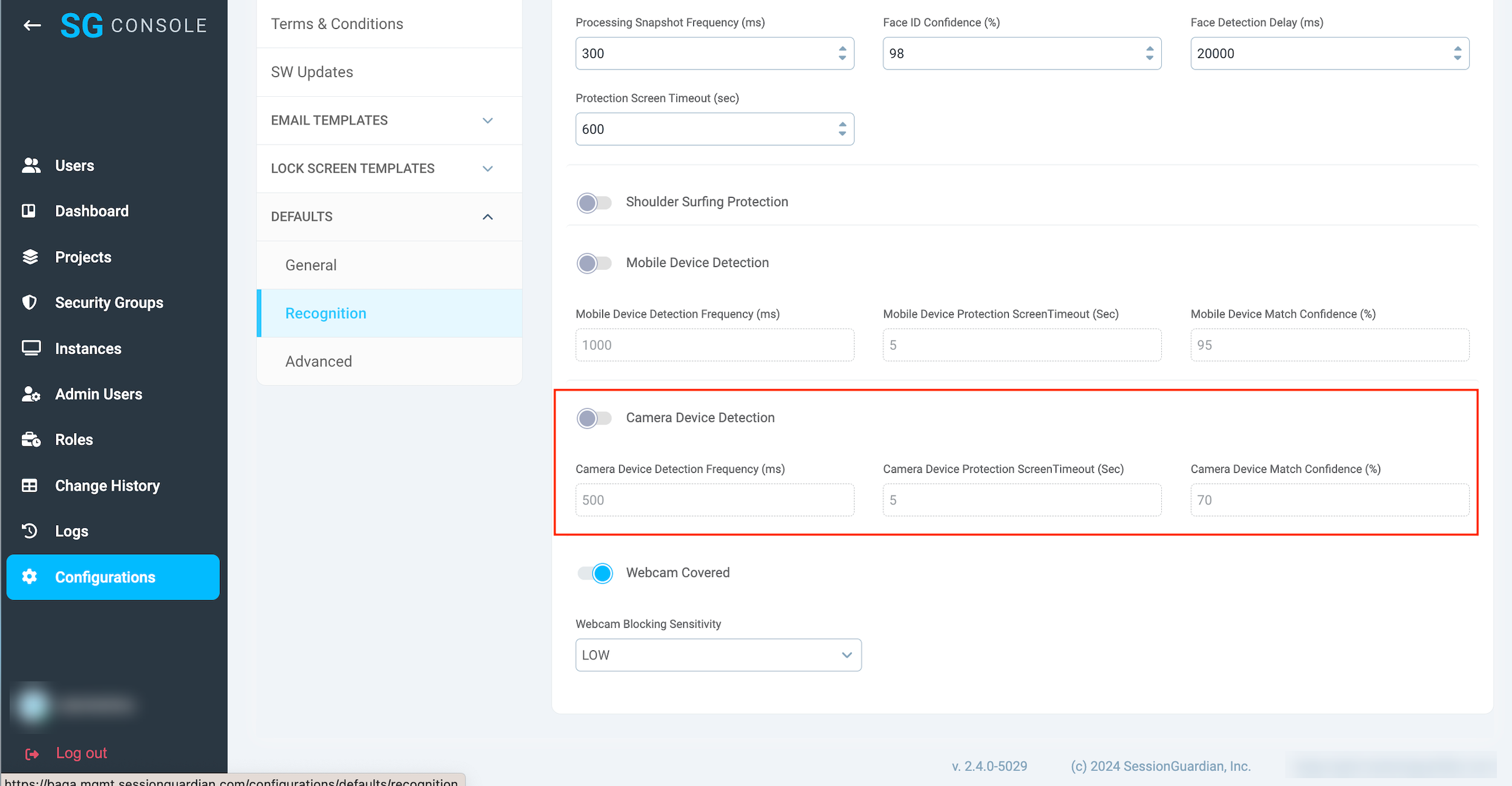 |
The same is applicable to User Profile and Security Group configurations:
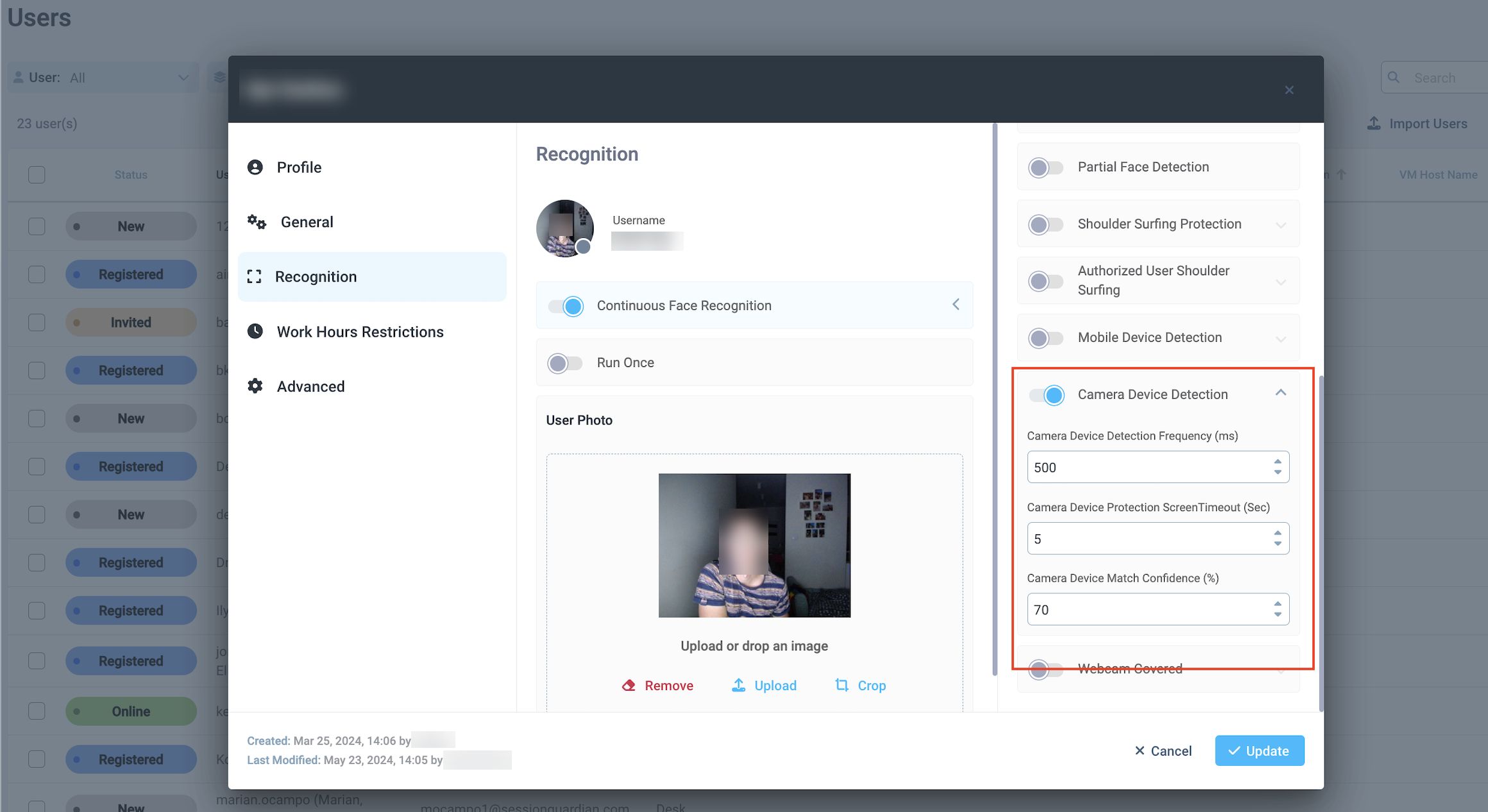 |
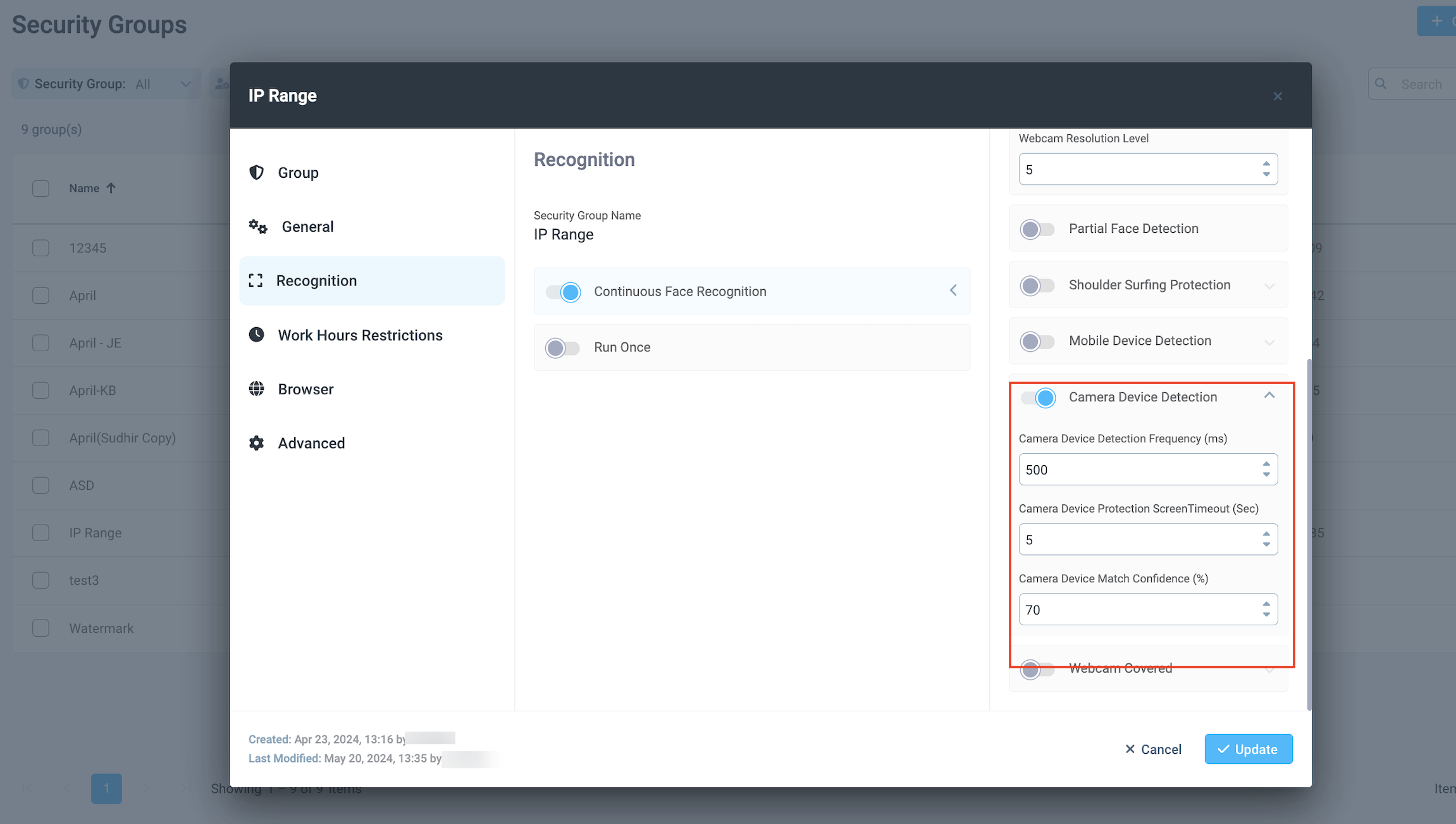 |
Screen Capture access through SG Console Permissions
In case of Violation events, if configured, an alert is sent to a dedicated distribution list.
Screen Capture feature allows to capture the content of the screen once the violation occurs and include the link to the image stored in thee customer's S3 in the email.
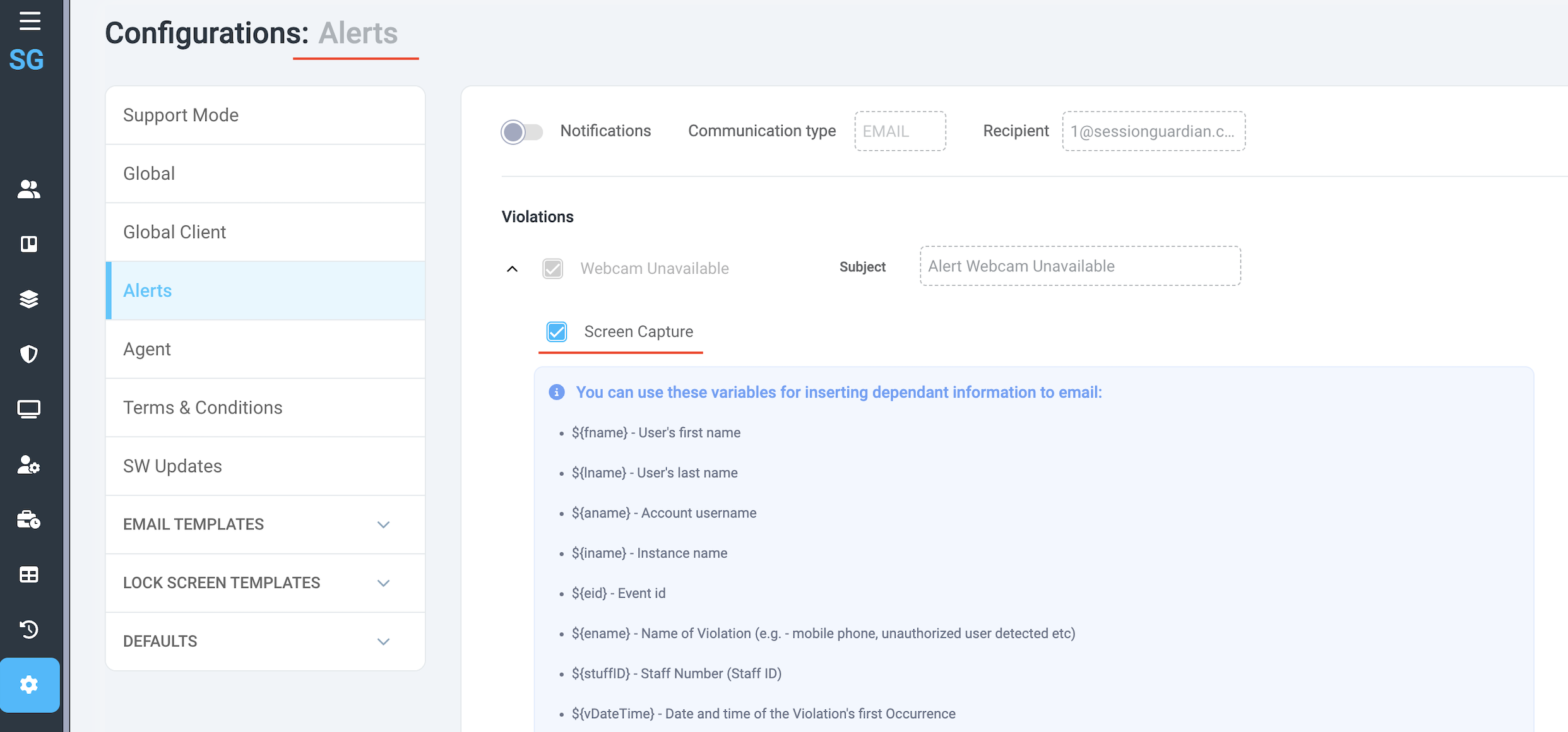 |
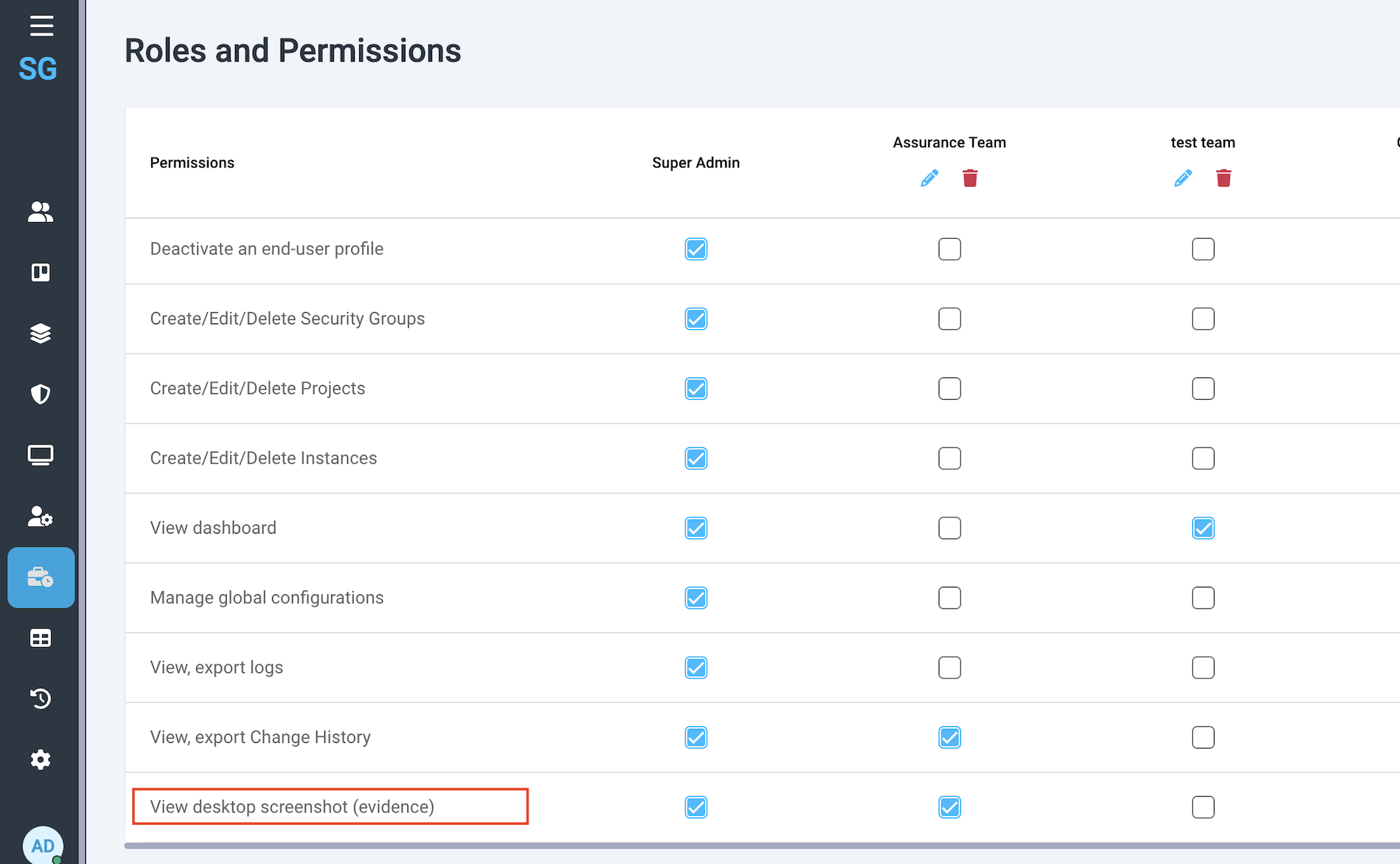
The ability to view the captured contents of the screen depends directly on Permissions, specifically “View desktop screenshot (evidence)”.
 |
When the email is received, there is a link to the image that is stored in S3.
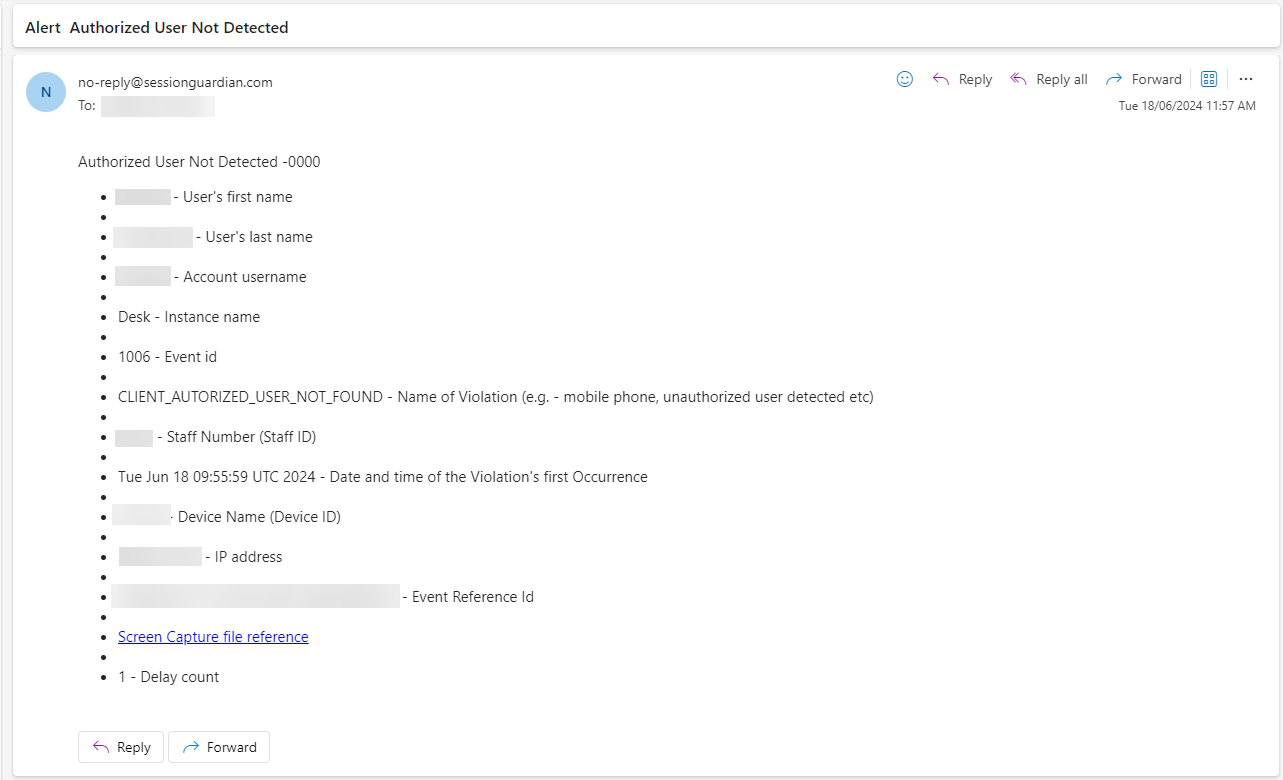 |
When the email recipient clicks the lick, we check whether the user is logged in to SG Console and has the View desktop screenshot (evidence) permission assigned. These two conditions must be met in order to view the image.
Screen Capture Email Template configuration
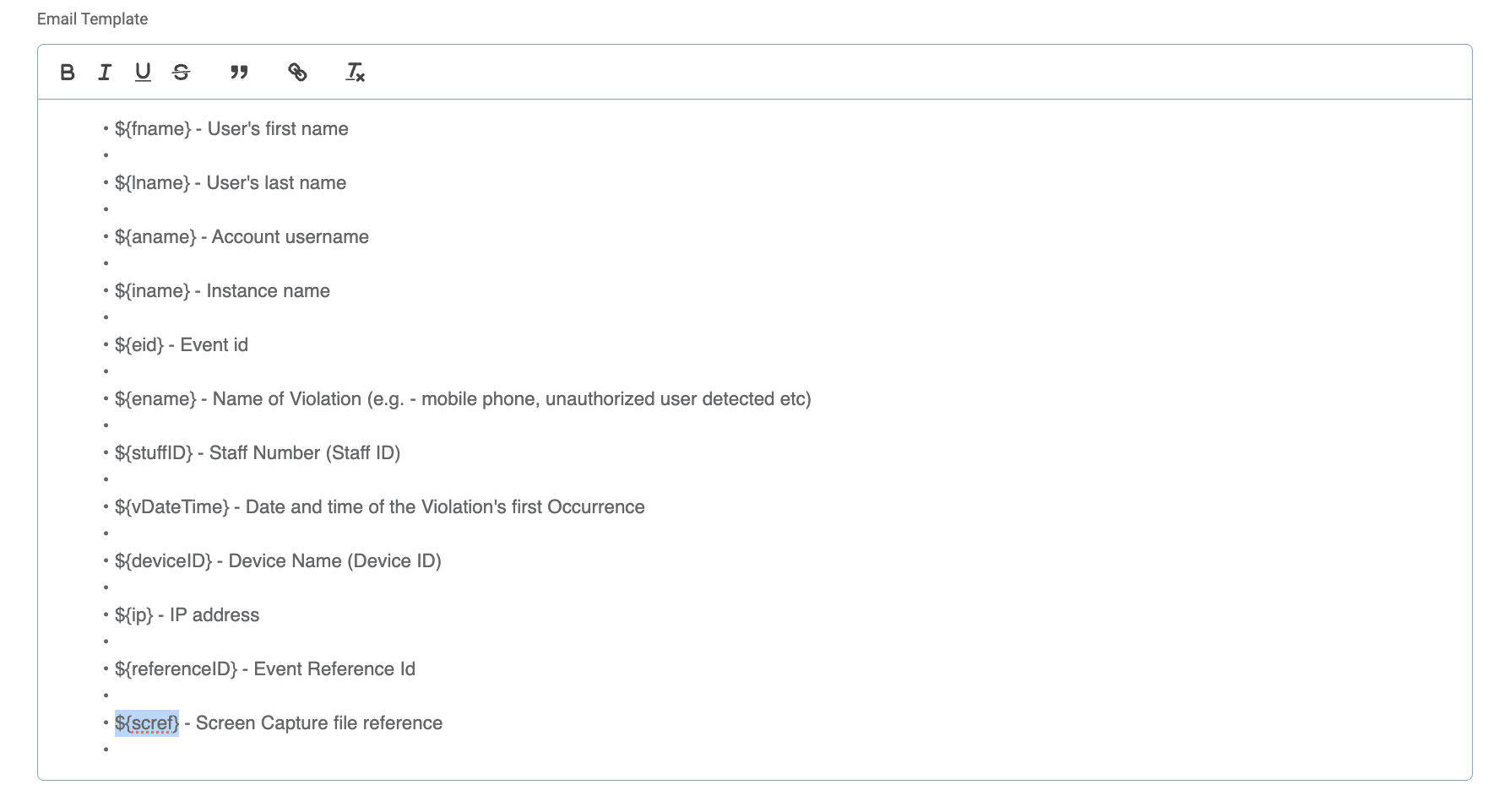
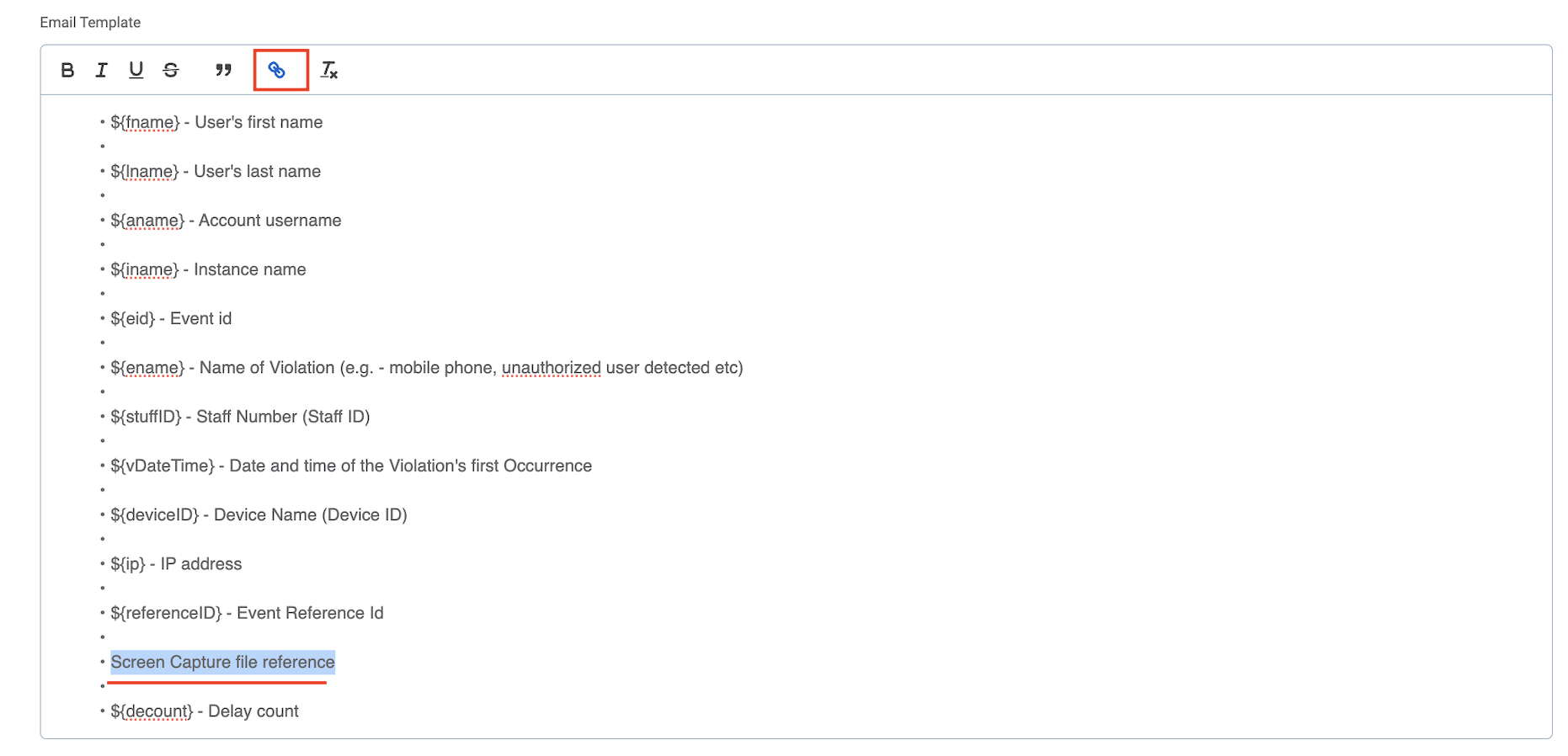
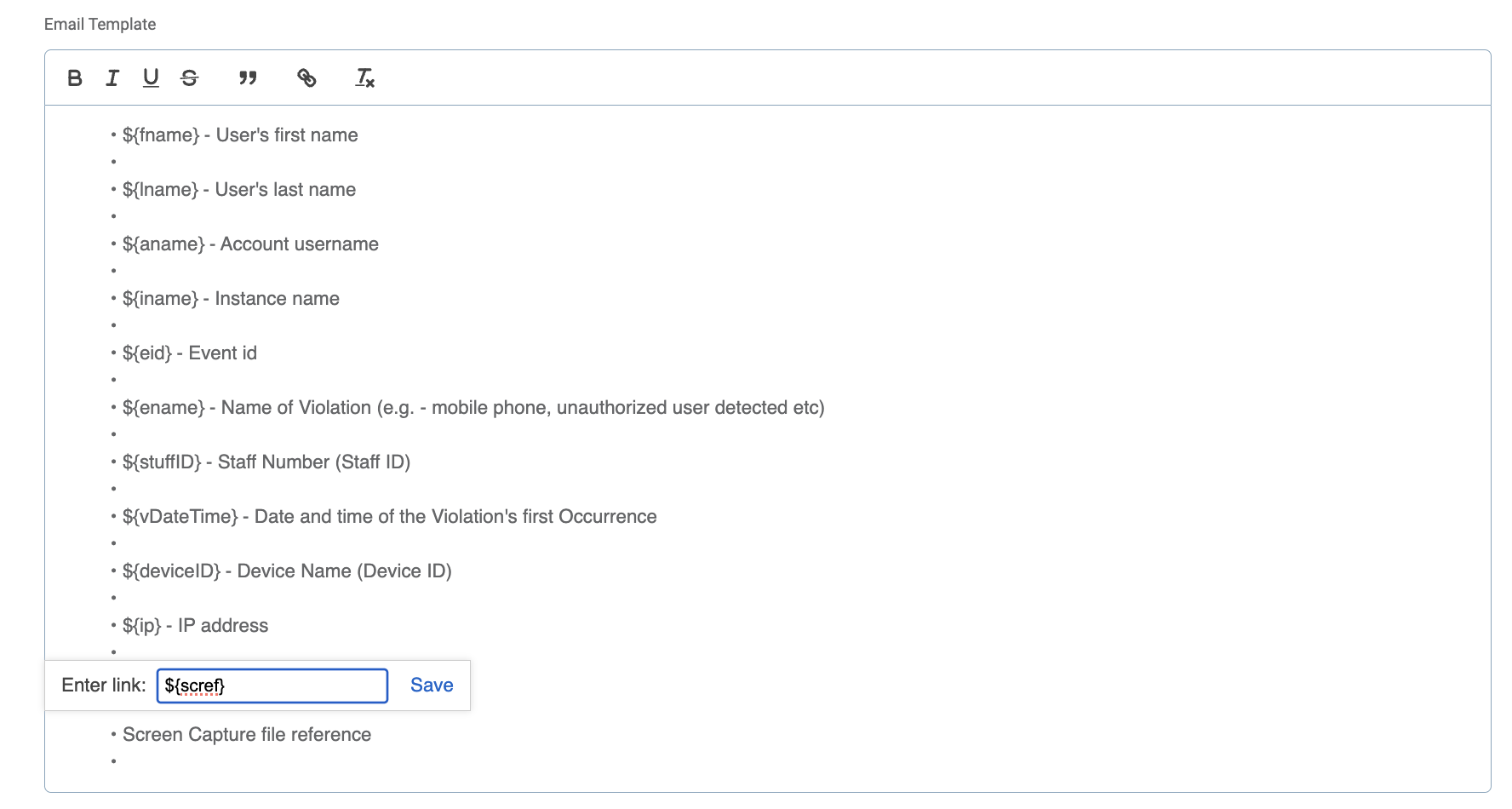
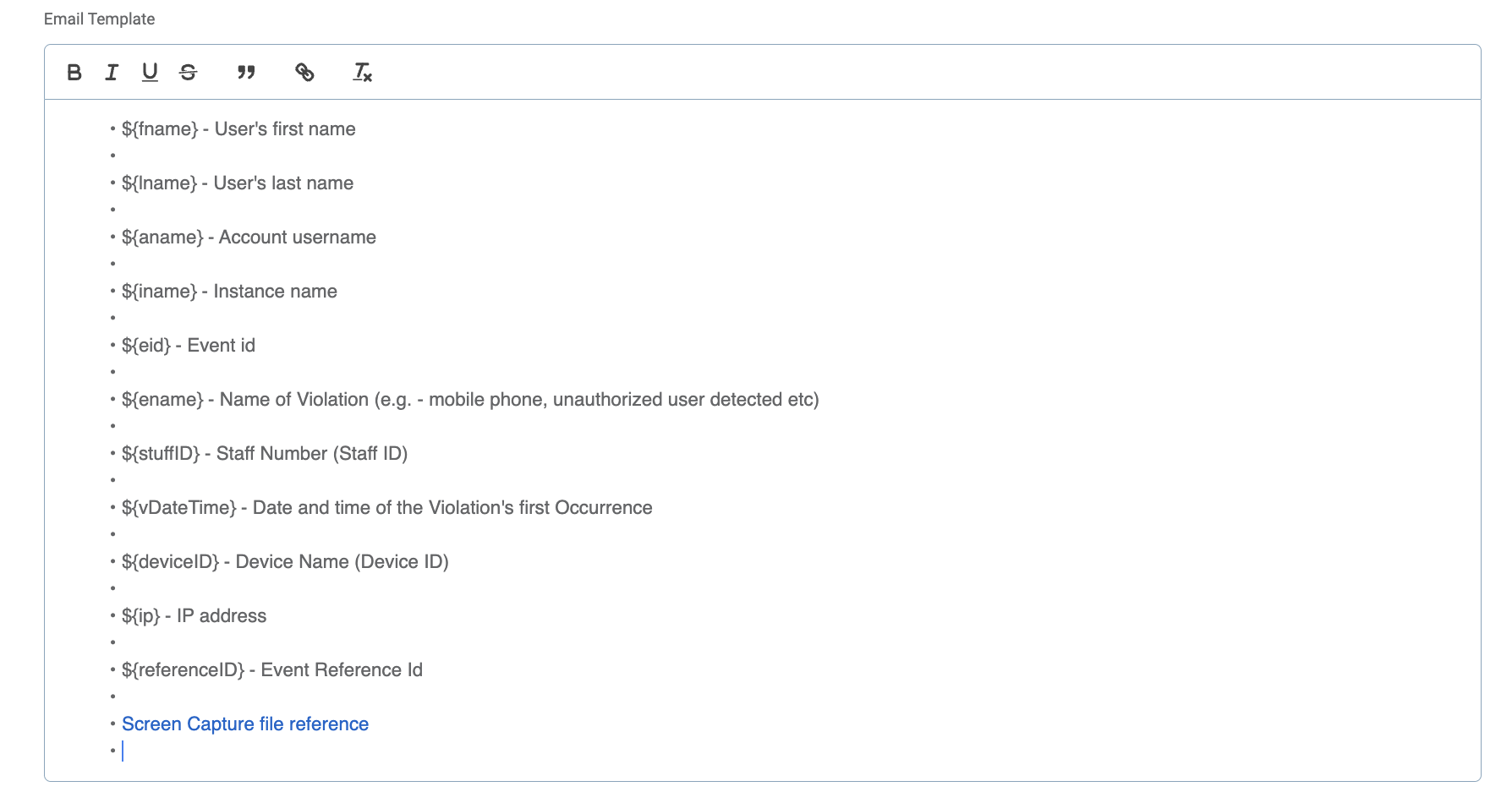
Please note the following steps to ensure a proper clickable link is included in the emails.
Go to Alerts > find any Violation and a related template > Screen Capture file reference
Copy or cut ‘${scref}’
Delete ‘${scref}’ in template
Select ‘Screen Capture file reference’
Click on the Link icon in the toolbar template
Paste ‘${scref}’
Save Changes
 |
 |
 |
 |
SG Admin Console 2.4.0
New features:
Additional Events for Webcam Blocking
Improvements:
SG Console Admin log in time out
Face Recognition Key (Mobile) not mandatory
Webcam Covered Configuration on SG Console
Webcam Covered Alerts
Webcam Covered is an event that is triggered in cases when a user intentionally covers his/her webcamera with a hand, with an object, or with a webcamera shutter.
This event is logged in the system and can also be configured for Alert notifications. In order to set up the email Alerts on Webcam Covered event, Escalated or Delayed ones, please do the following:
Go to Console > Configurations;
Go to Alerts,
Ensure the Notifications toggle is on,
Scroll down the Violations list (Events) to find Webcam Covered
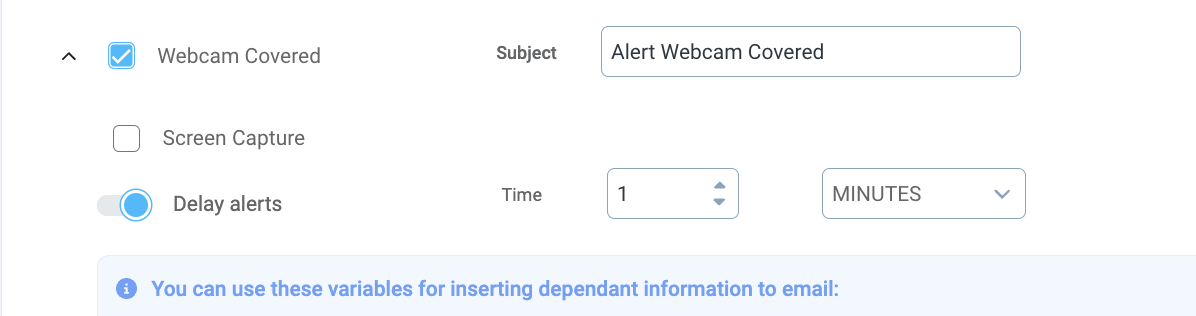
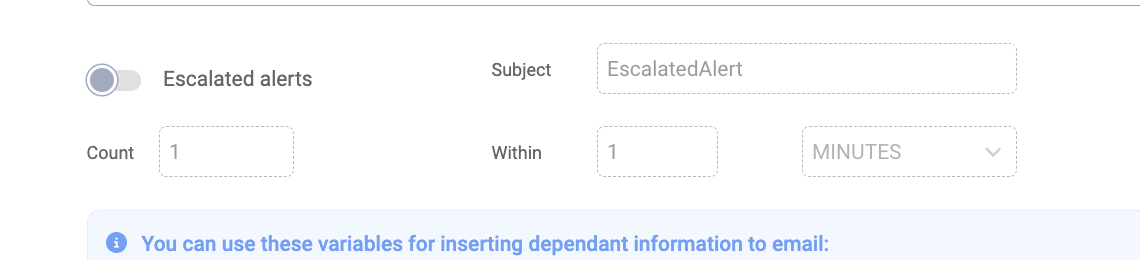
Per need, update the Subject field, tick the Screen Capture, configure Escalated or Delayed alerts.
Please note, the email recipient is configured at the very beginning and can only have 1 email address.
 |
Webcam Covered Lock Screen
If in case of Webcam Covered event you want the user’s screen to lock, you can configure the setting through the Console.
Go to the Console > Configurations
Go to Lock Screen Templates
Locate Webcamera Covered menu item
Ensure the Lock Screen toggle is on. Per need, upload an image and update the message to display when the screen gets locked.
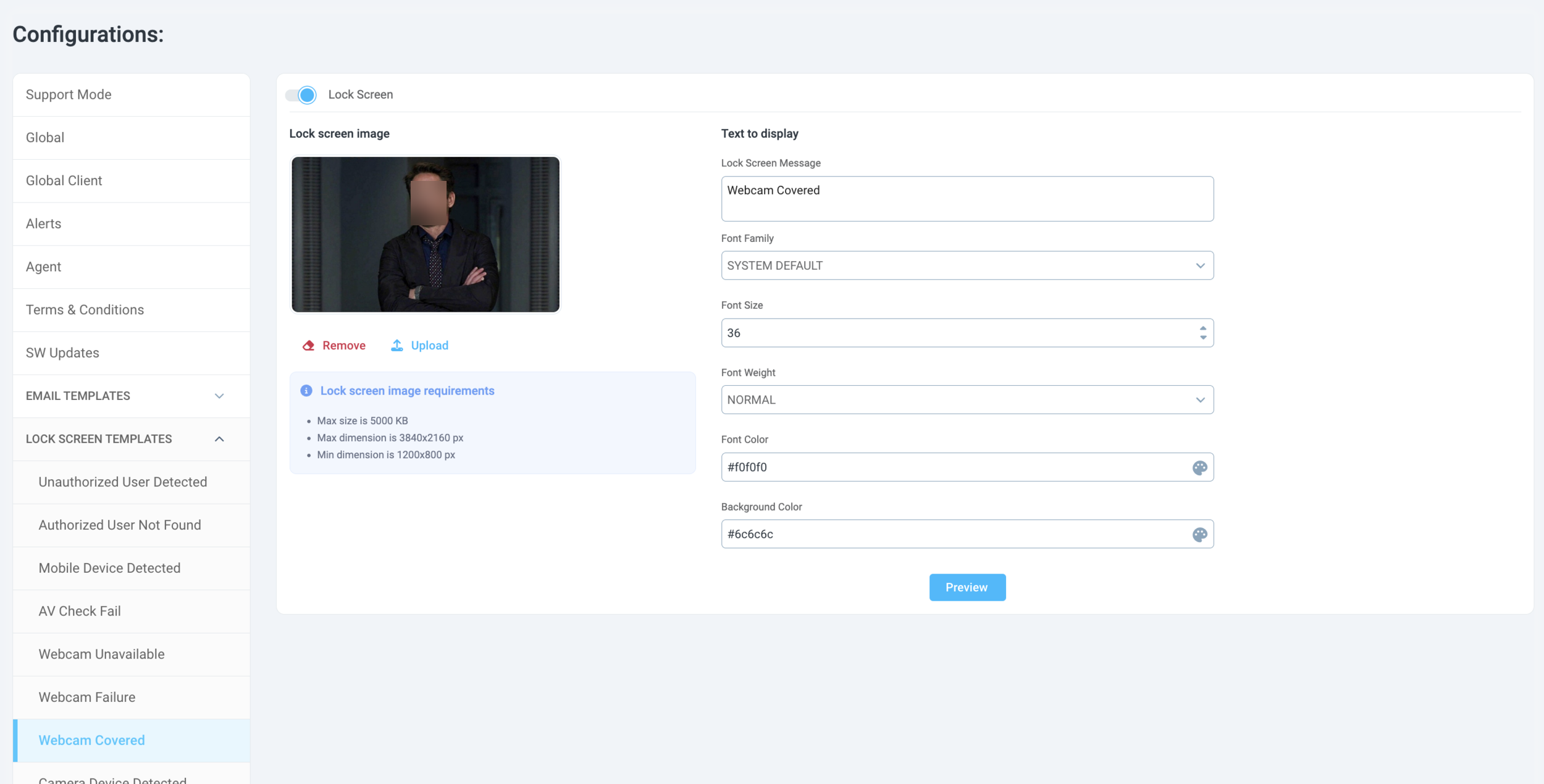
Please note, this is a Global Configuration which will apply to all end users of the SG Desktop Service application.
Improvements:
SG Console Admin log in time out
The Admin Console users will not be automatically logged out only in case of continuous inactivity. If the Admin is active within the configured time period, he/she will not be logged out of the console.
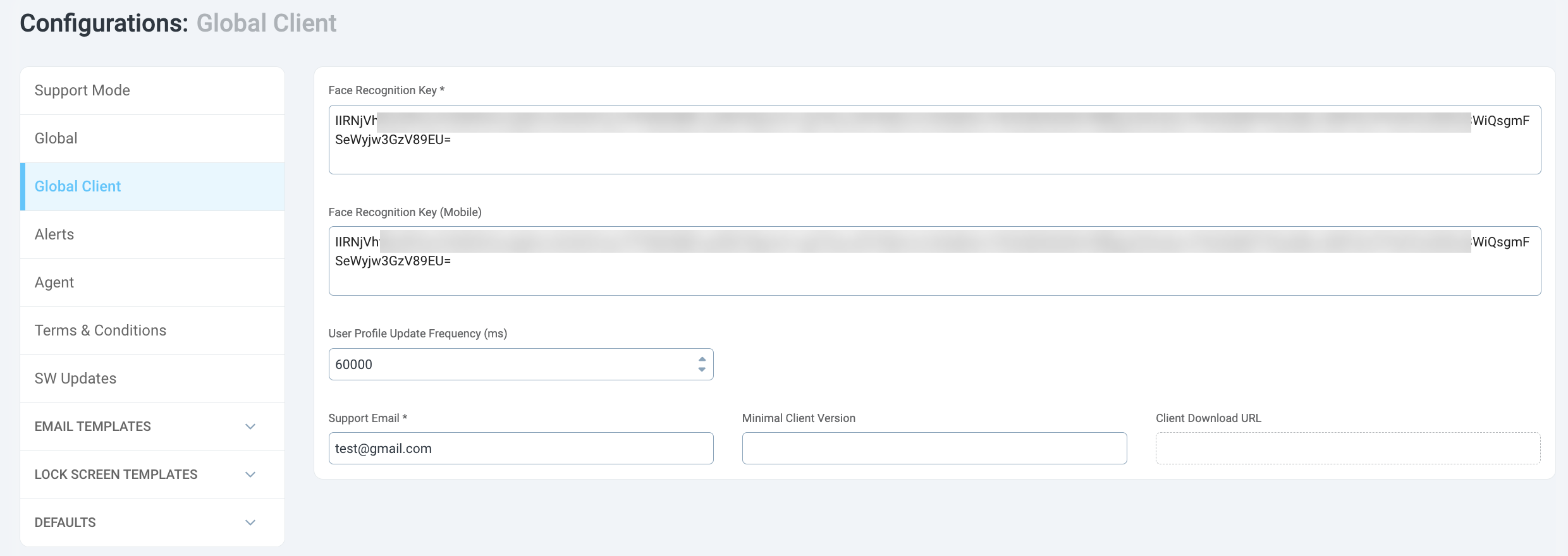
Face Recognition Key (Mobile) not mandatory
It is no longer required to input the Face Recognition Key (Mobile) value
SG Admin Console 2.3.1
April 27, 2024
Bug fixes:
Service-Server connection time out
Minor UI bugs in SG Console
Configuration updates:
Face Detection Threshold (from 3 to 2)
Validity Token (set to 15 min)
Phone Match Confidence (95%, but we recommend 98%)
Face Recognition Key configuration is now done in GUI (SG Console Configurations > Global Client)