Dashboard: Authentication risk insights
The Authentication risk insights dashboard monitors authentication threats across your SecureAuth environment, showing potential attacks and their impact on your users.
Why this matters
View data about authentication attacks targeting your environment so you can configure appropriate protections and respond to active threats,
What this dashboard shows
Access the Authentication risk insights dashboard from Dashboard > Auth risk insights tab.
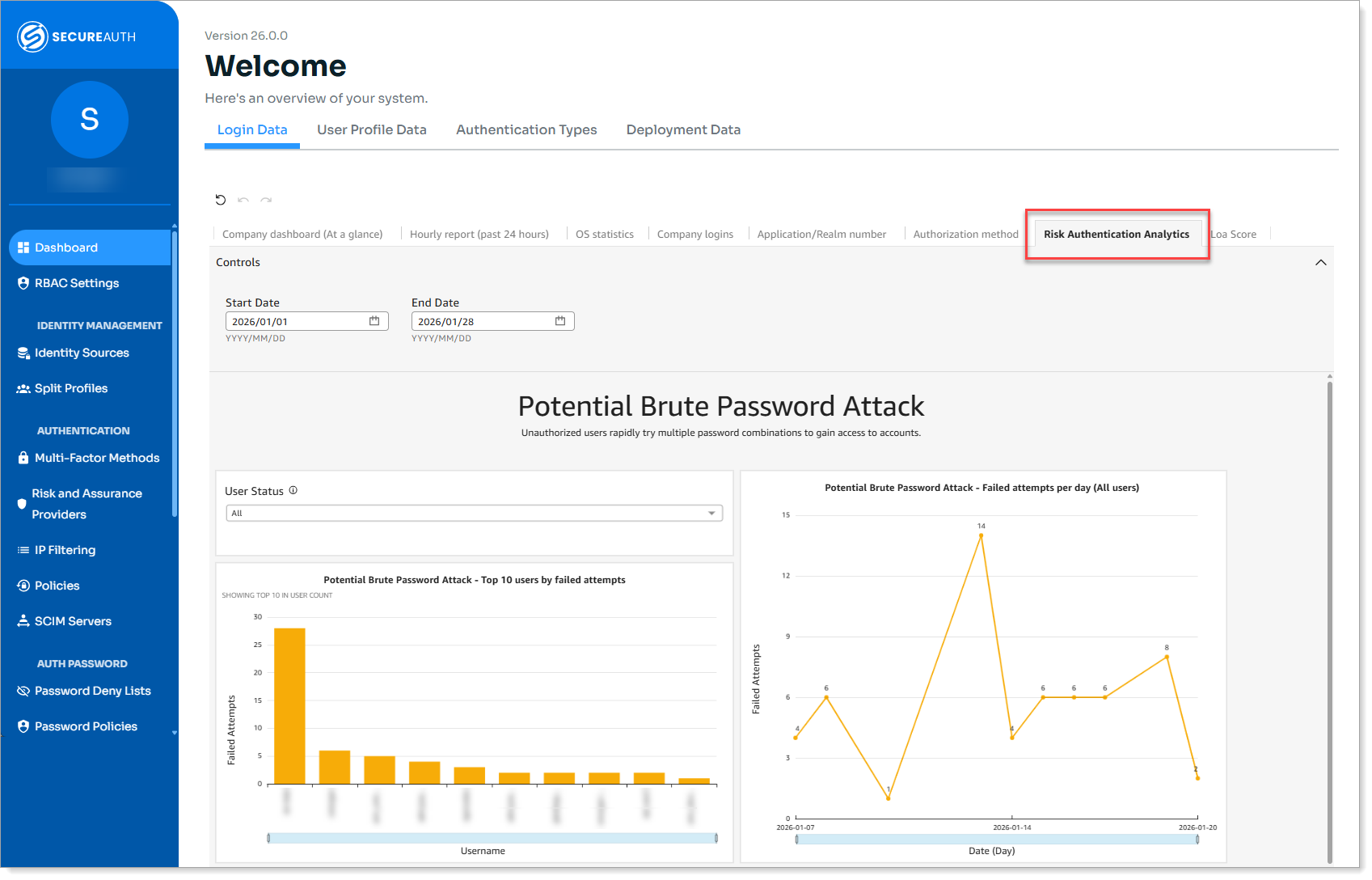 |
Dashboard: Auth risk insights tab
The dashboard tracks four types of potential authentication threats:
Threat type | What it detects | Protection feature |
|---|---|---|
Potential Brute Force Password Attack | Multiple password combinations tried against accounts | Password Throttling |
Potential Password Spray Attack | Common passwords tested across many accounts | Dynamic IP Blocking |
Potential MFA Fatigue Attack | Excessive MFA requests to overwhelm users | MFA Throttling |
Potential Risky IP Activity | Authentication attempts from suspicious IP addresses | Policy-based IP blocking |
Important: Each threat section appears on the dashboard only when you have configured the corresponding protection feature.
Potential Brute Force Password Attack
Shows accounts experiencing repeated password guessing attempts where unauthorized users rapidly try multiple password combinations to gain access to the same account.
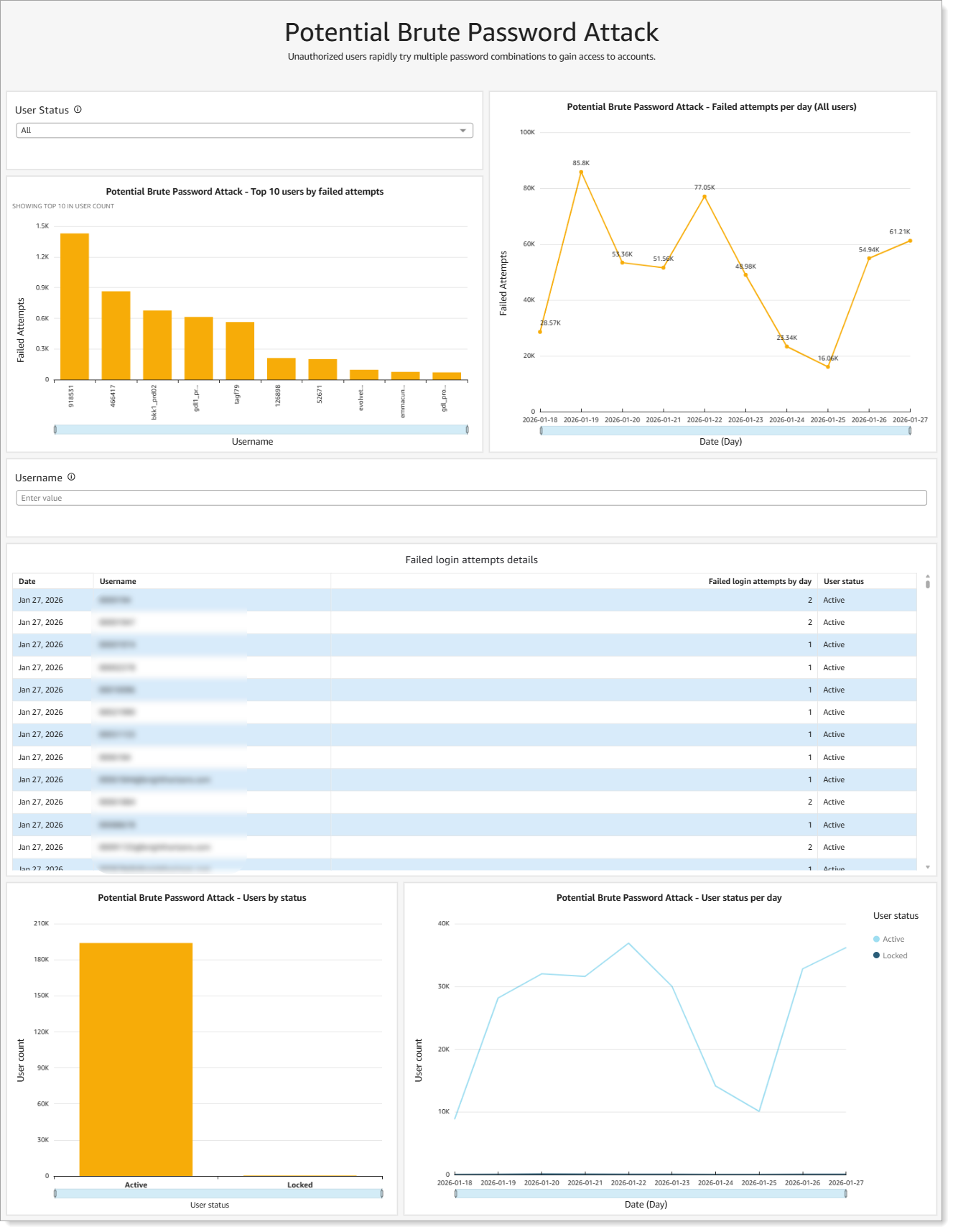 |
Analytics for potential brute password attacks
What you see:
Top 10 users by failed attempts
Failed attempts per day over time
Failed login attempts details with user status
User account status (active or locked)
To see this data: Enable Password Throttling to limit failed password attempts and block or lock users with repeated invalid attempts.
Potential Password Spray Attack
Shows IP addresses testing the same common password across many different accounts to evade per-account lockout detection.
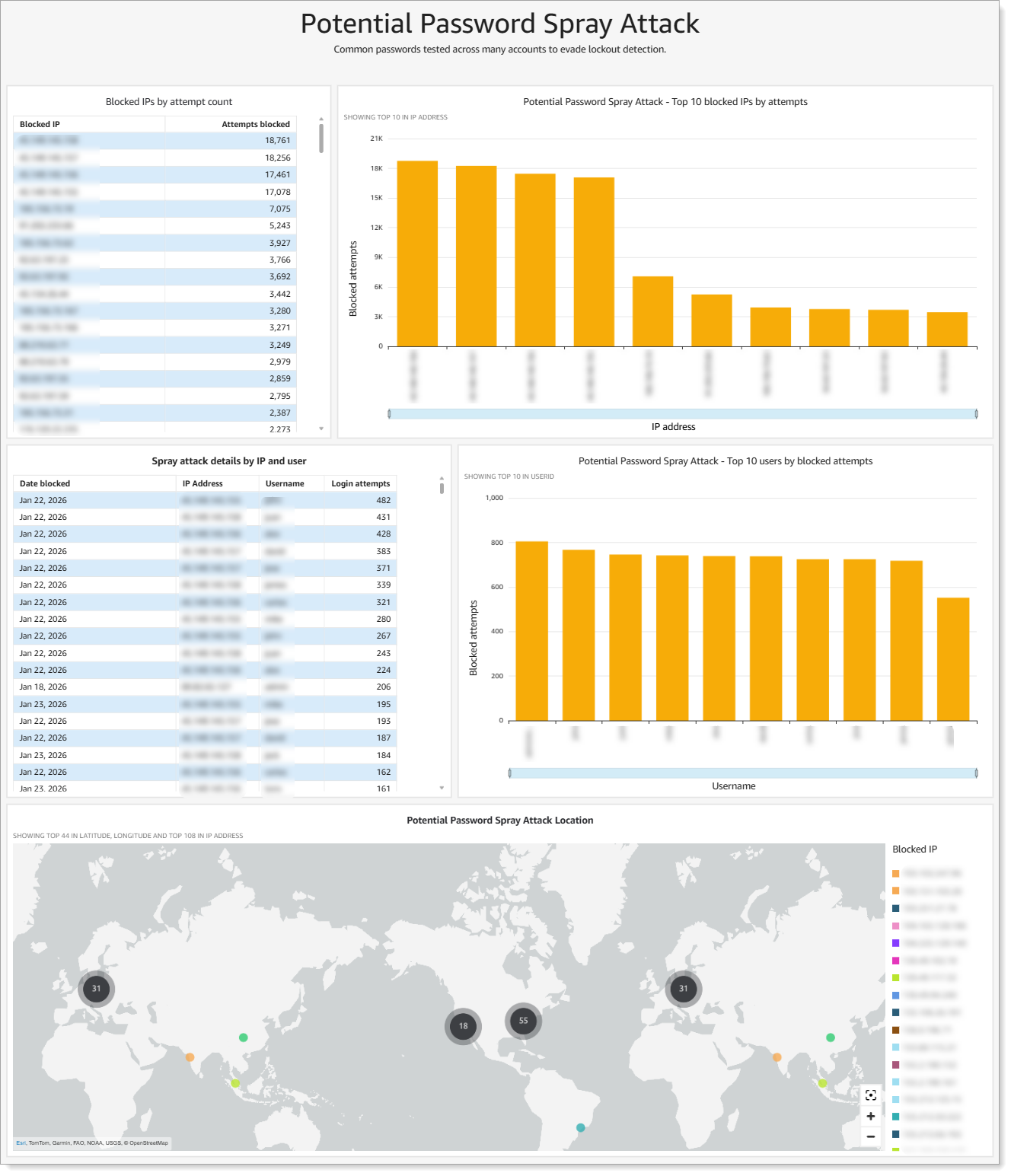 |
Analytics for potential password spray attacks
How this differs from brute force: Instead of trying many passwords against one account (brute force), attackers try one password against many accounts. Dynamic IP Blocking detects this pattern by monitoring failed login attempts using different usernames from the same source IP address
What you see:
Blocked IPs by attempt count
Top 10 blocked IPs by attempts
Top 10 users by blocked attempts
Attack location map
To see this data: Add Dynamic IP Blocking rule to block IP addresses after failed login attempts using different usernames.
Potential MFA Fatigue Attack
Shows accounts receiving excessive MFA requests where unauthorized users repeatedly send authentication requests to overwhelm users into approving access.
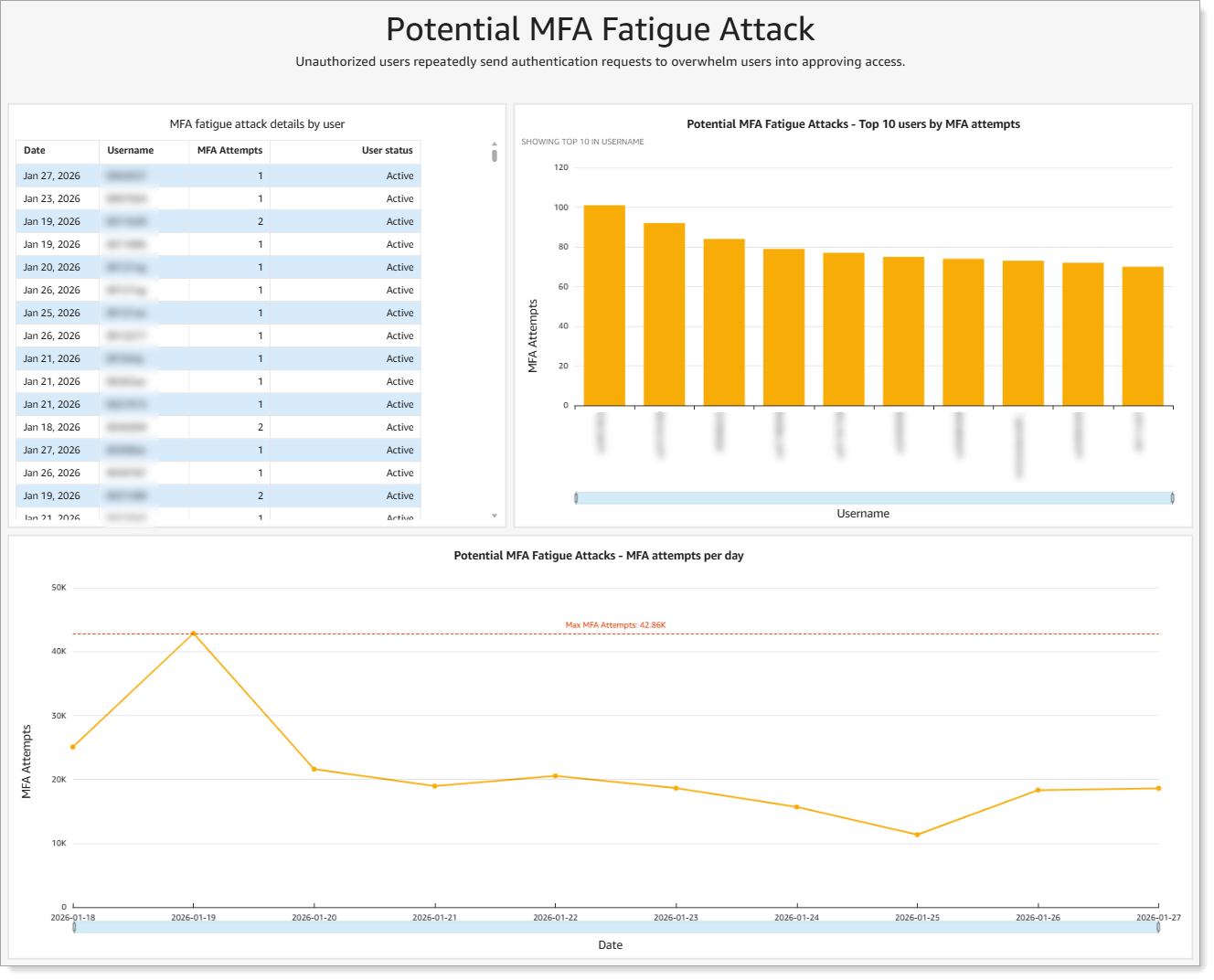 |
Analytics for potential MFA fatigue attacks
What you see:
MFA fatigue attack details by user
Top 10 users by MFA attempts
MFA attempts per day over time
To see this data: Enable MFA Throttling to limit failed MFA attempts and block or lock users with repeated invalid attempts.
Potential Risky IP Activity
Shows authentication attempts from IP addresses with suspicious or malicious reputation.
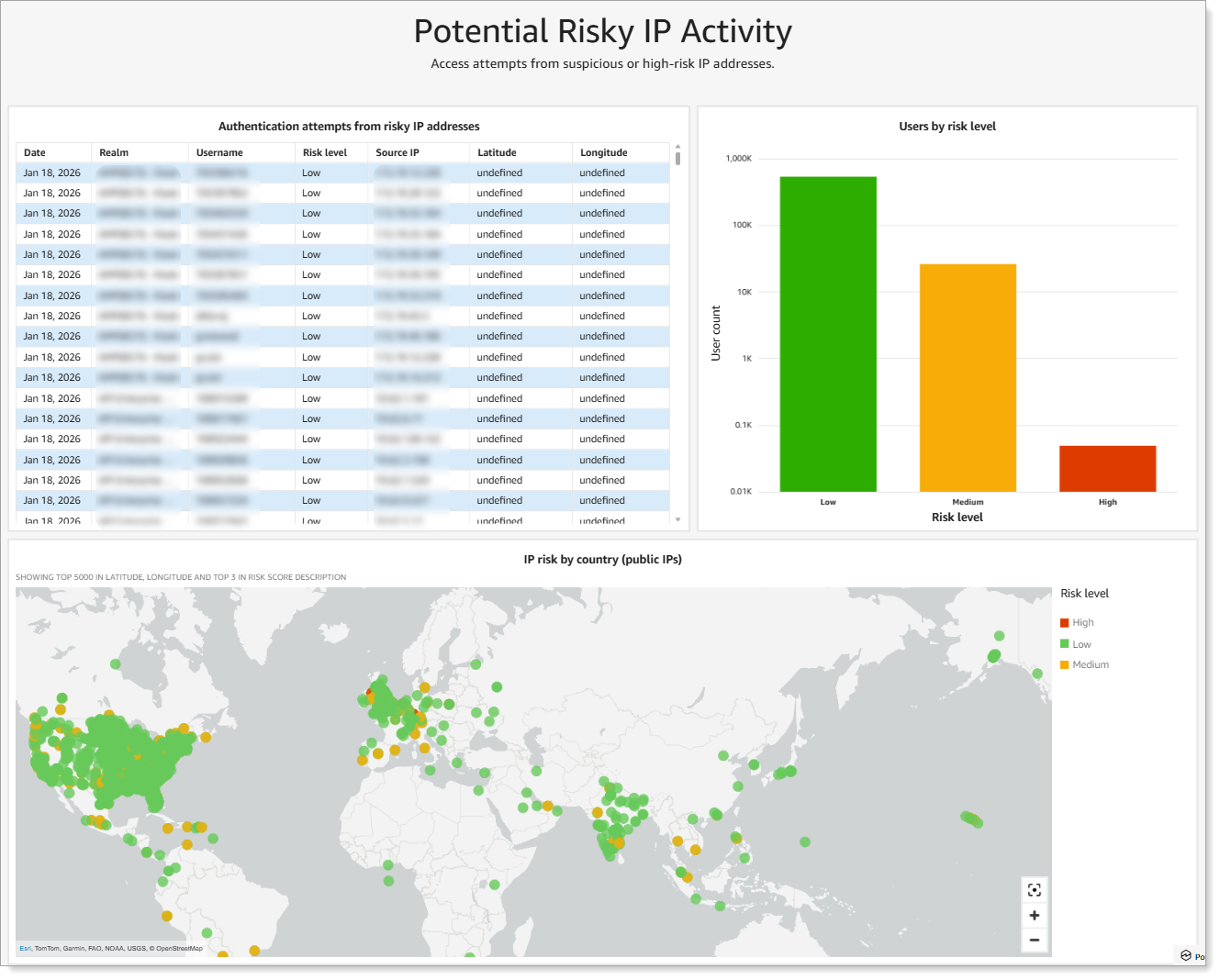 |
Analytics for potential risky IP activity
What you see:
Authentication attempts from risky IP addresses with risk level (high, medium, low)
Users by risk level distribution
IP risk by country on geographic map
To see this data: Configure IP-based blocking rules in your authentication policies.
Using the dashboard
Use the dashboard to monitor authentication threats, investigate suspicious activity, and verify your protection configurations are working as expected.
Monitor attack patterns
Use the date range selector to analyze threats over time:
Past 24 hours: Track active attacks
Past 7 days: Identify attack trends
Past 30 days: Review patterns and effectiveness of protections
Investigate threats
When you see potential attacks on the dashboard:
Review attack details: Check which accounts or IPs are involved
Contact affected users: Verify they haven't approved fraudulent access
Adjust configurations: Update blocking thresholds or time periods if needed
Monitor trends: Track whether attacks are increasing or decreasing
Understand risk levels
Risk level | Characteristics of a risky IP | What to do |
|---|---|---|
Low | Residential or enterprise ISP, clean reputation history, consistent geo-location, normal traffic patterns | Continue monitoring |
Medium | Commercial VPN, shared corporate proxy, cloud hosting IP (AWS, Azure, GCP), some historical abuse but not currently active | Monitor and require additional verification |
High | Known malicious IP, active botnet/malware association, TOR exit node, bulletproof hosting, credential stuffing source | Block immediately if not already blocked |
Configuring protection
To see threat data on this dashboard, you must first configure the corresponding protection feature:
For Potential Brute Force Password Attack: Enable Password Throttling to limit failed password attempts and block or lock users with repeated invalid attempts.
For Potential Password Spray Attack: Add Dynamic IP Blocking rule to block IP addresses after failed login attempts using different usernames.
For Potential MFA Fatigue Attack: Enable MFA Throttling to limit failed MFA attempts and block or lock users with repeated invalid attempts.
For Potential Risky IP Activity: Configure IP-based blocking rules in your authentication policies.